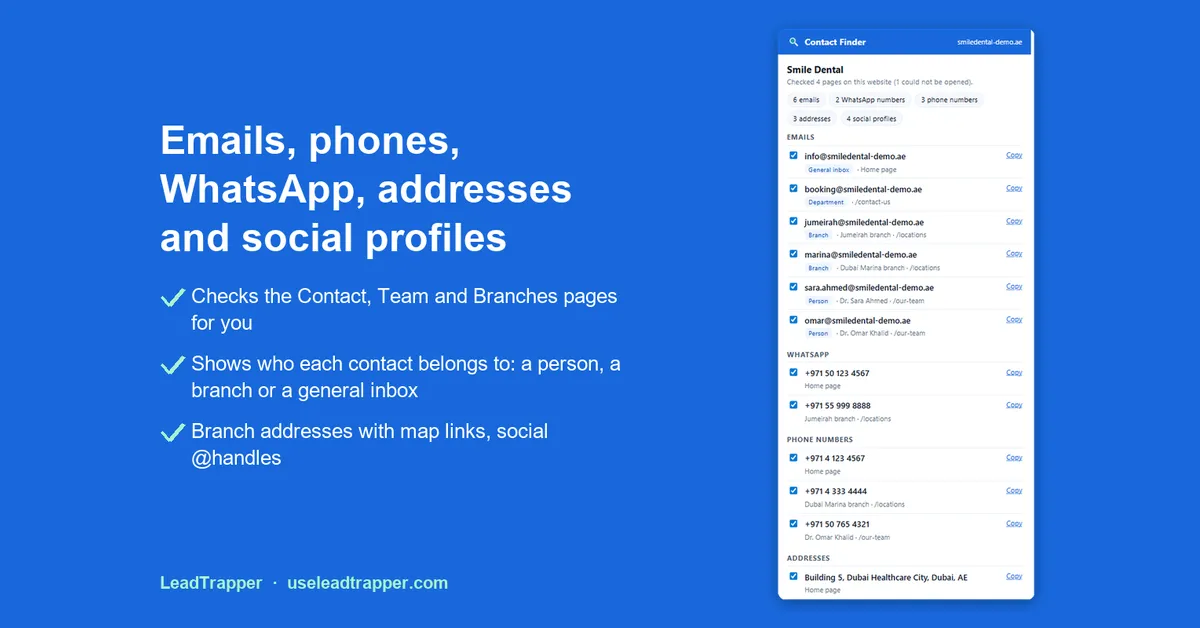
Contact Finder by LeadTrapper is a free Chrome extension that extracts the emails, phone numbers, WhatsApp numbers, addresses and social profiles published on a business website, including its contact, team and branch pages, and exports them to Excel or CSV. It runs in your browser and needs no account.
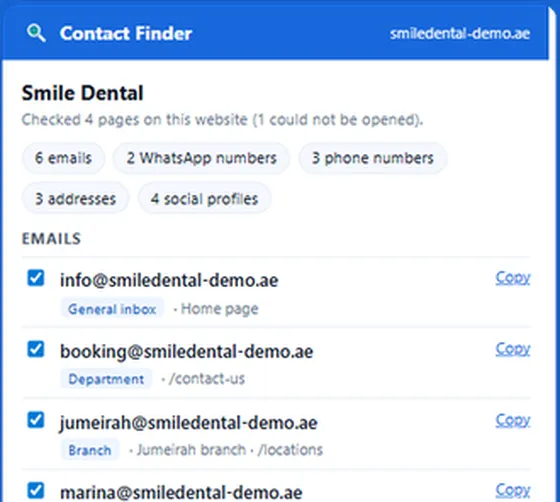

Extract the emails, phones, WhatsApp numbers, addresses and social profiles published on a business website, and download them to Excel.
- Emails, phones, WhatsApp, addresses and social profiles
- Also checks the Contact, Team and Branches pages
- Download one Excel or CSV file; nothing is sent to us
- Contact Finder by LeadTrapper is a free Chrome extension. On a business website it lists the emails, phone numbers, WhatsApp numbers, addresses and social profiles the site publishes, and it also checks the site's Contact, Team, About and Branches pages.
- On 13 October 2026 we ran it on five clinic websites in Dubai. Four returned contact details, 31 in all, and one returned nothing from its home page.
- Each contact is labelled with where it came from, such as a branch, a person or a general inbox, and you can collect contacts from many websites into one Excel or CSV file.
- It reads a website only when you click its icon, works on one site at a time, and refuses search engines and social networks.
- Nothing you find leaves your computer, and there is no account or sign-up.
Contact Finder by LeadTrapper is a free Chrome extension that extracts the contact details a business publishes on its own website: email addresses, phone numbers, WhatsApp numbers, addresses and social media profiles. Open the site, click the icon, and it lists what it found, checking the site’s Contact, Team and Branches pages for you. You can then download everything to Excel or CSV.
What Contact Finder Extracts
When you click the icon on a business website, Contact Finder reads that site and a few of its own pages where contact details usually sit, such as Contact, Team, About and Branches. It then lists five kinds of contact:
- Emails, including addresses a site hides from simple copy-paste.
- Phone numbers, in international format, with the country worked out from the website.
- WhatsApp numbers, taken from chat buttons and WhatsApp links.
- Addresses of offices and branches, each with a map link.
- Social media profiles, with their handles.
It also leaves out what is not a contact: no-reply addresses, image file names, dates, fax numbers and share buttons.
How to Use It
Install Contact Finder from the Chrome Web Store and pin it to the toolbar: click the puzzle icon at the top right of Chrome, then the pin next to Contact Finder.
- Open the website of a business, for example a clinic, a restaurant or a supplier.
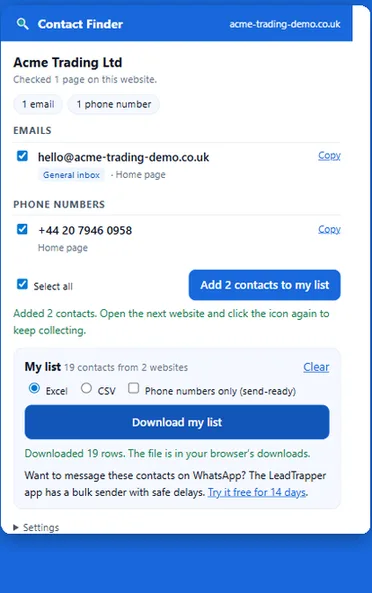
- Click the Contact Finder icon. It shows how many pages of the site it checked and lists the contacts by type.
- Tick the contacts you want and press Add to my list.
- Open the next website and click the icon again. Your list keeps growing.
- Press Download my list and choose Excel or CSV.
What We Found in a Real Test
On 13 October 2026 we ran Contact Finder on the websites of five dental and aesthetic clinics in Dubai, chosen from a Google Maps search. We clicked the icon once on each home page and recorded what it listed. We are not naming the clinics or repeating their details here.
| Website | Pages checked | Emails | Phones | Addresses | Social profiles | |
|---|---|---|---|---|---|---|
| Clinic 1 | 2 | 0 | 1 | 2 | 2 | 4 |
| Clinic 2 | 7 | 1 | 1 | 0 | 1 | 3 |
| Clinic 3 | 4 | 0 | 1 | 1 | 1 | 4 |
| Clinic 4 | 3 | 1 | 0 | 1 | 2 | 5 |
| Clinic 5 | 1 | 0 | 0 | 0 | 0 | 0 |
Four of the five sites returned contact details, 31 in all. Clinic 1 lists two branches, and Contact Finder gave each phone number and address the name of its branch. Social profiles were the most common find and emails the rarest. That matches our Google Maps scans, where only 15% to 47% of businesses had an email on their website.
Clinic 5 returned nothing: Contact Finder checked one page and found no contact details in it. In that case the popup suggests opening the site’s Contact page and trying again, which is the right next step. This was five websites in one city on one day, so it shows what to expect, not a success rate.
Who Each Contact Belongs To
Business websites often list several addresses: a general inbox, a booking desk, team members and branches. Contact Finder labels each contact as a general inbox, a department, a person (with their name when the page shows it) or a branch (with the branch name), and shows which page it came from.
The label comes from the nearest heading or name on the page, so it is only as tidy as the website. In our test a few labels were the day of the week the clinic printed next to its number. Read the label as a hint about where the contact sits, and check the page when it matters.
Export to Excel or CSV
Download my list saves every contact you added, from every website, in one file. You choose:
- Excel, which opens directly with each contact on its own row.
- CSV, for importing into a CRM or a spreadsheet tool.
- Phone numbers only (send-ready), a clean list of numbers for messaging.
The list stays in your browser until you press Clear, so you can collect over several sessions.
What It Does Not Do
- It works on business websites only. It refuses search engines and social networks, such as Google, Google Maps, LinkedIn, Facebook, Instagram, TikTok and X.
- It reads one website at a time, and only when you click its icon. It does not crawl a list of sites in the background.
- It reads what the website publishes. If a site shows no email, there is no email to find, and it does not guess addresses.
- It runs in Chrome on a computer. Browser extensions cannot be installed on a phone.
Free Extension, Cloud Scraper or Desktop App?
Searches for a contact details scraper mostly turn up cloud services that crawl a list of websites for you and charge by usage, which suits developers and large one-off jobs. A free extension suits checking businesses one by one as you research them. The LeadTrapper Windows app sits in between for sales work.
| Contact Finder (free extension) | LeadTrapper Windows app | |
|---|---|---|
| Emails, phones, WhatsApp, addresses, social profiles | Yes | Yes |
| Contact, team and branch pages | Yes | Yes |
| How many websites | The site you are on, one at a time | A list you paste, or businesses it finds by type and city |
| Check numbers on WhatsApp | No | Yes, with the Number Filter |
| Send messages | No | Yes, with the bulk sender and safe delays |
| Price | Free | $50/year, 14-day free trial |
The app’s Website Contact Finder, under Google Maps in its left menu, uses the same rules as the extension. Give it your own list of websites, or a business type and a city, and it reads each site’s home page and its contact, team and branch pages.
Getting Contact Numbers for Marketing
Finding a number is the first step. Before you message anyone, two things decide whether it works. First, check which numbers are actually on WhatsApp, so you do not waste messages; the WhatsApp Number Filter guide shows how. Second, keep to WhatsApp’s rules on unsolicited messages, which the cold outreach policy guide explains.
If your leads come from Google Maps rather than websites, the free Maps Lead Extractor reads a results page, and the Google Maps scraper in the Windows app collects whole areas with phone numbers and websites. Use the contacts you collect lawfully and follow the anti-spam and privacy rules of the places you contact. WhatsApp is a trademark of WhatsApp LLC; Contact Finder is not affiliated with or endorsed by WhatsApp or Meta.
Frequently Asked Questions
Install a free browser extension such as Contact Finder by LeadTrapper, open the business website and click the extension icon. It lists the emails, phone numbers, WhatsApp numbers, addresses and social profiles the site publishes, including those on its contact, team and branch pages, and you can download them to Excel or CSV.
Yes. Tick the contacts you want, add them to your list, and press Download my list. You can choose Excel or CSV, or Phone numbers only for a list that is ready to send to. The list keeps growing as you visit more websites until you clear it.
No. Contact Finder works on businesses' own websites and refuses search engines and social networks. To collect businesses from Google Maps, use the free Maps Lead Extractor or the LeadTrapper Windows app.
No. The extension reads the website in your browser when you click its icon, keeps your list on your own computer, and sends nothing to LeadTrapper or anyone else. It needs no account.
It can only read contact details that are written in the website's pages. In our test, one of five sites returned nothing from its home page. Open the site's Contact page and click the icon again, or try another page of the site.
No. The extension reads the website you are on when you click it. The Website Contact Finder in the LeadTrapper Windows app takes a list of websites, or finds businesses by type and city, and reads each site for you.
About LeadTrapper
LeadTrapper is a Windows app for finding business leads and contacting them on WhatsApp. It collects business contacts from Google Maps, Instagram, Facebook, TikTok and LinkedIn, checks which numbers are on WhatsApp with its Number Filter, and sends personalised campaigns with automatic delays from one or more WhatsApp accounts. It also has a chatbot, a shared inbox for every account, and Store Orders for online shops. It installs from the Microsoft Store, and the full app is free for 14 days, then $50 a year. Free web tools, browser extensions and a Wix app are listed on the Free Tools page.
Find Contacts for a Whole List of Businesses
LeadTrapper for Windows finds businesses by type and city, reads each website for emails, phones and WhatsApp, and messages them with safe delays. $50/year, 14-day free trial.
Related Articles
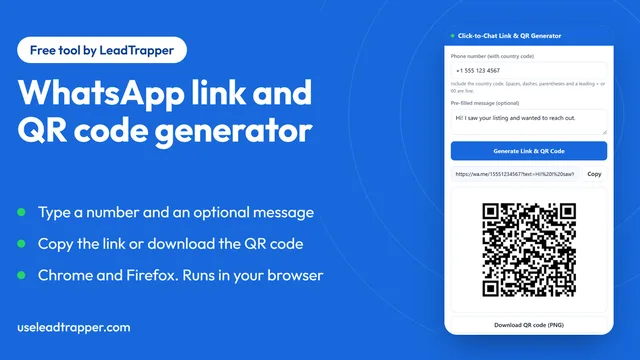
WhatsApp Link & QR Generator Extension: Chrome, Firefox
Make a WhatsApp click-to-chat link and QR code from any number with the free Chrome or Firefox exten…
Read article
Google Maps Lead Extractor Extension for Edge (Free)
The free Maps Lead Extractor for Microsoft Edge reads names, ratings and addresses from Google Maps…
Read article