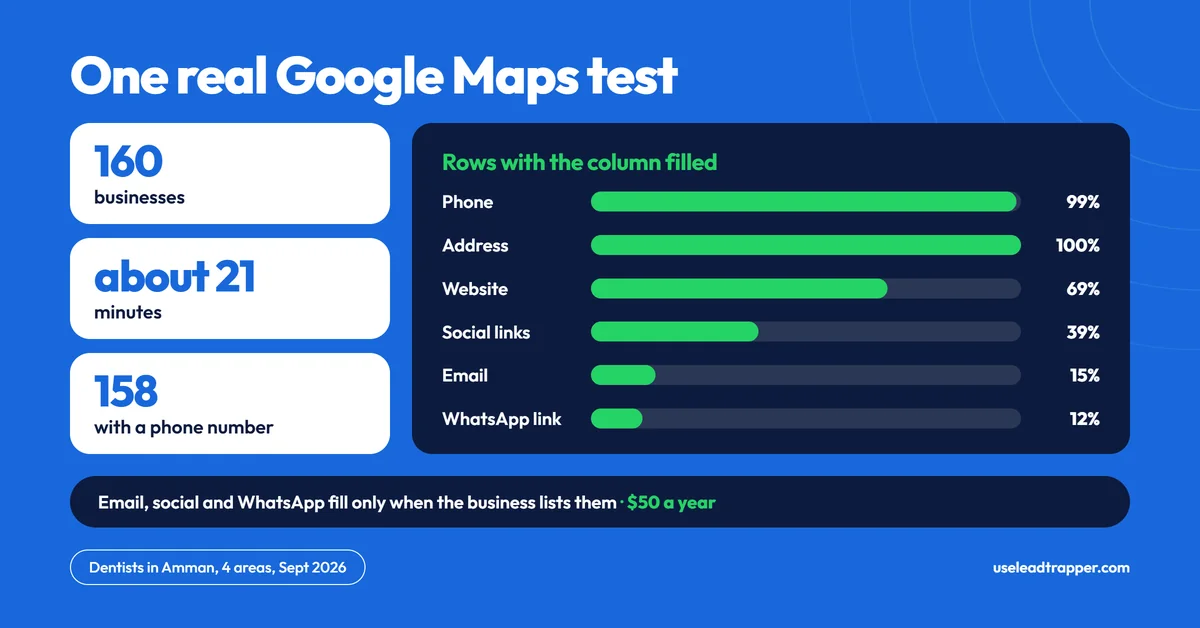
Search a business type and city, and the scraper returns each business's name, phone, address, rating, review count, website and Maps link, plus email and social links when listed, exported to CSV. In one test, dentists in Amman gave 160 businesses in about 21 minutes, 158 with a phone number.
- The Google Maps scraper returns name, phone, address, rating, review count, website and Maps link for each business, plus email and social links when the business lists them.
- Works for any business type in any city — restaurants in London, real estate agents in Dubai, clinics in Singapore.
- Phone numbers come as published on Maps. Run them through the Number Filter to see which are on WhatsApp before you message.
- Export to CSV in one click — ready to import into LeadTrapper's WhatsApp bulk sender.
- In one real test (September 2026), dentists in Amman across four areas gave 160 businesses in about 21 minutes, and 158 had a phone number.
What Is a Google Maps Scraper?
A Google Maps scraper is a tool that automatically collects business data from Google Maps listings — the same information you would find by searching “dentist Dubai” and clicking through each result manually, but done automatically, in minutes instead of hours. The fields it returns — name, phone, address, rating, website — are the same public listing attributes Google documents in its Places API policies.
It is one piece of a broader B2B lead generation strategy — for how it compares to LinkedIn outreach, cold email, and paid contact databases, see how to do B2B lead generation for the full method breakdown.
If you only want a quick look at a search before you run a scan, the free Google Maps lead extractor extension for Edge reads the name, rating and address of the results on your screen into a CSV. It leaves out phone numbers and websites, which the scraper collects.
What Data Does LeadTrapper Scrape?
For every business, LeadTrapper exports 13 columns: the search zone, name, phone, WhatsApp link, email, website, social links, rating, review count, address, Maps link, services and prices. The phone number is exported as published on Maps. To see which numbers are on WhatsApp, run the list through the WhatsApp Number Filter before you message it.
Email, social links and the WhatsApp link are filled only when the business shows them on its own website, so expect gaps. In the real test (dentists in Amman, four areas, 160 businesses), the fill rates were:
| Column | Businesses with a value |
|---|---|
| Phone | 158 of 160 (99%) |
| Address | 160 of 160 |
| Website | 111 (69%) |
| Social links | 63 (39%) |
| 24 (15%) | |
| WhatsApp link | 19 (12%) |
This matters because most lead lists from purchased databases give you a name and phone number, and nothing else. A lead with a star rating and review count tells you immediately whether the business is active and established — before you make the first contact.
How to Run a Search
Open the Google Maps Scraper in LeadTrapper, enter the business type and city — for example “interior design company” in “Dubai” or “accountant” in “London” — set the optional result limit, and click Search. Rows start to appear after a minute or so and keep filling in while the scan runs. Each business is opened one at a time, at roughly seven a minute in the real test, so a big search takes minutes, not seconds. Click Export CSV to download the list when it finishes.
To scan one area only, search it on Google Maps yourself (for example “dentist Business Bay”), copy the address of the results page, switch LeadTrapper to Direct URL mode and paste it. That runs a single area instead of the district split, so the list is smaller and more local.
Best Use Cases by Industry
| ❌ Before — manual Google Maps research | ✅ After — LeadTrapper scraper |
| Open 160 dentist listings one by one and copy each phone number by hand | 160 dentists in Amman in about 21 minutes, 158 with a phone number, while you do something else |
| Manually copy phone numbers into a spreadsheet one by one | One-click CSV export, WhatsApp-ready |
| No way to filter by rating or review count | Sort by rating, filter low-review listings instantly |
| Repeat the same process for every new city or industry | A new search is a new keyword and city, nothing else to set up |
Real estate — Agents in Dubai, London, and Toronto scrape property management companies, landlords, and commercial brokers by area. A search for “property management company Jumeirah” returns every listed agency with a direct phone number. The same search in “Canary Wharf London” or “Downtown Toronto” works identically.
Marketing agencies — Agencies in Berlin, Singapore, and New York build prospect lists by scraping SMEs in their target sector — restaurants, clinics, fitness studios — and pitching their services directly on WhatsApp. At the pace of the real test, a 200-contact list takes about half an hour to scan.
Recruitment — Recruiters in Mumbai, São Paulo, and Istanbul scrape employers by industry sector and contact HR departments directly. One search for “IT company” in a city returns dozens of potential hiring clients with phone numbers and websites.
B2B services — Accountants, cleaning companies, and IT support firms in Lagos, Manila, and Jakarta find local businesses in their service area and run WhatsApp outreach within hours of identifying a new neighbourhood or sector to target.
Wholesale and distribution — Suppliers in Cairo and Mexico City find retailers and distributors by product category. One search for “electronics retailer” in a city returns every listed shop with direct contact details.
The same search works on other sources when your buyers are not on Maps — the instagram scraper for followers covers extracting contacts from Instagram audiences instead.
Countries and Cities Covered
LeadTrapper’s Google Maps Scraper works in any country where Google Maps has business listings. There is no geo-restriction in the tool: you type a business type and a city, and it searches that city.
Examples of markets you can point it at: UAE (Dubai, Abu Dhabi, Sharjah), Saudi Arabia (Riyadh, Jeddah), Egypt (Cairo, Alexandria), United Kingdom (London, Manchester, Birmingham), United States (New York, Los Angeles, Miami), India (Mumbai, Delhi, Bangalore), Indonesia (Jakarta, Surabaya), Brazil (São Paulo, Rio), Nigeria (Lagos, Abuja), Turkey (Istanbul, Ankara), Canada (Toronto, Vancouver), Singapore, and Philippines (Manila, Cebu).
For a worked example in one market, the walkthrough of lead generation in Dubai runs the same process end to end.
Google Maps Scraper Cost vs Competitors
| Tool | Pricing model | Cost | No-code? | WhatsApp sender included? |
|---|---|---|---|---|
| Outscraper | Pay as you go | About $3 per 1,000 records after the first 500 free; emails and other enrichment cost extra | Yes | No |
| PhantomBuster | Monthly plan | Start plan $69 a month ($56 billed annually) | Partial | No |
| LeadTrapper | Flat fee | $50 a year, all features | Yes | Yes |
Neither of these includes a WhatsApp sender, so you would pay for a separate tool to message the leads. LeadTrapper combines the scraper and the WhatsApp bulk sender in one $50/year purchase — no separate messaging subscription required.
Once you have your leads, see the full guide on writing WhatsApp messages that get replies to structure your first campaign. If you’re comparing Outscraper specifically, see the Outscraper alternative breakdown for an honest per-record vs flat-fee cost analysis, or the roundup of free lead generation tools if you are weighing this against a free plan first. For building a reusable, verified contact list rather than a one-off search, see building B2B lead lists. To find businesses that are already paying for Facebook ads in your niche, see the Facebook Ad Library scraper guide. If you want the rules before you start, see is scraping Google Maps legal. For how reliable those numbers are, and a quick way to test a sample before you send, see how reliable are phone numbers from B2B lead tools.
Frequently Asked Questions
It isn't a simple yes or no. US courts have held that collecting data from public web pages isn't hacking under the Computer Fraud and Abuse Act, but Google's own Maps terms restrict copying and mass downloading of Maps content, and privacy and marketing law can apply to the list you build. LeadTrapper reads only what any visitor can see without signing in to Google, such as name, phone, address, rating, review count and website. The risk of using any Maps scraper is yours, and this isn't legal advice.
It depends on the city, the business category, and how many areas you scan. In one real test in September 2026, a search for dentists in Amman across four areas returned 160 businesses in about 21 minutes. A search for restaurants in London returns far more than a search for specialist engineers in a small town, and a bigger search simply takes longer, because each business is opened one at a time.
The export has 13 columns: the search zone, name, phone, a WhatsApp link, email, website, social links, rating, review count, address, Maps link, services and prices. Email, social and WhatsApp are filled only when the business lists them on its own website, so those columns are often empty. In the real test, 99% of businesses had a phone number, 69% a website, 39% social links, 15% an email and 12% a WhatsApp link.
Yes. LeadTrapper is a desktop application with a simple search interface. You enter the business type and city, click Search, and rows fill in as the scan runs. No scripts, no Chrome extensions, no API keys required.
Yes. Nothing in the scraper is tied to a country: it searches whatever city you type, wherever Google Maps has business listings. The real test above ran in Amman.
About LeadTrapper
LeadTrapper is a Windows app for finding business leads and contacting them on WhatsApp. It collects business contacts from Google Maps, Instagram, Facebook, TikTok and LinkedIn, checks which numbers are on WhatsApp with its Number Filter, and sends personalised campaigns with automatic delays from one or more WhatsApp accounts. It also has a chatbot, a shared inbox for every account, and Store Orders for online shops. The full app is free for 14 days, then $50 a year. Free web tools, browser extensions and a Wix app are listed on the Free Tools page.
Start Scraping Google Maps Today
Build a lead list from Google Maps and message it from the same app. Any city, any industry. $50/year, all features included.
Related Articles
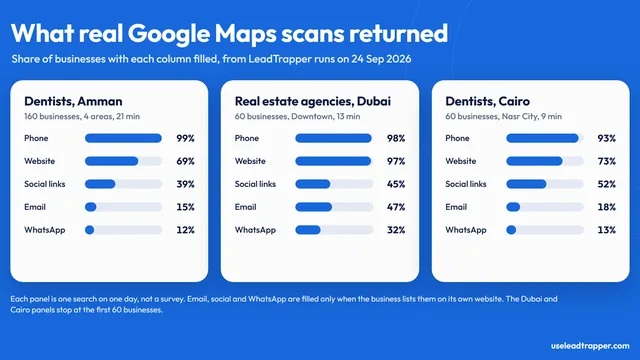
Google Maps Lead Data: What Real Scans Returned
What LeadTrapper's Google Maps scraper returned in real runs on 24 Sep 2026: phone, website, email a…
Read article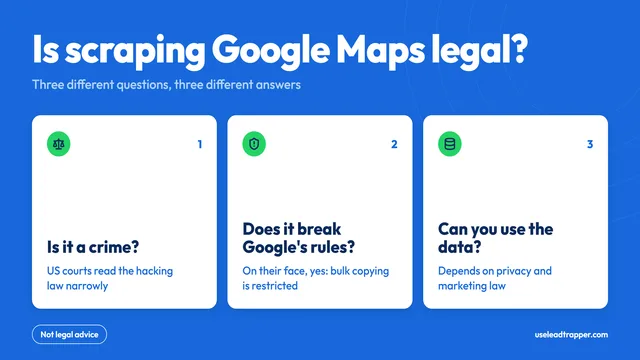
Is Scraping Google Maps Legal? What the Law and Google Say
Is scraping Google Maps legal? US courts, Google's own terms and privacy law give three different an…
Read article