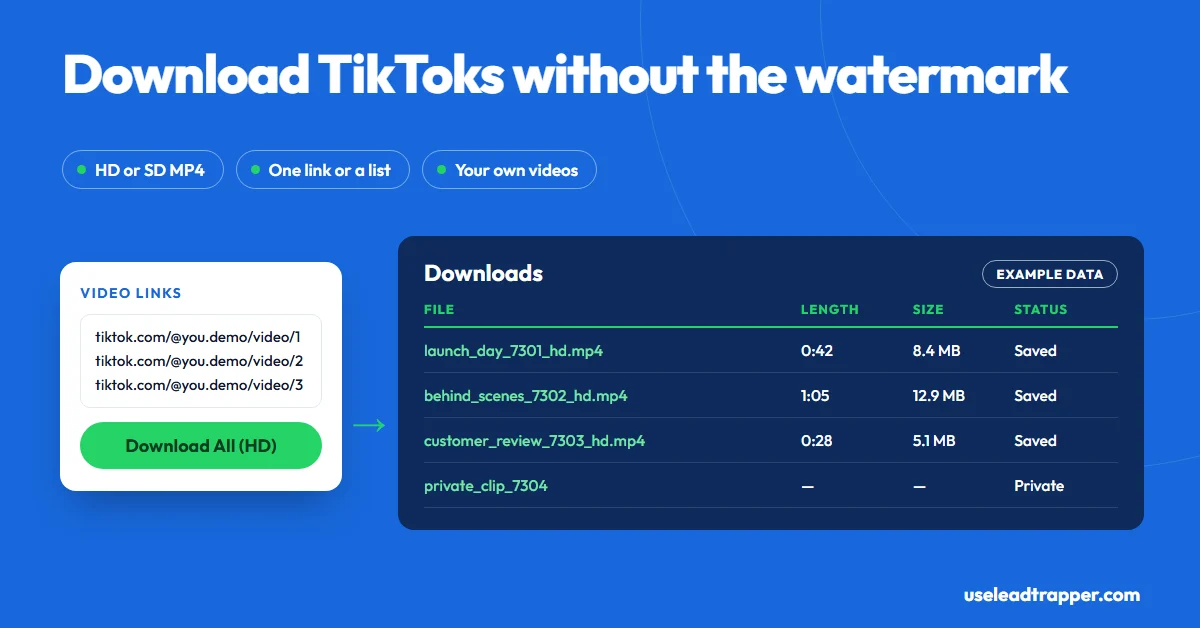
Paste a TikTok link into LeadTrapper's Video Download tab, press Fetch, then Download HD or SD to save an MP4 without TikTok's watermark. Paste many links, one per line, to download them in a row. Use it for your own videos or with the creator's permission: TikTok's Terms don't let you download other people's content without consent.
- LeadTrapper's Video Download tab takes a TikTok link, shows the cover, title, creator, length, plays, likes, comments and file sizes, then saves an MP4 in HD or SD to your Downloads folder.
- Bulk Download takes many links, one per line, and downloads them one after another in HD, then reports how many succeeded and failed.
- To get the file, LeadTrapper sends the video link to tikwm.com, an outside download service, which returns watermark-free links. If that fails, it falls back to yt-dlp on your computer, and then the watermark isn't guaranteed to be gone.
- Private, deleted and region-restricted videos can't be downloaded, and no TikTok login is needed for public ones.
- TikTok's Terms say content on TikTok may not be downloaded or reproduced without consent. Download your own videos, or other people's with their permission.
To download a TikTok video without the watermark, paste its link into a downloader that fetches the clean file instead of the one TikTok’s Save button gives you. LeadTrapper’s TikTok tools include a Video Download tab that does this in HD or SD, for one link or a whole list. This guide covers both, explains exactly how LeadTrapper gets the file, including the outside service it uses, and sets out what TikTok’s Terms allow, because a clean file of someone else’s video isn’t yours to repost.
Why People Download Without the Watermark
TikTok’s own Save option, when a creator allows it, adds TikTok’s logo and the creator’s username to the file. That’s fine for sending a clip to a friend. It’s a problem when you want to use your own video somewhere else:
- Reposting to Instagram Reels or YouTube Shorts. A floating TikTok logo looks like recycled content, and Instagram said in 2021 that it makes such Reels less discoverable.
- Ads and websites. A product video on a landing page or in a paid ad looks better without another app’s branding.
- Backups. TikTok’s own Terms advise keeping copies of your content, because TikTok can remove it. A clean HD archive is more useful than a watermarked one.
- Client work. Agencies and creators deliver approved user-generated videos to brands as clean files, with permission.
Downloading One Video
- Copy the video’s link from TikTok’s Share button or the address bar.
- In LeadTrapper, open TikTok Studio and choose Video Download.
- Paste the link and press Fetch.
- Check the preview: the cover, title, creator, length, plays, likes, comments, and the HD and SD file sizes.
- Press Download HD or Download SD. A progress line shows the download, and the MP4 lands in your Downloads folder.
The file is named after the video’s title, its ID and the quality you chose, so a folder of downloads stays easy to sort.
Downloading a List of Videos
Below the single download is Bulk Download. Paste links one per line, such as all your videos from last month, and press Download All (HD). LeadTrapper fetches and saves each one in turn, showing “Item 3 of 20” as it goes, then reports how many downloaded and how many failed. A link that fails, for example a private video, is skipped and the rest continue.
How It Gets the File
Being clear about this matters. When you press Fetch, LeadTrapper sends the video link to tikwm.com, an outside download service, and asks for the video’s details and its watermark-free HD and SD links. Only the video link goes to that service, not your TikTok account; no login is needed for public videos. LeadTrapper then downloads the file to your computer.
If that service fails, LeadTrapper falls back to yt-dlp, an open-source downloader, running on your own computer. That keeps downloads working when the service is down, but the fallback takes the best file TikTok offers it, and that file isn’t guaranteed to be watermark-free.
Private videos, deleted videos and videos restricted in your region can’t be fetched by either route. LeadTrapper tells you when that’s the likely reason.
What TikTok's Terms Allow
TikTok’s Terms of Service (last updated 1 December 2025) say content on TikTok “may not be downloaded, copied, reproduced, distributed” without prior written consent from TikTok or its licensors, and that no rights are licensed in the sound recordings and music in videos. Copyright law adds its own rules: the creator owns their video, and the label owns the song.
In practice:
- Your own videos: the safe case, though music from TikTok’s library may not be cleared for other platforms. Swap the sound for a licensed one when you repost.
- Someone else’s video: ask first, in writing. Brands that work with creators put download and reuse rights in the agreement.
- Never re-upload another creator’s video as your own, or strip the watermark to hide where it came from.
LeadTrapper gives you the tool, not the permission. This isn’t legal advice.
Repurposing Your Own Videos
A clean file is the start. To make a TikTok work on other platforms:
- Replace TikTok-library music with a track licensed for the destination, or with Instagram’s or YouTube’s own audio.
- Rewrite the caption for the platform. Hashtags that work on TikTok rarely carry over.
- Re-cut the first second. Viewers decide fast everywhere, but what grabs attention differs.
- Post natively. Upload the file in each app rather than sharing a link.
If you sell to businesses, the same TikTok Studio also finds leads. Its hashtag scraper lists videos and creators under any tag, and our guide to how to scrape TikTok covers all five ways to find creators.
Other Ways to Do It
| Approach | Watermark | Bulk | Cost | Notes |
|---|---|---|---|---|
| TikTok’s Save option | Kept | No | Free | Only where the creator allows downloads |
| Free downloader websites | Removed | Usually one at a time | Free, with ads | Your link goes to their servers; quality and ads vary |
| yt-dlp on its own | Not guaranteed | Yes, with commands | Free | Command line; for technical users |
| LeadTrapper Video Download | Removed through tikwm.com; not guaranteed on the fallback | Yes, one link per line | $50/year, all features | Windows app; HD or SD; part of the TikTok lead tools |
If downloading is all you need, a free website does the job for occasional clips. LeadTrapper makes sense when the downloader is one part of how you use TikTok for business, next to the comment scraper, the creator search and the WhatsApp bulk sender.
Frequently Asked Questions
Copy the video's link, paste it into LeadTrapper's Video Download tab, press Fetch, then Download HD or Download SD. The MP4 lands in your Downloads folder. LeadTrapper gets a watermark-free file through an outside download service; if that service fails and the backup method is used, the watermark may remain.
Yes. Paste the links into Bulk Download, one per line, and press Download All (HD). LeadTrapper fetches and saves them one after another and tells you how many downloaded and how many failed.
Downloading your own videos is the safe case. TikTok's Terms say content on TikTok may not be downloaded, copied or reproduced without consent, and they license no rights in the music. Re-posting someone else's video without permission can also breach copyright. Ask the creator first. This isn't legal advice.
To repost them cleanly on other platforms. In February 2021 Instagram said it would make Reels recycled from other apps, such as those with visible watermarks, less discoverable in places like the Reels tab. A clean file also looks more professional on YouTube Shorts and in ads.
Private videos, deleted videos and videos blocked in a region can't be fetched, and LeadTrapper says so. If a public video fails, try again later: the outside download service can be busy, and the backup method depends on TikTok's current site.
About LeadTrapper
LeadTrapper is a Windows app for finding business leads and contacting them on WhatsApp. It collects business contacts from Google Maps, Instagram, Facebook, TikTok, LinkedIn and business websites, checks which numbers are on WhatsApp with its Number Filter, and sends personalised campaigns with automatic delays from one or more WhatsApp accounts. It also has a chatbot, a shared inbox for every account, and Store Orders for online shops. It installs from the Microsoft Store, and the full app is free for 14 days, then $50 a year. Free web tools, browser extensions and a Wix app are listed on the Free Tools page.
Save Your TikToks as Clean HD Files
The TikTok downloader and scraper, Instagram tools, Google Maps scraper and WhatsApp sender all come with LeadTrapper. $50/year — all features included.
Related Articles
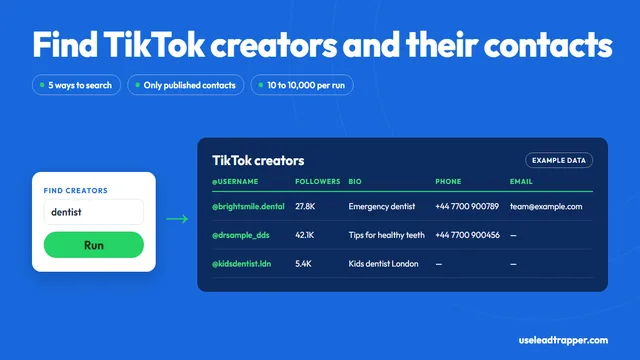
How to Scrape TikTok for Leads Without Writing Code
Scrape TikTok creators, hashtags, keywords and commenters without code: what LeadTrapper's TikTok sc…
Read article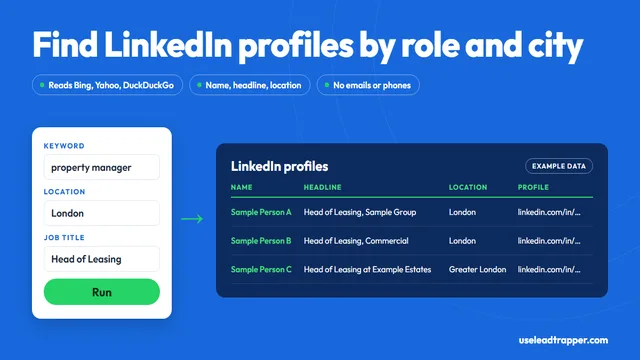
LinkedIn Profile Scraper: What It Finds and the Risks
LeadTrapper's LinkedIn profile scraper finds profiles by keyword, job title and city, then reads nam…
Read articleTikTok Scraper for Business Leads
Creators by keyword, hashtag or username, with the emails and phones they publish.
See the product