Email Finder for Business Websites, in Bulk
Most businesses publish their emails and phone numbers on their own website, spread over the contact, team and branch pages. LeadTrapper's Email Finder reads those pages for hundreds of websites at once and saves every email, phone and WhatsApp number, address, social profile and contact form into one list. Each email is labelled as a general inbox, a department, a team member or a branch. $50 a year after a 14-day free trial.
Download for Windows$50 a year · 14 days free · no card needed · Windows 10 and 11
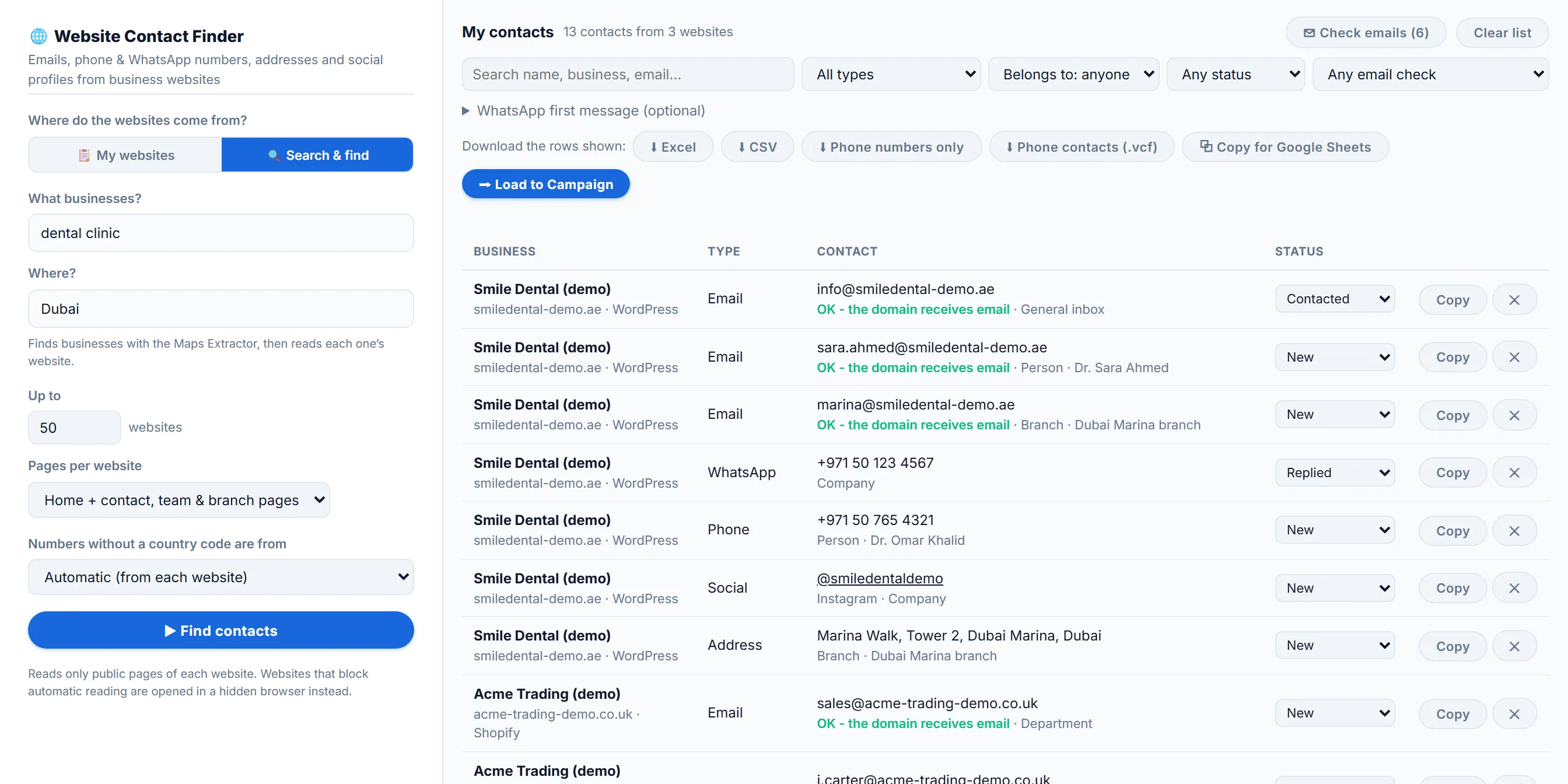
What the Email Finder does
- Reads hundreds of websites at once. Paste up to 1,000 websites, load them from Excel or CSV, or type a business type and a city and let the Google Maps scraper find the businesses first.
- Looks where contacts live. Besides the home page, it opens the Contact, Team, About and Branches pages of each website, up to 12 extra pages in Deep mode.
- Collects every way to reach the business. Emails, phone and WhatsApp numbers, office and branch addresses with a map link, social profiles with their handles, and the contact-form page when there’s no email at all.
- Labels who each contact belongs to. A general inbox, a department, a team member with their name, or a branch with its name, so you can write to the right person.
- Checks emails before you send. It flags typing mistakes and throwaway inboxes, and checks whether each email’s domain can receive mail.
- Keeps one list. Everything goes into My contacts, kept between searches with no duplicates. Filter it, search it, mark contacts as Contacted or Replied, and see which shop or website builder each business uses.
How it works
- Add websites. Paste a list or load a file, or switch to Search & find and type something like “dental clinic” and “Dubai”.
- Press Find contacts. LeadTrapper reads four websites at a time on your own computer. Websites that block plain requests are opened in a hidden browser instead.
- Use the list. Filter to team members or WhatsApp numbers, then download Excel, CSV, phone numbers only, a phone contacts file or a copy for Google Sheets, or load the numbers into the WhatsApp bulk sender.
Why read the website itself
Big email finders sell a database: they guess addresses from name patterns and charge credits for each lookup. A business’s own website is a different source. Whatever is there was published by the business so customers could reach it, it costs nothing to read, and for local businesses it often includes a WhatsApp number that no database has. The trade-off is honest: if a business publishes no email, there’s nothing to find, and LeadTrapper won’t invent one. For the browser, the free Contact Finder extension does the same for one website at a time.
Know the limits
The Email Finder only collects what each website publishes, so a site with just a contact form gives you the form’s link, not an email. It skips search engines, social networks and review sites, which have their own LeadTrapper tools such as the Instagram scraper. The email check confirms a domain can receive mail, not that one person’s inbox exists. Contact details can be personal data under privacy laws such as the GDPR, so keep your first message relevant and easy to opt out of.
Who uses the Email Finder
- Agencies and B2B sellers emailing the local businesses they found on Google Maps.
- Sales teams and recruiters looking for named team members’ emails on company websites.
- WhatsApp marketers collecting the WhatsApp numbers businesses publish on their sites.
- Anyone with a list of websites who needs it turned into contacts.
Try the Email Finder free for 14 days
Tips for a better list
- Use Deep mode for larger companies. It opens more pages, which is where Team and Branches pages live.
- Start from a search. Search & find takes a business type and a city, so you don’t need a list of websites first.
- Filter to team members when you want to write to a person, not a general inbox.
- Act on the email check. Remove flagged emails before you send.
- Mark contacts as you go. Contacted and Replied keep track of who you’ve reached.
Common problems
- A website shows as blocked. The website showed a security check, so it couldn’t be read automatically. Open it yourself, or try again later.
- A website comes back empty. It publishes no contact details. If it has a contact form, LeadTrapper saves the form’s page instead.
- “Not a website address.” Check the address in your list for typos.
- An email is flagged. It may have a typing mistake, be a throwaway inbox, or have a domain that can’t receive mail. A passed check confirms the domain, not one person’s inbox.
Compared with other email finders
| LeadTrapper Email Finder | Hunter | Snov.io | |
|---|---|---|---|
| Price | $50 a year, all features | Free plan with 50 credits; Starter €49 a month | Free 50 credits; Starter $39 a month |
| Where emails come from | The pages each business published | Found and pattern-based addresses | Database search |
| Credits | None | Per lookup | Per lookup |
| Messages them | Numbers load into the WhatsApp bulk sender | No | No |
Prices checked 21 October 2026. More in how to find business email addresses.
Guides
- How to find business email addresses from their websites
- Bulk email extractor: emails from a list of websites
- How to find an email from a LinkedIn profile
- Extract contact details from any website for free
- Cleaning a contact list before a campaign
Price
The Email Finder is part of LeadTrapper, $50 a year for every feature, including the Google Maps scraper, WhatsApp bulk sender, Number Filter, account warmer and the Instagram, Facebook, TikTok and LinkedIn lead finders. Every new user gets 14 days free with no card. See pricing.
Download LeadTrapper for Windows
Questions
Where does the Email Finder get its emails?
Only from the business’s own website. It reads the home page and the pages that usually hold contact details, such as Contact, Team, About and Branches, and collects the emails, phone and WhatsApp numbers, addresses and social profiles published there. It doesn’t guess addresses like firstname@company.com and doesn’t buy them from a database.
Can it find emails for a list of websites?
Yes. Paste up to 1,000 websites, one per line, or load them from an Excel, CSV or text file. You can also type a business type and a city, such as dental clinic in Dubai, and it finds the businesses on Google Maps first, then reads each one’s website.
Does it verify emails?
It checks them, but it can’t verify a single inbox. It flags typing mistakes such as gmial.com and throwaway inboxes, and the Check emails button asks Cloudflare’s public DNS whether each email’s domain can receive mail at all, so you skip addresses that would bounce. Only the domain names are sent.
Can it tell team members’ emails from the general inbox?
Yes, when the website shows it. Each email is labelled as a general inbox (info@), a department (sales@), a team member with their name, or a branch with its name. Phone numbers, social profiles and addresses are labelled as a team member’s, a branch’s or the company’s.
How much does it cost?
$50 a year for every LeadTrapper feature, including the Email Finder, after a 14-day free trial with no card needed. There are no credits: you can read as many websites as you like.
Why does a website show as blocked?
The website showed a security check, such as a captcha page, so it could not be read automatically. Open it yourself, or try again later.
Does it guess email addresses?
No. It only collects emails a website actually publishes, including ones written as info [at] site [dot] com. If a business publishes none, there is nothing to find.
Can it find WhatsApp numbers on websites?
Yes. It saves WhatsApp numbers and links a website publishes, along with phone numbers, so you can load them into a WhatsApp campaign.
Works well with
Google Maps Scraper
Business leads from any city. Included in the same $50/year app.
LinkedIn Scraper
Profiles by role and city. Included in the same $50/year app.
WhatsApp Bulk Sender
Personalised messages to a whole list. Included in the same $50/year app.