Google Maps Scraper for Windows
Type a business type and a city. LeadTrapper scans Google Maps district by district and gives you each business's name, phone, address, rating and website, ready to export or to message on WhatsApp. $50 a year after a 14-day free trial.
Download for Windows$50 a year · 14 days free · no card needed · Windows 10 and 11
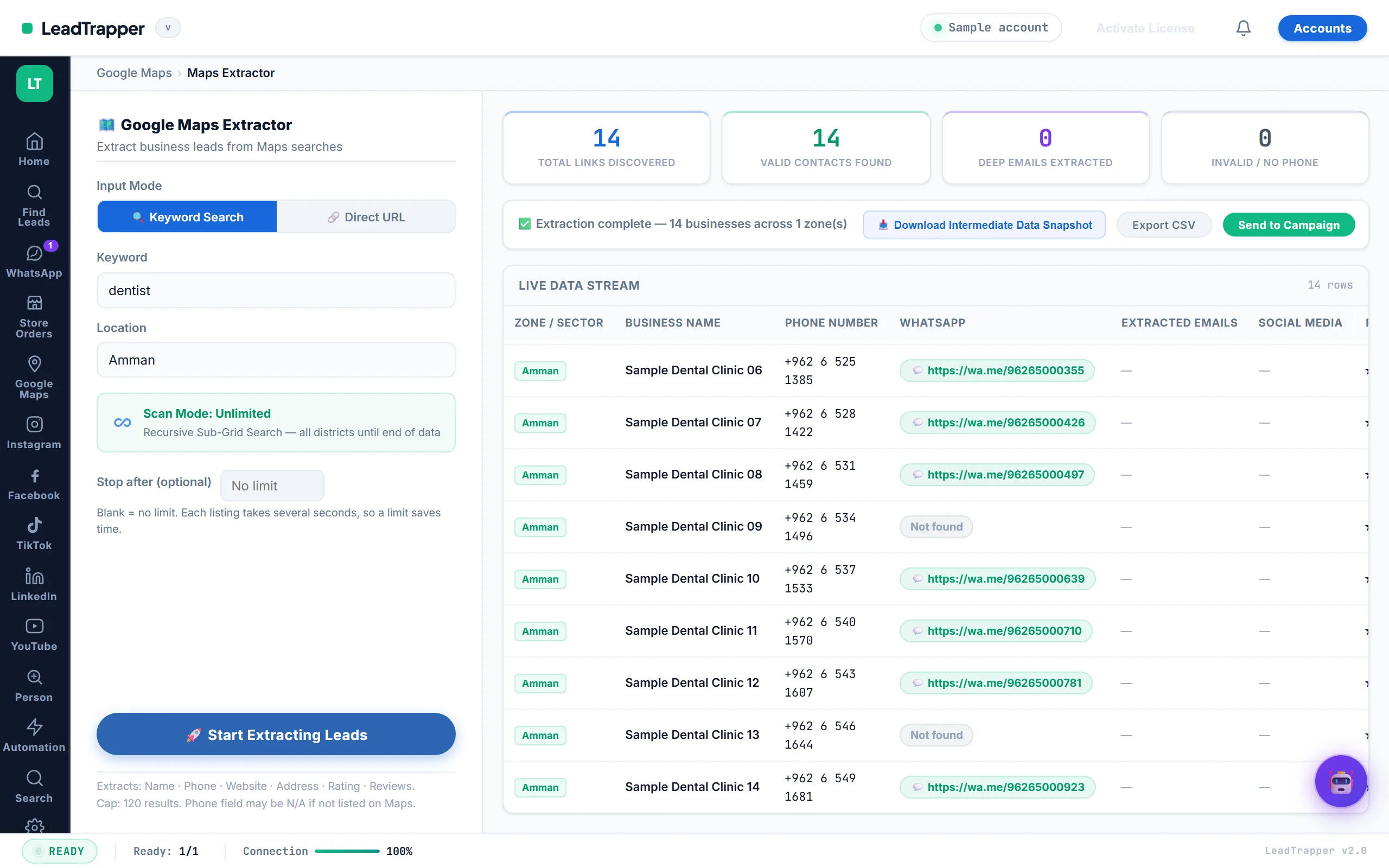
What the Google Maps scraper does
- Searches any city. Type a business type and a location, or paste a Google Maps search link.
- Covers the whole area. Unlimited scan mode splits the city into districts and keeps going until Google Maps has nothing new to show, so you are not stuck with the first page of results.
- Collects the contact details. Name, phone, address, rating, review count, website and Maps link for every business.
- Adds a WhatsApp link for each phone number, and marks the ones without a phone.
- Finds emails and social profiles on the business’s own website when they are listed there.
- Stops when you want. Set an optional limit so a run ends after a set number of businesses.
- Exports in one click. Download a CSV, or send the list straight to a WhatsApp campaign.
- Needs no API key. It runs in a browser on your own computer, with no per-search fees.
How it works
- Search. Enter a business type and a city, for example dentists in Amman or restaurants in Dubai Marina, and press Start.
- Check. Run the WhatsApp Number Filter to keep only numbers that are on WhatsApp.
- Reach out. Export the list, or send it to the WhatsApp bulk sender with a personalised message.
What one real search returned
In September 2026 we searched for dentists in Amman across four areas. The scan took about 21 minutes, opening roughly seven businesses a minute, and returned 160 businesses. This is how full each column was:
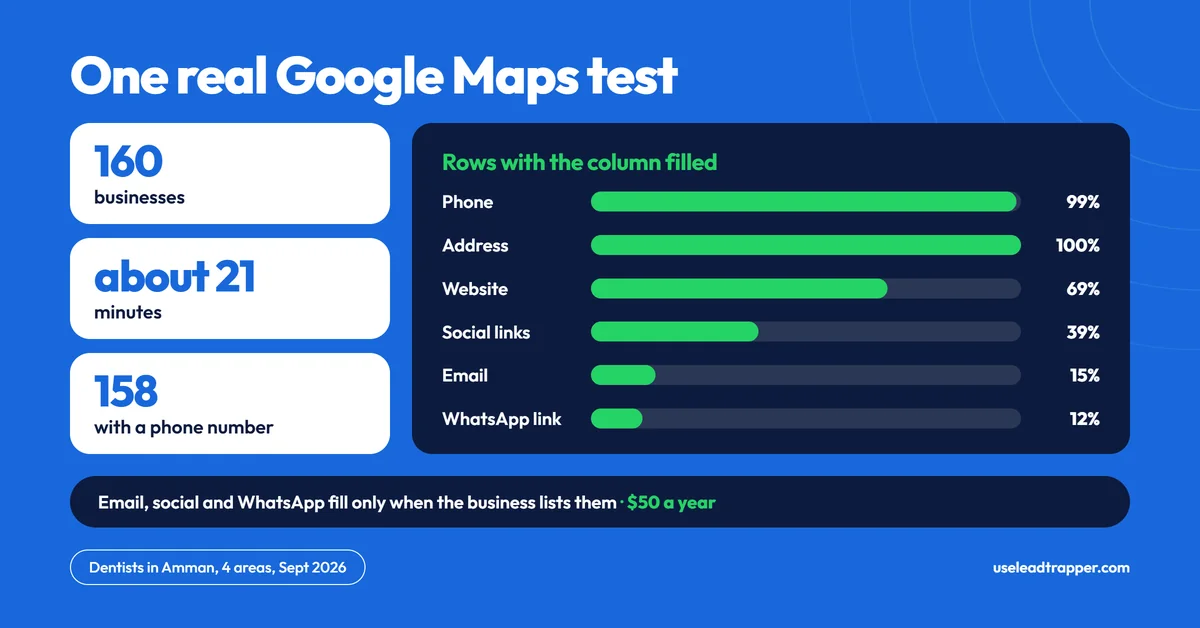
| Column | Filled |
|---|---|
| Phone | 158 of 160 (99%) |
| Address | 160 of 160 (100%) |
| Website | 69% |
| Social links | 39% |
| 15% | |
| WhatsApp link on their website | 12% |
Phone numbers are almost always there, because they come from the Maps listing itself. Emails, social links and WhatsApp links come from each business’s own website, so they’re only filled when the business publishes them. To get more emails, run the websites through the Email Finder, which also reads the Contact, Team and Branches pages. Results depend on the city and business type: restaurants in a capital city return far more than specialist engineers in a small town.
Try the same search free for 14 days
Who uses a Google Maps scraper
- Agencies and freelancers looking for local businesses to offer a website, ads or social media management. Businesses without a website show up as an empty Website column.
- Suppliers and wholesalers selling to a trade, such as dental supplies to clinics or coffee beans to cafes.
- Recruiters and B2B sales teams building a list of companies in one city before calling.
- Anyone opening in a new city who wants to see the competition, their ratings and how many reviews they have.
Tips for a better list
- Use the word customers use. “Dentist” and “dental clinic” can return different businesses. Run both, then combine the exports: the Number Filter removes duplicate numbers.
- Search by district for big cities. Unlimited scan mode splits the city into areas for you, or type one district, such as “restaurants in Dubai Marina”, for a short, focused list.
- Sort the export by rating and reviews. A business with 300 reviews is active and reachable; one with 2 reviews and no website may be closed.
- Check numbers before you message. Run the list through the WhatsApp Number Filter so you only message numbers that are on WhatsApp.
Common problems
- Fewer results than expected. Google Maps shows a limited number of businesses per search area. Turn on unlimited scan mode, or search each district separately.
- It feels slow. Each business is opened one at a time, at about seven a minute, so 160 businesses take around 20 minutes. You can keep working while it runs, or set a limit to stop early.
- Many emails are empty. That’s normal: most businesses don’t list an email on Google Maps. Use the Email Finder on their websites.
- Phone numbers in different formats. Numbers are exported as Google Maps shows them. The Number Filter fixes the format and adds your country code before you send.
Google Maps scraper or a bought lead list?
| LeadTrapper Google Maps scraper | Bought lead list | |
|---|---|---|
| Freshness | Pulled from Google Maps the day you search | Often months or years old |
| Targeting | Any business type, any city or district | Whatever the seller has |
| Cost | $50 a year, unlimited searches | Paid per list or per contact |
| Who else has it | Only you | Sold to many buyers |
More on this choice in B2B lead generation lists: buy or build.
Compared with other Google Maps scrapers
| LeadTrapper | Outscraper | Apify | |
|---|---|---|---|
| Price | $50 a year, unlimited searches | First 500 records free, then about $3 per 1,000 | Free plan, paid plans from $19 a month plus usage |
| How it runs | Windows app on your computer | Cloud service | Cloud platform, more setup |
| Speed | About seven businesses a minute | Faster for very large lists | Depends on the scraper you pick |
| Checks WhatsApp numbers | Yes, with the Number Filter | No | No |
| Sends WhatsApp messages | Yes, built in | No | No |
At low volume Outscraper is often cheaper: about $50 buys roughly 17,000 records. Above that, or when you want to message the businesses from the same app, LeadTrapper costs less. Prices are from each company’s pricing page in October 2026. The full comparison is in Outscraper alternatives.
Use the data responsibly
Google’s terms restrict automated access, and data-protection laws still apply to how you contact people. Read is scraping Google Maps legal before you start, contact businesses rather than private people, and give everyone an easy way to opt out.
Guides
- How to use a Google Maps scraper for B2B lead generation
- Understanding your Google Maps scan results
- How to find business leads in Dubai with Google Maps
- Outscraper alternative
Price
One payment of $50 a year covers unlimited Google Maps searches, with no credits and no per-record fees. It also includes the tools you’ll want next: the Number Filter to check the numbers, the WhatsApp bulk sender to message them, and the Email Finder, Instagram, Facebook, TikTok and LinkedIn lead finders. Try it free for 14 days, no card needed. See pricing.
Download LeadTrapper for Windows
Questions
What data does the Google Maps scraper collect?
Each business’s name, phone number, address, rating, review count, website and Maps link, plus a WhatsApp link for the phone number, and emails and social links when the business lists them.
Does it need a Google API key?
No. LeadTrapper reads Google Maps in a browser on your own computer, so there is no API key and no per-search fee.
How many results can I get?
It depends on how many businesses Google Maps lists. In one test, dentists in Amman gave 160 businesses in about 21 minutes, 158 of them with a phone number. You can also set a limit so a run stops early.
Is scraping Google Maps legal?
Collecting public business listings is common, but Google’s terms restrict automated access and data-protection laws still apply to how you use the data. Read our guide on whether scraping Google Maps is legal before you start.
Does it work on Mac?
No. LeadTrapper is a Windows app for Windows 10 and 11, installed from the Microsoft Store.
Why are some emails and websites missing?
Phone numbers and addresses come from the Google Maps listing, so nearly every business has them. Emails, social links and WhatsApp links come from the business’s own website, so they’re filled only when the business publishes them. In our Amman test, 69% had a website and 15% an email.
Works well with
Email Finder
Emails from business websites. Included in the same $50/year app.
WhatsApp Number Filter
Check numbers before you send. Included in the same $50/year app.
WhatsApp Bulk Sender
Personalised messages to a whole list. Included in the same $50/year app.