WhatsApp Number Filter for Windows
Sending to numbers that are not on WhatsApp is one of the fastest ways to get flagged. LeadTrapper cleans your list, checks every number against WhatsApp and tells you which are valid, and whether each is a business or personal account. $50 a year after a 14-day free trial.
Download for Windows$50 a year · 14 days free · no card needed · Windows 10 and 11
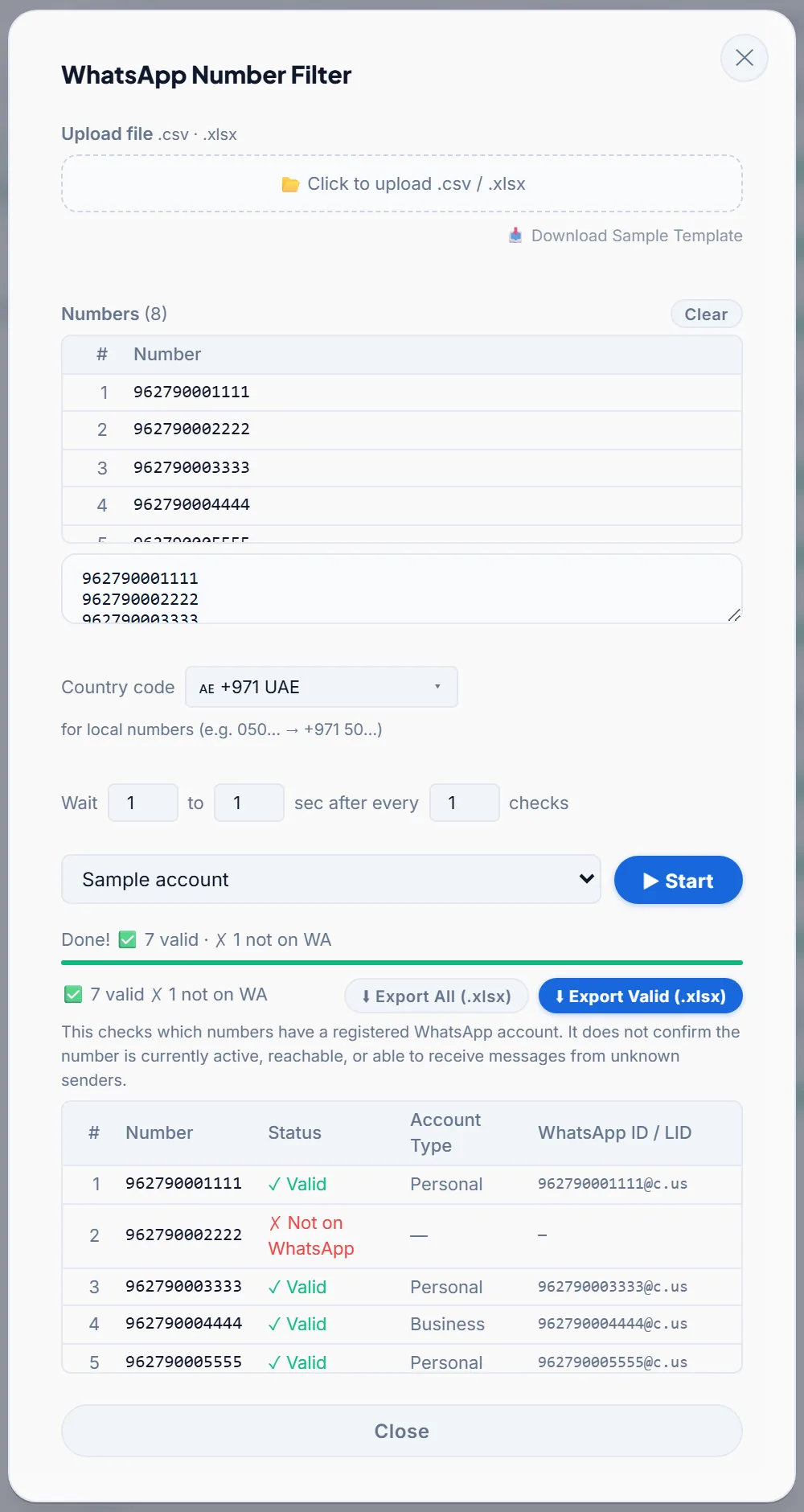
What the WhatsApp Number Filter does
- Takes any list. Upload a CSV or Excel file, or paste numbers. A sample template shows the layout.
- Cleans the numbers first. It fixes formatting, removes duplicates and adds your country code to local numbers, so 050… becomes +971 50… for the UAE.
- Checks each number against WhatsApp. It uses the same lookup WhatsApp’s own web client uses, through your own connected account. No message is sent to the numbers you check.
- Shows the account type. Each valid number is marked as a business or personal account.
- Paces itself. Set a short wait after a set number of checks, so large lists are checked at a steady pace.
- Pauses when something is wrong. After 7 misses in a row it pauses for 15 minutes to protect your account, then Start picks up where it stopped.
- Exports what you need. Download all results, or only the valid numbers, as an Excel file ready for a campaign.
How it works
- Load the list. Your own customer list, a list from the Google Maps scraper, or one somebody gave you.
- Pick the country and start. Keep the WhatsApp window open while it checks.
- Send to the valid numbers. Export them, or take them straight to the WhatsApp bulk sender.
Why filter before you send
Messages that fail because a number is not on WhatsApp are a warning sign on their own, separate from blocks and reports. A list can be honest and still full of dead numbers, especially a bought or old one. Filtering before the first message is the fix; sending more slowly is not. See why invalid numbers quietly get accounts banned.
A valid result means the number has a WhatsApp account. It does not prove the number is active or accepts messages from strangers.
Who uses a WhatsApp number filter
- Anyone about to run a bulk WhatsApp campaign, so messages only go to numbers that are on WhatsApp.
- Agencies and sales teams cleaning lists from the Google Maps scraper, which include landlines.
- Clinics, real estate offices and shops with old customer lists where many numbers have changed.
- Anyone who bought or was given a list and wants to know how much of it is real.
Try the Number Filter free for 14 days
Tips for a better list
- Pick the right country first. Local numbers get that country’s code added, so the wrong country makes good numbers look invalid.
- Check scraped lists straight away, before you write a message.
- Export only the valid numbers and send those to your campaign.
- Use the account type. Business and personal accounts may deserve different messages.
- Pace large lists. A short wait after a set number of checks keeps the pace steady.
Common problems
- “Safety Pause: 7 checks in a row came back not registered or failed.” The filter waits 15 minutes, then Start resumes from where it stopped. Common causes are the wrong country code, a run of landlines, or a disconnected account.
- Almost every number comes back invalid. Check the country setting: local numbers got the wrong country code.
- Fewer results than numbers in the file. Duplicates are removed after cleaning, so 050… and +971 50… count once.
- Checking stopped. Keep the WhatsApp window open while the filter runs.
Compared with other ways to check numbers
| LeadTrapper Number Filter | Free checker extensions | Checking by hand | |
|---|---|---|---|
| Cost | $50 a year, all features | Free | Free |
| How it runs | Windows app with your connected account | A browser tab that must stay open | Save each contact or open each chat |
| Cleans formats and duplicates | Yes, automatically | Varies | No |
| Sends to the valid numbers | Yes, in the WhatsApp bulk sender | No, you need a separate sender | No |
More in WhatsApp number checker tools compared.
Guides
- How the WhatsApp Number Filter checks a number
- Bulk verify WhatsApp numbers from a CSV
- WhatsApp number checker tools compared
- Using a number filter in real estate, sales and other industries
Price
The Number Filter is part of LeadTrapper, $50 a year for every feature, including the WhatsApp bulk sender, Google Maps scraper, account warmer and the Instagram, Facebook, TikTok and LinkedIn lead finders. Every new user gets 14 days free with no card. See pricing.
Download LeadTrapper for Windows
Questions
How does the WhatsApp Number Filter check a number?
It cleans each number’s format, removes duplicates, then checks it with the same lookup WhatsApp’s own web client uses, through your connected WhatsApp account. Each result shows whether the number is on WhatsApp and whether it is a business or personal account.
Does a valid result mean the person will get my message?
No. It confirms the number has a registered WhatsApp account. It does not confirm the number is active, reachable or accepts messages from unknown senders.
Does it send anything to the numbers I check?
No. Checking a number looks it up on WhatsApp; it does not send the person a message.
What file formats can I use?
CSV or Excel (.xlsx), or paste numbers straight in. Results export to Excel, either all of them or only the valid numbers.
How much does it cost?
$50 a year for every LeadTrapper feature, including the Number Filter, after a 14-day free trial with no card needed.
Why did the Number Filter pause?
7 checks in a row came back not registered or failed, so it paused for 15 minutes to protect your account. Click Start when the pause ends and it continues from where it stopped. Check the country setting and that your account is connected.
Do I need to clean the numbers first?
No. Dashes, spaces, missing country codes and duplicates are fixed automatically before each number is checked.
Can I check numbers from the Google Maps scraper?
Yes. Export the Google Maps results and load the file, or paste the numbers. Google Maps lists often include landlines, which the filter marks as not on WhatsApp.
Works well with
WhatsApp Bulk Sender
Personalised messages to a whole list. Included in the same $50/year app.
WhatsApp Account Warmer
Warm up new numbers safely. Included in the same $50/year app.
Google Maps Scraper
Business leads from any city. Included in the same $50/year app.