In this article 6 sections
WhatsApp marketing automation should automate the reply first: keyword rules answer predictable questions within seconds. Then schedule campaigns for working hours, add anyone who replies stop to a permanent do-not-contact list, and make the bot go quiet when a person takes over. LeadTrapper does this without the API.
- The highest-value automation is not the campaign — it is the reply. Answering within seconds instead of hours is what turns an outbound message into a conversation.
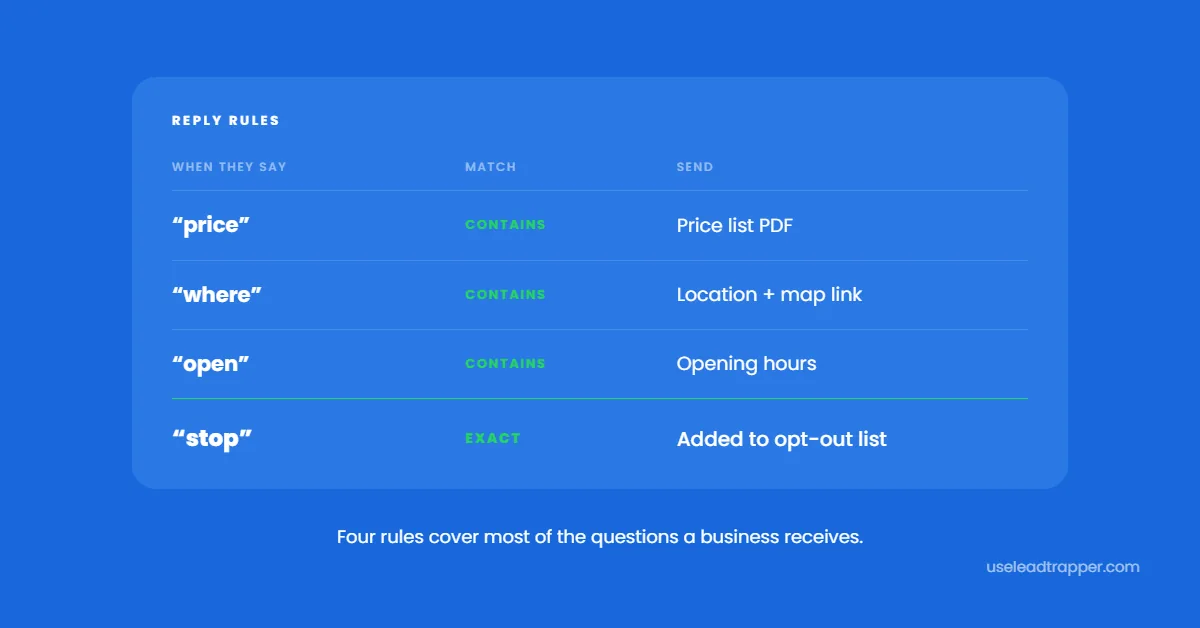
- Keyword rules handle the predictable questions: price, location, opening hours, catalogue. A handful of rules can cover the predictable first replies.
- Scheduling matters as much as content. A campaign queued at midnight and released at 9am lands when people are actually reading.
- Automation should include the exit: a rule that adds anyone replying 'stop' to a permanent do-not-contact list, applied to every future campaign.
- The handover has to be clean — when a human replies in the inbox, the bot must go quiet on that conversation instead of talking over them.
Most people set up WhatsApp marketing automation backwards. They automate the sending, which was already easy, and leave the replies to whoever happens to look at their phone. Then a bulk sender campaign goes out at 10am, forty people reply within the hour, and the first eight get an answer.
The messages that matter are the ones coming back. Reply speed is what separates a campaign that produces conversations from one that produces a list of missed opportunities — a reply within a minute lands while the person is still holding their phone, and one four hours later arrives after they have moved on.
Start With the Reply, Not the Campaign
Look at the last fifty messages your business received on WhatsApp. Most of them are variations of four or five questions: how much, where are you, are you open, do you have this, send me the list.
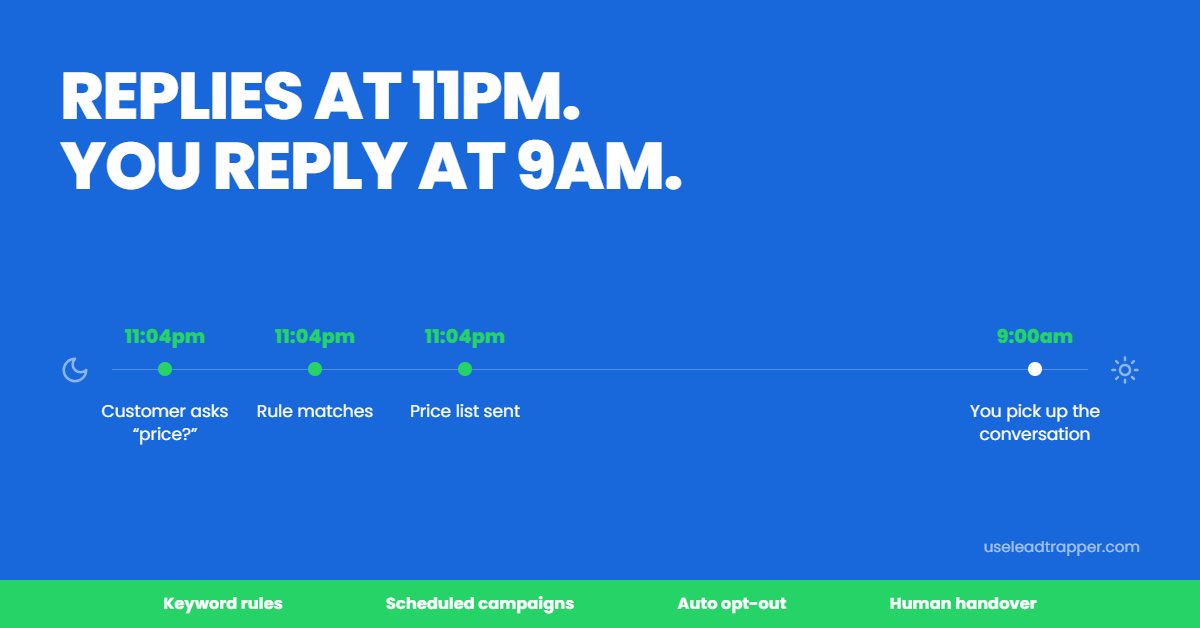
Those are answerable without you. Not with a chatbot pretending to be a person — with a rule that recognises the question and sends the real answer instantly, then flags the conversation for you if it goes anywhere interesting.
A restaurant supplier in Jakarta receiving “price?” at 11pm can have the price list delivered at 11pm. The alternative is answering at 9am tomorrow, by which time the buyer has messaged two competitors.
Building Keyword Rules That Work
A rule in LeadTrapper matches incoming text and sends a reply. The matching mode is what determines whether it fires correctly.
Contains looks for the word anywhere in the message. It is the right default for most rules, but it matches inside other words too — a rule on “hi” will also fire on “this” and “chief”, so keep the keywords long enough to be distinctive.
Exact fires only when the whole message is that word. This is the correct mode for commands like “stop” or “menu”, where you do not want a partial match.
Starts with suits prefixed commands. Regex exists for genuinely complex patterns, and unless you know regular expressions well you should leave it alone — LeadTrapper will refuse to save a pattern that would run too slowly, but the simpler modes handle almost everything.
Four rules cover most businesses: price, location, opening hours, and catalogue. Write those first and add more only when you notice a question repeating.
Replies can carry attachments, so “send me your list” can return an actual PDF catalogue rather than a promise to send one later.
Scheduling for Human Hours
Writing a campaign at midnight is normal. Sending it at midnight is not.
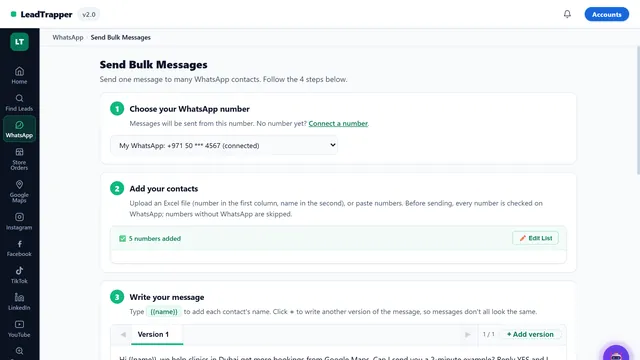
A scheduled campaign holds until the time you set, then runs unattended. The detail worth checking in any tool is whether the schedule keeps your safety settings — because a scheduled run that ignores your messages-per-minute cap and your quiet hours will send four hundred messages flat out at 3am, which is the fastest way to lose the number.
In LeadTrapper a saved schedule carries the same rate ceiling, the same quiet-hours window, and the same attachment as a campaign you start by hand. It behaves as though you were watching it.
| ❌ Manual | ✅ Automated |
| You start the campaign and watch it | Queued at night, released at 9am |
| "Price?" waits until you wake up | Answered in seconds, any hour |
| Opt-outs noted in a spreadsheet | Added to a permanent list automatically |
| Bot talks over you mid-conversation | Bot goes quiet the moment you reply |
Automating the Exit
The rule most people skip is the one that protects them.
Set an exact-match rule on “stop” with the blacklist action attached. When someone sends it, they are added to a permanent do-not-contact list that applies to every campaign from that moment on — including campaigns you have not created yet. No spreadsheet, no memory, no awkward message six weeks later to someone who already asked you to stop.
Numbers are matched on their digits, so the same person saved as +971 50 123 4567 in one list and 00971501234567 in another is recognised as one contact rather than two. That sounds like a detail until it is the reason someone who opted out gets messaged again.
Handing Over to a Human
Automation earns its keep by knowing when to stop. Every conversation lands in one inbox, and the moment you type a reply yourself, the bot mutes that thread for an hour. Your customer will not receive a canned answer in the middle of talking to you — which is the failure that makes people distrust automated WhatsApp entirely.
Platform Comparison
Cost is the last row deliberately. The useful comparison is capability.
| Feature | WATI | AiSensy | Twilio build | LeadTrapper |
|---|---|---|---|---|
| Builds your contact list | No | No | No | Google Maps, Instagram, Facebook |
| Keyword reply rules | Yes | Yes | You build it | 4 match modes, attachments |
| Bot goes quiet when you reply | Varies | Varies | You build it | Auto-mute for 60 minutes |
| Schedule keeps rate cap and quiet hours | Template limits | Template limits | You build it | Yes |
| Opt-out added automatically by a rule | Manual | Manual | You build it | Yes, permanent list |
| Runs without Meta approval | No | No | No | Yes, QR scan |
| Your data stays on your machine | No | No | No | Yes |
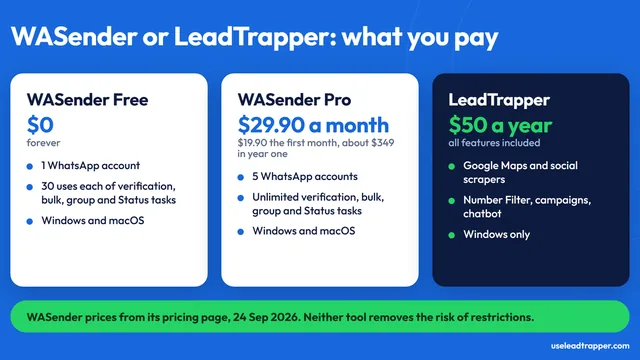
| Cost | $39–$229/mo | Free tier, then $45–$99/mo | Developer time | $50/year |
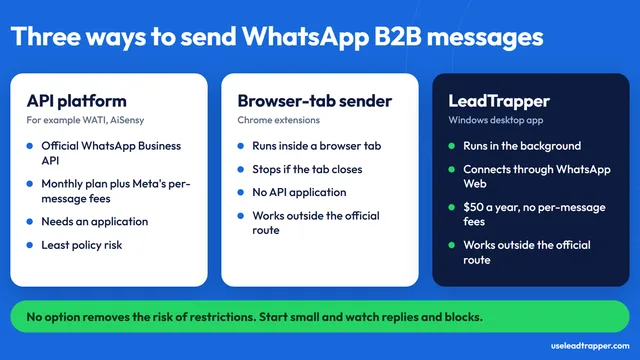
All three of the alternatives above run on the WhatsApp Business Platform, which means a Business Manager application, template approval, and per-conversation billing before your first message. The API platforms are capable products with a different centre of gravity: they are built for support inboxes and notification templates sent to people who already know you. For that job they are a sensible choice.
Two gaps matter for a small business. Neither will find you a new contact, which for most people reading this is the actual bottleneck. And both hold your customer list and your WhatsApp session on their infrastructure, where the arrangement lasts exactly as long as the subscription does.
If finding those contacts is where you are stuck, the walkthrough of how to scrape Google Maps for B2B leads covers extracting verified business numbers by city and category. Once you have them, the settings that keep your number alive while you send are in the guide to whatsapp bulk sms sender pacing.
Start with the four reply rules. That single afternoon of setup changes more than any campaign you schedule afterwards, because it converts the messages you are already receiving instead of chasing new ones. The rest — scraping, scheduling, opt-out handling, the handover to a human — runs on your own computer, with your customer list staying there. See everything included.
Before you send: warm up new or quiet numbers first with the WhatsApp Account Warmer, which runs in the same app.
Frequently Asked Questions
It is software that handles the repetitive parts of WhatsApp outreach without you present: sending campaigns at a scheduled time, replying to common questions with keyword rules, following up with people who did not answer, and removing anyone who opts out. You still handle the real conversations — automation clears the way to them.
Yes. LeadTrapper connects to WhatsApp Web on your own computer through a QR code scan, so there is no Meta Business verification, no template pre-approval, and no per-message charge. API platforms such as WATI and AiSensy are genuinely capable but are built around approved templates, start at $39-$45 per month, and add Meta's per-template charges on top.
Replying is far safer than sending. Bans come from outbound patterns — high volume, fixed intervals, identical text to strangers. Answering someone who messaged you first is normal account behaviour. It is worth adding a short random pause before each reply so responses do not arrive in exactly one second every time.
In LeadTrapper, the moment you send a message yourself from the live inbox, that conversation is muted for the bot for sixty minutes. Automated rules stop firing for that contact so the customer never gets a canned reply in the middle of a real conversation with you.
They should, and this is worth checking in any tool you evaluate. A scheduled campaign in LeadTrapper carries the same messages-per-minute cap, quiet hours, and attachment as a campaign you start by hand, so a run that fires at 9am while you are asleep behaves exactly like one you supervised.
About LeadTrapper
LeadTrapper is a Windows app for finding business leads and contacting them on WhatsApp. It collects business contacts from Google Maps, Instagram, Facebook, TikTok, LinkedIn and business websites, checks which numbers are on WhatsApp with its Number Filter, and sends personalised campaigns with automatic delays from one or more WhatsApp accounts. It also has a chatbot, a shared inbox for every account, and Store Orders for online shops. It installs from the Microsoft Store, and the full app is free for 14 days, then $50 a year. Free web tools, browser extensions and a Wix app are listed on the Free Tools page.
Automate the Repetitive Half
LeadTrapper schedules campaigns, replies with keyword rules, handles opt-outs, and hands over to you when a real conversation starts. $50/year, all included.