In this article 6 sections
The best Google Maps scraper depends on volume and budget. Outscraper and Apify charge per record, G Maps Extractor sells monthly record limits, Instant Data Scraper is free but basic, Google's Places API is official but costly, and LeadTrapper is a flat $50 a year Windows app that also messages leads on WhatsApp.
- There are four kinds of Google Maps scraper: cloud services that charge per record, browser extensions, Google's official Places API and desktop apps that scan on your own computer.
- Outscraper gives the first 500 records free, then charges $3 per 1,000 up to 100,000 records. Apify's Google Maps actor starts at $1.50 per 1,000 places, with extras such as contact enrichment charged on top.
- G Maps Extractor has a free plan with 1,000 records a month and paid plans from $19 a month. Instant Data Scraper is a free Chrome extension that copies what is on the page.
- Google's Places API charges $35 per 1,000 Text Search requests once phone and website fields are included, after 1,000 free a month, and returns at most 60 places per search.
- LeadTrapper is a flat $50 a year Windows app. It is slower than a cloud service, about seven businesses a minute in our tests, and it also checks numbers and sends WhatsApp messages.
A Google Maps scraper turns a search such as “dentists in Dubai” into a list of businesses with their phone numbers, websites, addresses and ratings. The tools that do it differ more than their names suggest: some charge per record, some sell a monthly allowance, one is Google’s own paid API, and some run on your own computer. This guide compares six of them on price, data and limits. One of them, LeadTrapper, is ours, and we say so wherever it appears. Prices are from each vendor’s page, checked on 25 October 2026.
The Four Kinds of Scraper
- Cloud services run the scan on their servers and charge per record or per month. They are fast and need nothing installed.
- Browser extensions read the Maps page open in your browser. They are cheap or free and work best for one search at a time.
- Google’s Places API is the official, paid way to get Maps data, aimed at developers building apps.
- Desktop apps scan from your own computer and connection. They are slower than the cloud, but the price doesn’t grow with the number of records.
The Six Tools
1. LeadTrapper (Windows desktop app)
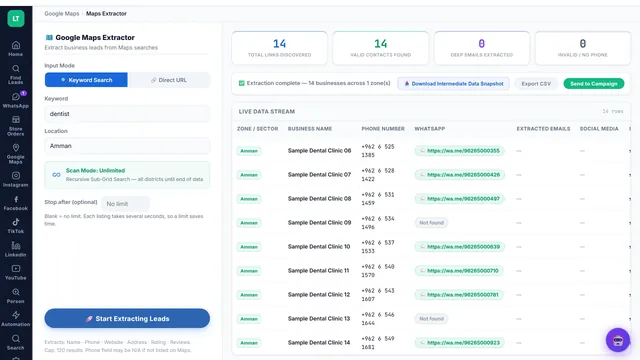
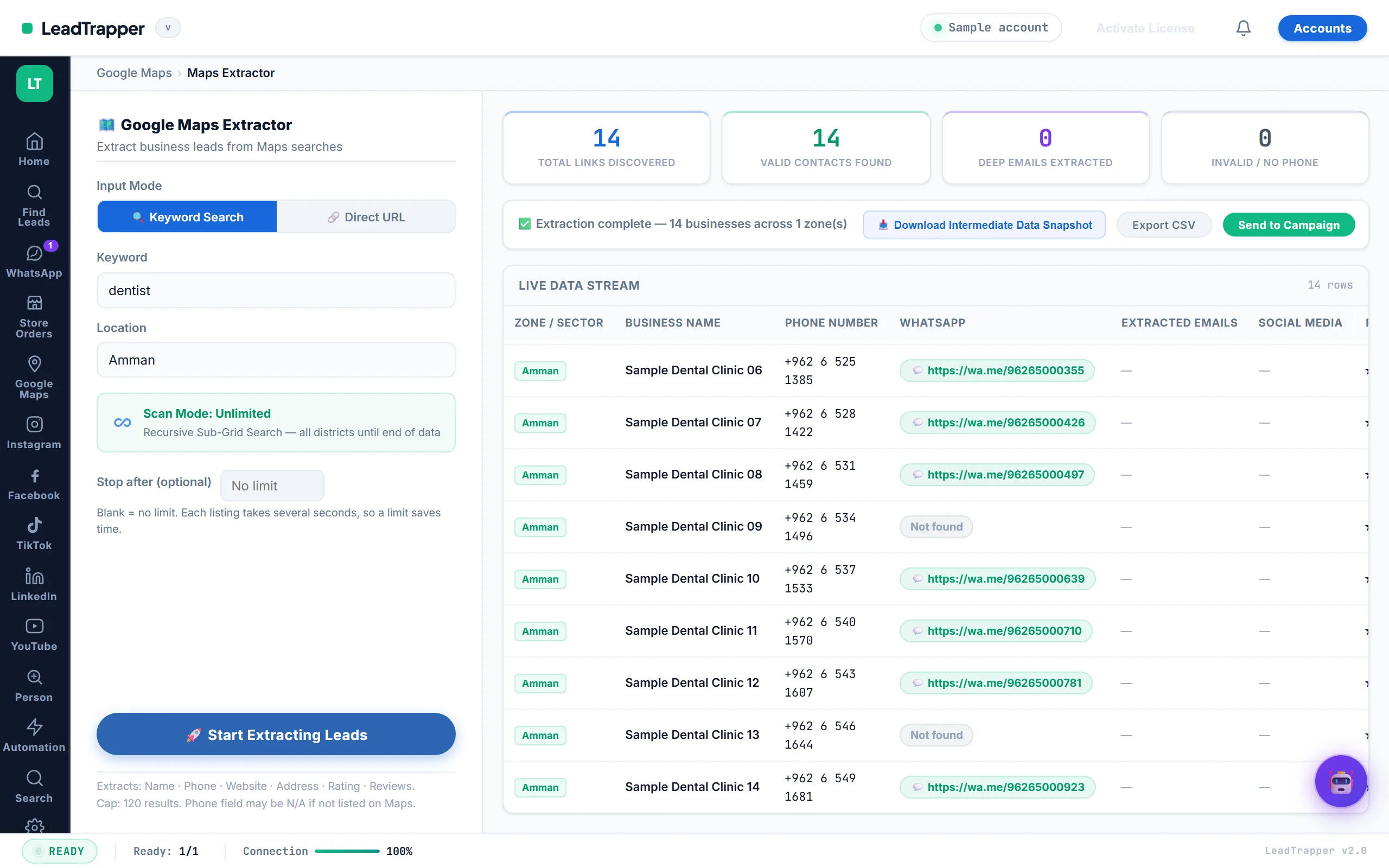
The LeadTrapper Google Maps Scraper takes a business type and a city and scans Google Maps district by district, so a big city isn’t cut off at the first page of results. Each business comes with its name, phone, address, rating, review count, website and Maps link, plus email and social links when the listing has them. In one test, dentists in Amman gave 160 businesses in about 21 minutes, 158 of them with a phone number. The data study has three more real runs.
It’s slower than a cloud service because it scans from your own computer. What it adds is the next step: the Number Filter checks which numbers are on WhatsApp, the Email Finder reads each business’s website for emails, and the WhatsApp Bulk Sender messages the list. It costs $50 a year after a 14-day free trial, on Windows 10 and 11 only.
Try LeadTrapper free for 14 days
2. Outscraper (cloud, pay per record)
Outscraper’s pricing page lists the first 500 businesses free, then $3 per 1,000 records up to 100,000, and $1 per 1,000 after that. Emails and contacts come from a separate Emails & Contacts Scraper, priced per 1,000 domains on the same tiers. It’s fast and simple, and at low volume it’s often the cheapest option. The Outscraper alternatives guide works out where a flat price wins.
3. Apify Google Maps Scraper (cloud actor)
The most-used Google Maps actor on Apify showed over 660,000 users and a 4.7 rating. It charges per event, “from $1.50 per 1,000 scraped places”, with the price falling on higher Apify plans. Extras cost more: on the free plan, extra place details and company contact enrichment are each about $2 per 1,000 places. It returns a lot of detail, including opening hours, reviews and images. You need to set up a run and read its options, so it suits people who are comfortable with a technical tool. Apify’s free plan includes $5 of usage a month. More on the platform in the Apify alternatives guide.
4. G Maps Extractor (extension and cloud)
G Maps Extractor sells monthly record allowances. Its Chrome extension is free for 1,000 records a month, then $39 a month for 100,000 records or $99 for 500,000. Its online scraper is also free for 1,000 records, then $19 a month for 20,000 records, $49 for 80,000 and up. Its page lists phone numbers, emails and social media among the exported fields.
5. Instant Data Scraper (free Chrome extension)
A general-purpose free extension that detects a list on the page and copies it to CSV. On a Google Maps results page it captures what the visible list shows. It doesn’t open each business, so details that only appear inside a listing, such as the website, are often missing, and you scroll the list yourself. It’s good for a quick look at a market and costs nothing.
LeadTrapper also makes a free Google Maps lead extractor for Edge that works the same way: names, categories, ratings and addresses from the results on your screen, without phone numbers.
6. Google Places API (official)
Google’s price list charges by SKU. A Text Search that returns phone numbers, websites or ratings counts as Text Search Enterprise: 1,000 free requests a month, then $35 per 1,000. Each search returns at most 60 places, so covering a whole city means many searches by area. It’s the only option backed by a contract with Google, and it needs a developer to use it.
The Comparison Table
| Compared | Type | Free tier | Paid price | Phone and website | Emails | Message the leads |
|---|---|---|---|---|---|---|
| LeadTrapper | Windows app | 14-day trial | $50 a year | Yes | When listed, plus Email Finder | WhatsApp, built in |
| Outscraper | Cloud | 500 records | $3 per 1,000 | Yes | Separate scraper, per domain | No |
| Apify actor | Cloud | $5 usage a month | From $1.50 per 1,000, plus extras | Yes | Paid add-on | No |
| G Maps Extractor | Extension and cloud | 1,000 records a month | From $19 a month | Yes | Listed | No |
| Instant Data Scraper | Extension | Free | Free | Often missing | No | No |
| Places API | Official API | 1,000 requests a month | $35 per 1,000 searches | Yes | No | No |
What a Year Costs
Say you collect 2,000 businesses a month, 24,000 a year:
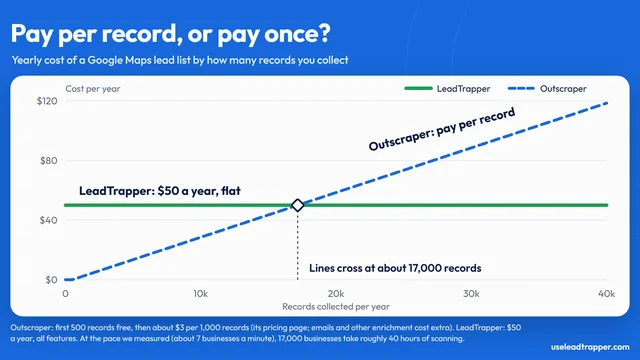
- Outscraper: 500 free, then 23,500 records at $3 per 1,000 is about $70 a year, before email enrichment.
- Apify: at the lowest listed rate of $1.50 per 1,000 places, about $36 a year in usage. Lower plans pay a higher rate, and extras such as contact enrichment cost more. The free plan includes $5 of usage a month, and paid plans start at $19 a month.
- G Maps Extractor: 2,000 a month is above the free 1,000, so the $19-a-month cloud plan, $228 a year.
- LeadTrapper: $50 a year at any volume, with the WhatsApp tools included.
- Places API: at a full 60 places per search, 2,000 places is about 34 searches, or about 100 billed requests of 20 results each, inside the 1,000 free a month. In practice a city needs many more searches by area, so the cost depends on how you search. Above the free 1,000 it’s $35 per 1,000 requests.
Cloud tools win at low or occasional volume. A flat price wins when you scan every week or want to message the list from the same app.
Which One Fits Your Job
- You need a few thousand records once: Outscraper or Apify.
- You want to see a market before you pay: Instant Data Scraper or the free Edge extension.
- You’re building a product on Maps data: the Places API.
- You want records on a monthly allowance in a browser extension: G Maps Extractor.
- You prospect local businesses every week and contact them on WhatsApp: LeadTrapper, $50 a year.
The Rules
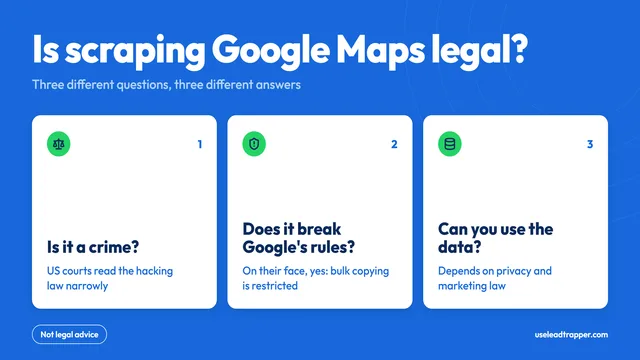
Google’s terms restrict copying and mass downloading of Maps content, and that applies to every scraper here except the Places API, which has its own terms. Marketing and privacy law also apply to how you use the list. Is scraping Google Maps legal? sets out the rules, and how to scrape Google Maps for B2B leads walks through a scan step by step.
Where LeadTrapper Finds Leads
LeadTrapper collects leads from each of these sources in one Windows app, then checks the numbers and sends the WhatsApp messages from the same place.
- Google Maps Scraper: Business leads from any city.
- Facebook Scraper: Advertisers, pages and group members.
- Instagram Scraper: Leads from profiles and hashtags.
- TikTok Scraper: Creators, hashtags and commenters.
- LinkedIn Scraper: Profiles by role and city.
- Email Finder: Emails from business websites.
Frequently Asked Questions
There is no single best one. For a few thousand records now and then, Outscraper or Apify is cheap and fast. For a free look at one search, Instant Data Scraper or LeadTrapper's free Edge extension is enough. For an official, contract-backed source, use the Places API. For steady lead lists you also want to message on WhatsApp, LeadTrapper is a flat $50 a year.
Yes, with limits. Outscraper's first 500 records are free, G Maps Extractor's free plan allows 1,000 records a month, Apify gives $5 of usage a month, and Instant Data Scraper is a free Chrome extension. LeadTrapper's free Maps Lead Extractor for Edge exports names, ratings and addresses but not phone numbers.
Most paid tools return the phone number and website Google shows. Emails are not on Google Maps, so tools read them from each business's website, often as a paid extra. LeadTrapper's scan collects the email and social links when the business lists them, and its Email Finder reads the websites for more.
It is the official route, so it comes with Google's terms and support. It is also expensive for lead lists: $35 per 1,000 Text Search requests with phone and website fields, and only 60 places per search. Its terms also limit how long you may store the data.
It is not a simple yes or no, and it applies to every tool here. Google's terms restrict copying Maps content, and marketing and privacy law apply to how you use the list. Read our guide to the rules first. This is not legal advice.
About LeadTrapper
LeadTrapper is a Windows app for finding business leads and contacting them on WhatsApp. It collects business contacts from Google Maps, Instagram, Facebook, TikTok, LinkedIn and business websites, checks which numbers are on WhatsApp with its Number Filter, and sends personalised campaigns with automatic delays from one or more WhatsApp accounts. It also has a chatbot, a shared inbox for every account, and Store Orders for online shops. It installs from the Microsoft Store, and the full app is free for 14 days, then $50 a year. Free web tools, browser extensions and a Wix app are listed on the Free Tools page.
Scan Google Maps, Then Message the Leads
Google Maps scraper, Email Finder, Number Filter and WhatsApp bulk sender in one Windows app. $50/year, all features included.