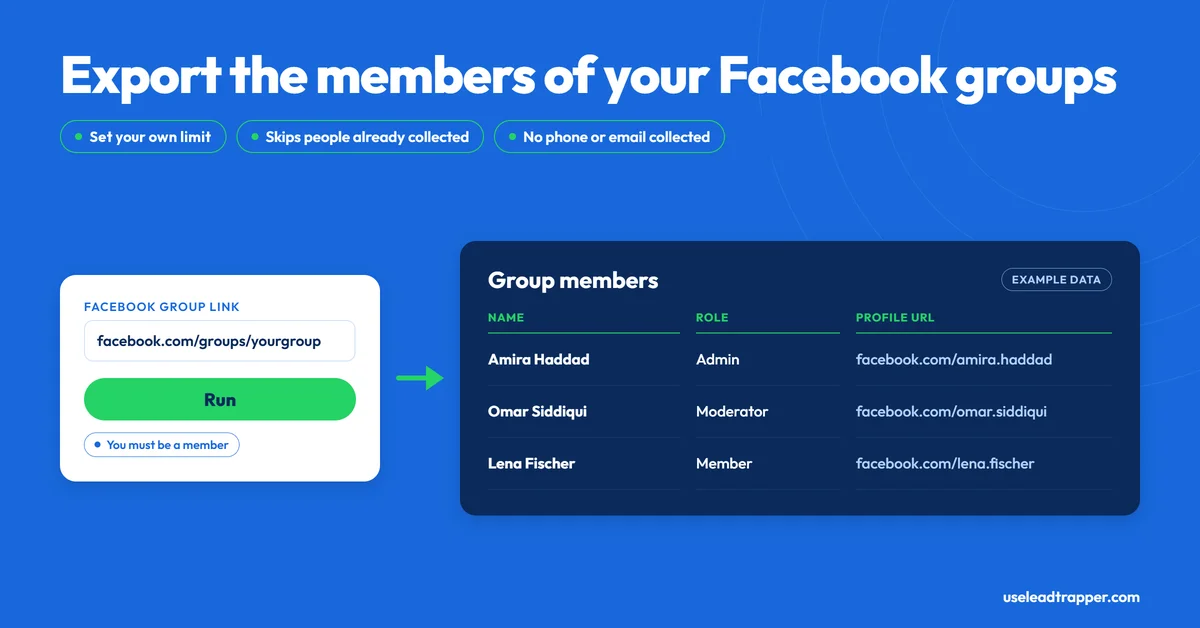
- LeadTrapper's group scraper collects the member list of one Facebook group per run: name, role and profile link, plus the member's Facebook ID in the exported file.
- You must already be a member of the group and signed in to Facebook in LeadTrapper's browser window. It cannot open groups you haven't joined.
- A run scrolls the members page up to 30 times and stops at your result limit (200 by default, 10 to 5,000). The limit is a ceiling, not a promise: a very large group may need more than one run.
- It skips members it collected in earlier runs, so a second run on the same group returns only people it hasn't returned before, until you press Clear DB.
- It returns no phone numbers or emails, and it does not scrape group posts or comments. Meta's Terms prohibit automated data collection without its permission.
LeadTrapper’s Facebook group members scraper takes the link to a Facebook group you belong to and returns the people in it: their names, their roles and links to their profiles. That’s the whole job. It doesn’t read the group’s posts, it doesn’t read comments, and it doesn’t find phone numbers or emails. This is what it does, what comes back, and the rules to know before you run it, checked against the code that runs it.
What the Group Members Scraper Does
A Facebook group’s Members tab lists everyone in it, a screenful at a time. Copying that list by hand means scrolling and pasting names one by one, which gets slow past a few hundred people. The scraper does the scrolling and collects the entries as Facebook loads them, so the list ends up in a table you can export.
One rule comes first: you must be a member of the group. LeadTrapper opens the group’s members page in a browser window signed in to your own Facebook account, so it sees what your account sees. If you haven’t joined the group, or Facebook won’t show you its members, the run ends with a message saying no members were found and to check that you’re logged in and the group is accessible.
How a Run Works, Step by Step
- Paste the group link. In LeadTrapper’s Facebook tools, open the Group Members tab and paste a link such as
https://www.facebook.com/groups/yourgroupname. Set the result limit, from 10 to 5,000. The default is 200. - Run it. LeadTrapper opens the group’s members page in a visible browser window on your own computer and starts collecting.
- Let it scroll. It scrolls the page up to 30 times, pausing about two seconds between scrolls, and picks up members from Facebook’s own responses as they load. It stops at your limit or the thirtieth scroll, whichever comes first.
- Export. The members appear in a table, and you can export them to CSV or Excel.
Only one Facebook task runs at a time. Start a second while the first is running and LeadTrapper tells you to wait for it to finish.
What You Get Back
| Field | What it holds |
|---|---|
| Name | The member’s Facebook name |
| Role | The role Facebook shows for them in the group, when it shows one |
| Profile URL | A link to their profile |
| Facebook ID | The member’s numeric Facebook ID (export file only) |
The on-screen table shows Name, Role and Profile URL, and the CSV or Excel export adds the Facebook ID. Role is the useful one if you’re trying to find a group’s admins or moderators, since it lets you separate them from ordinary members, but it depends on what Facebook returns for each person, so expect blanks.
What’s missing matters more. The export has no phone number, email or website columns at all, because Facebook’s members page doesn’t list them. A member list tells you who is in a community. It doesn’t tell you how to reach them.
It Remembers Who It Has Collected
LeadTrapper keeps a local record of every member it has collected, keyed by their Facebook ID, and skips anyone already in it on later runs. That’s convenient when you scrape a group in stages or scrape several overlapping groups, because the same person doesn’t turn up twice.
It also has a side effect worth knowing about. If you run the same group a second time, you get only members that weren’t returned before, which can look like the scraper found fewer people than it should. If you closed the window before exporting, or want the full list again, press Clear DB in the Facebook tools to wipe that record, then run the group again. The button empties the whole record, not one group’s, and LeadTrapper asks you to confirm first.
What It Doesn't Do
- It doesn’t scrape group posts or comments. The group scraper reads the member list only. The Posts Scraper is a separate tool that works on Facebook Page timelines, not groups, and for each post it returns the text, reaction count, comment count, share count, date and link. The comment count is a number; the comments themselves aren’t collected.
- It doesn’t find phone numbers or emails. The Ad Library search and the Page Scraper are covered in the Facebook Ad Library scraper guide, and they deal with business pages, which do publish contact details. Individual members mostly don’t.
- It doesn’t collect when a member joined. Some other tools list a join date. LeadTrapper’s export has name, role, profile URL and Facebook ID only.
- It doesn’t join groups for you, and it can’t read groups you aren’t in.
- It doesn’t guarantee a complete list. A run stops at your limit or after 30 scrolls, so a very large group may not be collected in one go.
Meta's Rules and the Built-In Pauses
Meta’s Terms of Service prohibit accessing or collecting data from its products by automated means without Meta’s prior permission (section 3.2). That applies to any scraper, this one included, and LeadTrapper can’t grant Meta’s permission for you. The risk of using it is yours.
There’s a second issue that’s specific to this tool. A group member list is a list of private individuals, and their names and profile links are personal data. Depending on where you and they are, privacy law such as the GDPR may apply to how you collect and use it, and members joined a group to talk to each other, not to be added to someone’s outreach list. Use it for research you’d be comfortable explaining to the people on the list, and keep to your local marketing and privacy rules. This isn’t legal advice.
What LeadTrapper does is limit how hard it pushes. It runs in your own browser, from your own connection or a proxy you’ve set up in Proxy Manager. It backs off when Facebook does: if Facebook shows a security check, the Facebook tools pause for 24 hours, and if Facebook returns three rate-limit or access errors during a run, they pause for 2 hours. While a pause is running, new Facebook searches are refused with a message that Facebook is cooling down to protect your account. Those pauses reduce the chance of an account restriction. They don’t remove it, so use an account you can afford to have limited and keep runs modest.
How It Compares
| Approach | What you get | Cost | Notes |
|---|---|---|---|
| Members tab, by hand | Names you copy yourself | Free | Slow beyond a few hundred members |
| Apify Facebook group actors | Varies by actor, per their listings | Apify plans start at $19/month plus pay-as-you-go usage; each actor sets its own rates | Separate actors for members, posts and comments |
| Free extensions, console scripts and templates (Edge Add-ons, GitHub, Bardeen) | Name and profile link; some also list join date and admin labels, per their listings | Free to paid, varies by tool | Run inside your own Facebook session, so the same Meta Terms apply |
| LeadTrapper group members scraper | Name, role and profile link for members of a group you belong to | $50/year, all features | No posts, comments, phones or emails |
If you want a member list from groups you’re already in, to study a community or find its admins, the scraper saves the copying. If you need what people wrote in the group, or a way to contact them, it isn’t that tool. The same kind of follower list for Instagram, and what to do with it, is covered in the Instagram scraper guide.
Frequently Asked Questions
Paste the group's link into the Group Members tab, set a limit and press Run. It only works for groups you're already a member of, and you must be signed in to Facebook in the browser window LeadTrapper opens. It loads the members page the way you would, so a group you haven't joined gives it nothing to read.
For each member it collects the name, the role Facebook shows for them, and a link to their profile. The on-screen table shows those three, and the CSV or Excel export adds the member's Facebook ID as a fourth column.
No. Facebook's members page doesn't list them, and the export has only four columns: name, role, profile URL and Facebook ID. If you want a person's contact details, you'd have to find them another way, and only where they've made them public.
Meta's Terms of Service prohibit collecting data from its products by automated means without Meta's prior permission, and LeadTrapper can't grant that permission. Member lists are also personal data about private individuals, so privacy law such as the GDPR may apply. The risk is yours, and this isn't legal advice.
No. The group scraper only reads the member list. LeadTrapper's Posts Scraper works on Facebook Page timelines, not groups, and it returns the number of comments on each post rather than the comments themselves.
LeadTrapper remembers every member it has collected before and skips them, so repeat runs only return people it hasn't returned already. If you lost a result set and want the full list again, press Clear DB in the Facebook tools to wipe that memory, then run it again.
Turn the Groups You Already Belong To Into a Member List
The Facebook group scraper, Page Scraper, Ad Library search and Lead Gen mode all come with LeadTrapper. $50/year — all features included.
Related Articles
Facebook Ad Library Scraper: Find Advertisers by Keyword
LeadTrapper's Facebook Ad Library scraper lists businesses running active ads for a keyword and coun…
Read article
Why Your WhatsApp Campaign Stopped Itself (and What to Do)
LeadTrapper halts a run on its own in four cases: repeated failed sends, a run of dead numbers, or a…
Read articleBrowse All Articles
Lead generation, WhatsApp marketing, Google Maps, Instagram, and Facebook scraping guides.
See all