In this article 6 sections
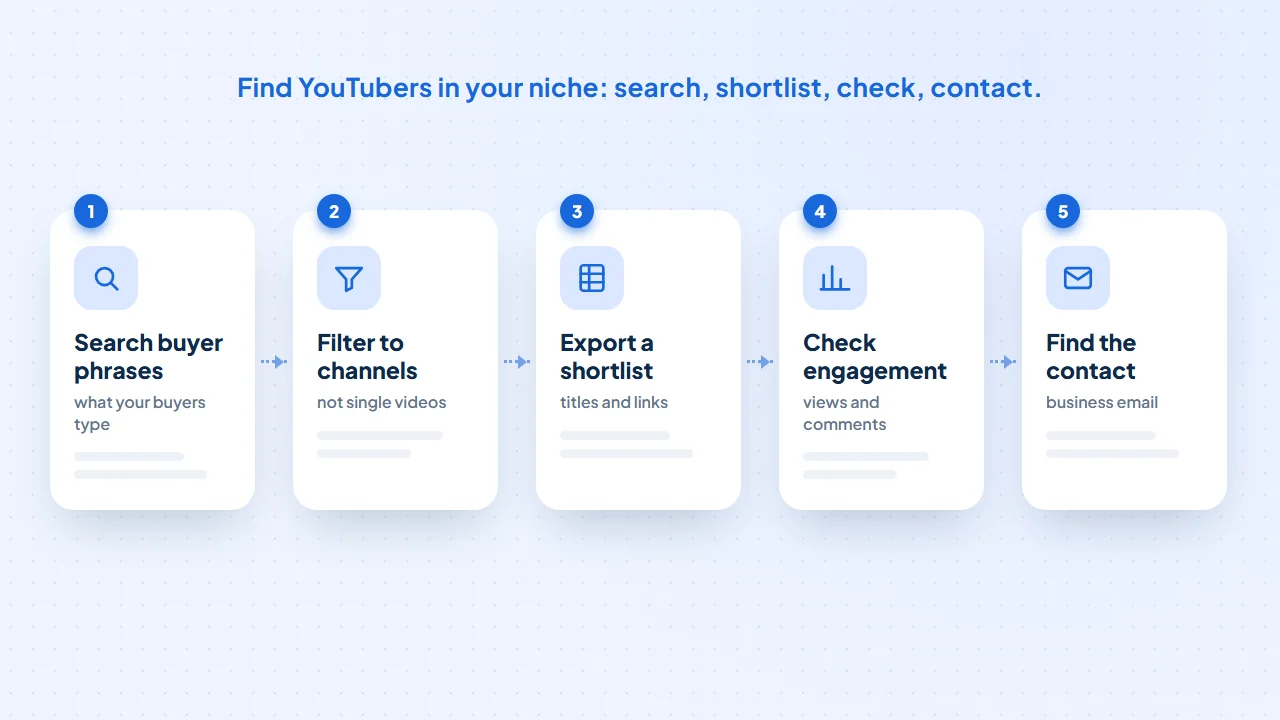
Search YouTube for the phrases your customers type, filter results to channels, and list the creators who keep appearing. Then check their recent views, comments and past sponsors. LeadTrapper's Find Videos tool exports up to 500 matching videos with channel names and links to a spreadsheet to start the shortlist.
- Search the phrases your customers would type, not your brand name, and filter YouTube's results to channels. The creators who keep appearing are your niche.
- Judge a channel by the typical views on its recent videos and by what the comments say, not by subscriber count.
- LeadTrapper's Find Videos and Videos of a Channel tools export titles, channel links, views, duration, dates and video links, up to 500 rows. They hold no subscriber count and no emails.
- Creators who already work with competitors, or who answer your customers' questions, are the best fit. Check how they disclose sponsorships.
- Contact comes last: the channel's About page, its website or its social bio. Keep the first message short and specific.
Most outreach to YouTubers fails for one reason: the creator was chosen by size, not by who their viewers are. Ask instead which channels already speak to the people who would buy from you. This guide shows free ways to find those channels, a quick way to turn them into a list, and the checks to run before you write. We make LeadTrapper, which has a YouTube search export, and we say so where it appears.
Start With What Your Customers Search
The most reliable way to find your niche’s YouTubers is to search YouTube for the words your customers use, then filter the results to channels. YouTube’s help page on filtering search results says you can filter by type of content, including video, short, movie, playlist or channel, from the Filter button after a search.
Pick 10 phrases a buyer would type, such as “best standing desk for small spaces”, “home office setup 2027” or “standing desk review”. Search each one twice: once as videos, to see which creators rank, and once filtered to channels, to see who is built around the topic. Write down every creator who appears more than once. Comparison and “review” phrases find creators who already recommend products, which is the behaviour you want.
Use a separate browser profile for this research. YouTube personalises results to your history, and ChannelCrawler’s guide to finding YouTubers, which is a third-party source, makes the same point.
Where Else Creators Show Up
Searching finds the channels YouTube ranks; other sources find the ones your customers actually trust. Guides from Modash and ChannelCrawler, which sell creator tools of their own, list these routes. The table groups them.
| Source | What it finds | Cost | Note |
|---|---|---|---|
| YouTube search by buyer phrase | Channels that rank for your topic | Free | Start here |
| “Up next” and sidebar suggestions | Channels similar to one you like | Free | Follow from a creator who suits you |
| Competitors’ sponsored videos | Creators who already take brand deals | Free | Search the competitor’s name or link in video descriptions; check for exclusivity |
| Comments on popular niche videos | Small creators who comment as their channel | Free | See our guide to the YouTube comment scraper |
| Reddit, Discord, forums | Creators your audience recommends | Free | Search the niche community for “channel” and “YouTuber” |
| Your customers and followers | Channels they watch | Free | Ask in a newsletter or order confirmation |
| Creator databases (Modash, HypeAuditor, ChannelCrawler) | Filter by size, location, engagement | Mostly paid | Fine for budgets; check how fresh the data is |
| Creators you know on TikTok or Instagram | Their YouTube channel, if any | Free | Our guide on finding a TikTok creator’s business email covers those profiles |
The same method works on TikTok; see our guide on how to find TikTok influencers in your niche.
Build the Shortlist in a Spreadsheet
A spreadsheet turns scattered notes into a list you can sort, and LeadTrapper’s YouTube tools can fill the first columns for you. In the app, open YouTube and choose Find Videos, type your keyword and set the number of results (1 to 500, 50 by default). Press Start, then export CSV or Excel.
You get one row per video with title, channel, channel link, views, duration, date and the video link, plus the first 200 characters of the description when YouTube’s results include it. It runs on your Windows PC and needs no YouTube login. Sort by the channel column and remove duplicates: each channel that appears several times is one you noted by hand too, now with a link.
Then choose the Videos of a Channel tab, paste a shortlisted channel’s address (an @handle or a /channel/UC... link) and export its latest videos with views and dates. That gives you the numbers for the vetting below. The export holds no subscriber count, no emails and no audience location. YouTube’s terms ban automated access, so keep runs small; the risk is yours. The same limits are explained in our guide to the YouTube channel email finder.
Export your first creator shortlist free for 14 days
Check Fit Before You Write
A creator is a good fit when their recent videos get steady views from the people you sell to. Run four quick checks on each shortlisted channel, using the checks that Modash and Semrush both describe in their guides.
- Typical views. Take the 10 most recent long videos from the channel export. Ignore the best and worst, and look at the middle. Check that views are not falling.
- Views against subscribers. Views well below subscribers can mean an old or inactive audience; the channel export has views but not subscribers, so read the subscriber count from the channel page.
- Comments. Open two videos. Real questions and replies are a good sign; a wall of one-word comments is not.
- Past sponsors. Watch two sponsored segments. Do they feel natural, and does the creator really use the product?
Also note the audience’s country if you can read it from currency and language, and how often the creator posts, so you know whether they have room for your offer. Cost is the last check, not the first.
If you would rather have an AI assistant sort a long shortlist, our guide to a YouTube scraper for Claude explains the data routes and their limits.
A Worked Example
These numbers are invented to show the steps, not a test result. You sell ergonomic standing desks in the UK and have a small budget.
You run Find Videos for “standing desk review” with 100 results: 100 videos from 64 channels. A second run for “home office setup” gives 100 more from 71 channels, 22 of them already on the first list, so you hold 113 channels. You keep those appearing in at least two searches: 27.
For each you run Videos of a Channel with 12 results and calculate the middle views. Eleven channels sit between 4,000 and 30,000 views, post at least twice a month, and their comments ask about desks and prices. You watch the sponsored segment on 6 of them, drop 2 for pushy delivery, and take the 9 left to the contact step.
Get a Contact and Keep It Honest
Start with the channel’s About page, then the creator’s website and social bios, in that order. The step-by-step method is in our guide to the YouTube channel email finder, and LeadTrapper’s Email Finder can read a list of those websites in one run for the emails they publish.
Write two short sentences on who you are and what you offer, name one video you watched, and state the next step, such as sending a sample. If the creator accepts, remember that sponsored content must be disclosed. The FTC’s Disclosures 101 for social media influencers says creators must disclose any financial or personal relationship with a brand, including free products, and put the disclosure in the video itself, not only the description. Offering to help with that makes you easier to work with. Other countries have their own advertising rules, so check those that apply.
Where LeadTrapper Finds Leads
LeadTrapper collects leads from each of these sources in one Windows app, then checks the numbers and sends the WhatsApp messages from the same place.
- Google Maps Scraper: Business leads from any city.
- Facebook Scraper: Advertisers, pages and group members.
- Instagram Scraper: Leads from profiles and hashtags.
- TikTok Scraper: Creators, hashtags and commenters.
- LinkedIn Scraper: Profiles by role and city.
- Email Finder: Emails from business websites.
Frequently Asked Questions
Search YouTube for the questions and phrases your customers use, filter the results to channels, and note the creators who appear repeatedly. Add competitors' sponsored creators, creators your customers follow, and channels mentioned on Reddit or in newsletters. Then check views, comments and past sponsors.
Search long, specific phrases rather than the broad topic, sort by recent uploads, and look at the commenters on popular niche videos who run their own channels. Small channels often have steady views and a loyal audience. Check median views of the last 10 videos instead of subscribers.
There is no rule. Fit and viewing numbers matter more: a channel with 8,000 subscribers whose videos get 6,000 views from your exact buyers can beat one with 200,000 subscribers and weak views. Decide by views per video, comment quality and audience location.
Yes. LeadTrapper's Find Videos tool takes a keyword and exports matching videos with their channel name and channel link, which you reduce to a list of unique channels. It does not export subscriber counts or emails, so you add those by hand from each channel.
In the US, the FTC says creators must disclose any financial, employment, personal or family relationship with a brand, including free products, and the disclosure belongs in the video itself, not only in the description. Other countries have their own rules.
Use the business email in the channel's About section if it shows one, the website linked in the description, or a social bio. Send two sentences on who you are and what you offer, mention one video you watched, and make the next step clear.
About LeadTrapper
LeadTrapper is a Windows app for finding business leads and contacting them on WhatsApp. It collects business contacts from Google Maps, Instagram, Facebook, TikTok, LinkedIn and business websites, checks which numbers are on WhatsApp with its Number Filter, and sends personalised campaigns with automatic delays from one or more WhatsApp accounts. It also has a chatbot, a shared inbox for every account, and Store Orders for online shops. It installs from the Microsoft Store, and the full app is free for 14 days, then $50 a year. Free web tools, browser extensions and a Wix app are listed on the Free Tools page.
Build a Creator Shortlist in One Spreadsheet
The YouTube tools, Email Finder, TikTok and Instagram scrapers and WhatsApp sender all come with LeadTrapper. $50/year, all features included.