In this article 8 sections
LinkedIn has no button that exports a list of other companies' pages to Excel. You can export your own Page's analytics as XLS. For a list of target companies, build it from Google Maps instead, then find the people at each company on LinkedIn by job title.
- LinkedIn has no export for a list of other companies' pages. Its own XLS export covers analytics for a Page you administer, not a list of competitors or prospects.
- Sales Navigator does not export account lists either: LinkedIn's help page says it currently offers no such option.
- Connectors such as Coupler.io and Supermetrics read the Pages you manage. They are for your own reporting, not for building a prospect list.
- LinkedIn's User Agreement bans scraping profiles and other data from its services. Extensions and cloud scrapers that read company pages fall under that ban.
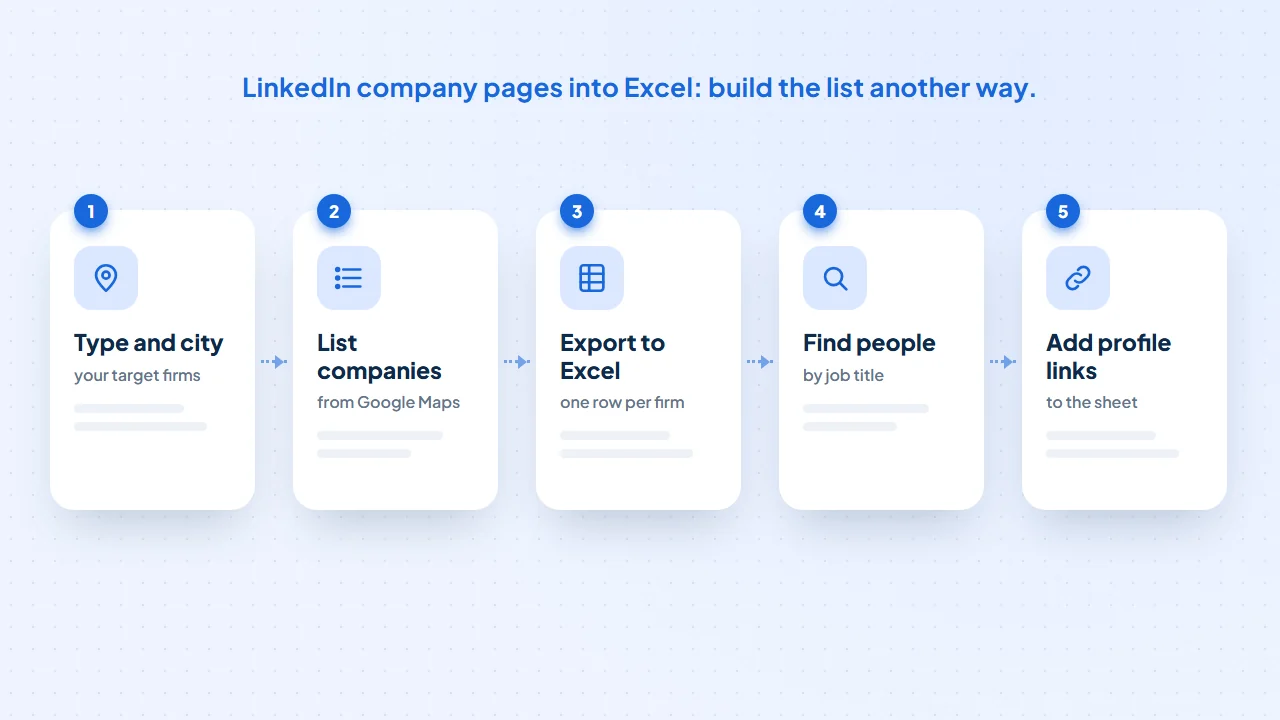
- A workable company list comes from Google Maps (name, phone, website, address, rating, reviews) in Excel, plus LinkedIn profiles found by role and city for the people who work there.
LinkedIn does not let you export a list of company pages to Excel. It does let a Page admin export their own Page’s analytics, and that is the only company-page export it offers. If you want a spreadsheet of target companies, you have to build it from another source.
This guide shows what each LinkedIn route covers, what the tools that claim more really do, and a method that ends with a company list and the people to contact in it. The list part uses the Google Maps scraper; the people part uses the LinkedIn scraper.
What LinkedIn Lets You Export
LinkedIn lets you export data about a Page you administer, and nothing about pages you don’t. The Export your LinkedIn Page analytics report help page says Page admins can export analytics as an XLS file: open the admin view, choose the Analytics dropdown, pick a report (visitors, content, followers, competitors, leads or employee advocacy), choose a timeframe and click Export. Each report is exported separately.
That file is a report on your company page. It does not contain a list of other companies.
Sales Navigator is the paid LinkedIn product people expect to export lists. LinkedIn’s help page Export Account and Lead Information from Sales Navigator says LinkedIn currently doesn’t offer the option to export account and lead information, and points Advanced Plus customers to CRM sync. You can upload a CSV of accounts into Sales Navigator, but you can’t take one out (checked 25 Nov 2026).
Connectors and Extensions
Connectors such as Coupler.io and Supermetrics move data about your own Pages into Excel, and Chrome extensions claim to read any company page. They are different things, so check which one you are looking at.
- Excel add-ins. Coupler.io’s guide describes installing its add-in from Excel’s Add-ins menu, connecting LinkedIn Company Pages and scheduling refreshes. Supermetrics works the same way: install the add-in, choose LinkedIn Company Pages, authorize your account, click Get data. They report on Pages your LinkedIn account has rights to, so they suit your own page.
- Custom API work. Coupler.io says the do-it-yourself route, with Power Query or Apps Script, needs developer-portal approval and a verified company page, and calls the access restrictive. That is the vendor’s description, not LinkedIn’s.
- Chrome extensions. Listings such as LinkedIn Company Page Extractor say they extract company name, headquarters and follower counts to Excel or CSV while you are logged in. They read pages in your browser as you, which is where the risk sits.
- Cloud scrapers. Services such as PhantomBuster and TexAu export Sales Navigator searches. Vendor posts report a cap of about 2,500 results for a lead search and about 1,000 for an account search. Those are vendor claims, not LinkedIn documentation.
What LinkedIn's Terms Say
LinkedIn’s User Agreement bans scraping. Section 8.2 says you may not use software, scripts, robots or other means to scrape or copy the services, including profiles and other data, and may not use bots or other unauthorized automated methods to access them. The LinkedIn User Agreement shows an effective date of 3 Nov 2025 (checked 25 Nov 2026).
Extensions and cloud scrapers that read company pages do exactly this, so using them puts your LinkedIn account at risk. For the full picture, see does LinkedIn allow scraping. This isn’t legal advice.
Options Compared
| What you want | What LinkedIn offers | What third parties offer | Risk |
|---|---|---|---|
| Analytics of your own Page in Excel | XLS export for Page admins | Coupler.io, Supermetrics add-ins | Low: your own data |
| List of competitor or prospect company pages | None | Chrome extensions, cloud scrapers | Breaks LinkedIn’s scraping ban |
| Sales Navigator account list as CSV | None (help page, 25 Nov 2026) | Export extensions | Breaks the same ban |
| Your own connections with their company names | Data export, see export LinkedIn connections to Excel | None needed | Low |
| Company list for a city and industry | None | Google Maps scrapers, official registers | Check each source’s terms |
| People at one company | Manual search | Search-engine queries, profile scrapers | See the terms above |
Build the Company List From Google Maps
A company list for a business type and city comes fastest from Google Maps, because most local firms have a listing with a phone, website and address. LeadTrapper’s Google Maps scraper takes a search such as “accounting firm, Leeds” and exports an Excel file with these columns: No., Business Name, Phone Number, Website, Full Address, Rating, Review Count.
That is not a copy of LinkedIn company pages. It has no employee counts, industries or follower numbers, and companies with no Maps listing are missing. For many outreach jobs the phone and website matter more than the LinkedIn page, and the website tells you what the company does. For a national register as a free first step, our guides on B2B leads in France and B2B leads in Nigeria show how company registers fit in.
Build your company list free for 14 days
No card needed. Free for 14 days, then $50 a year. Windows 10 and 11.
Add the People Who Work There
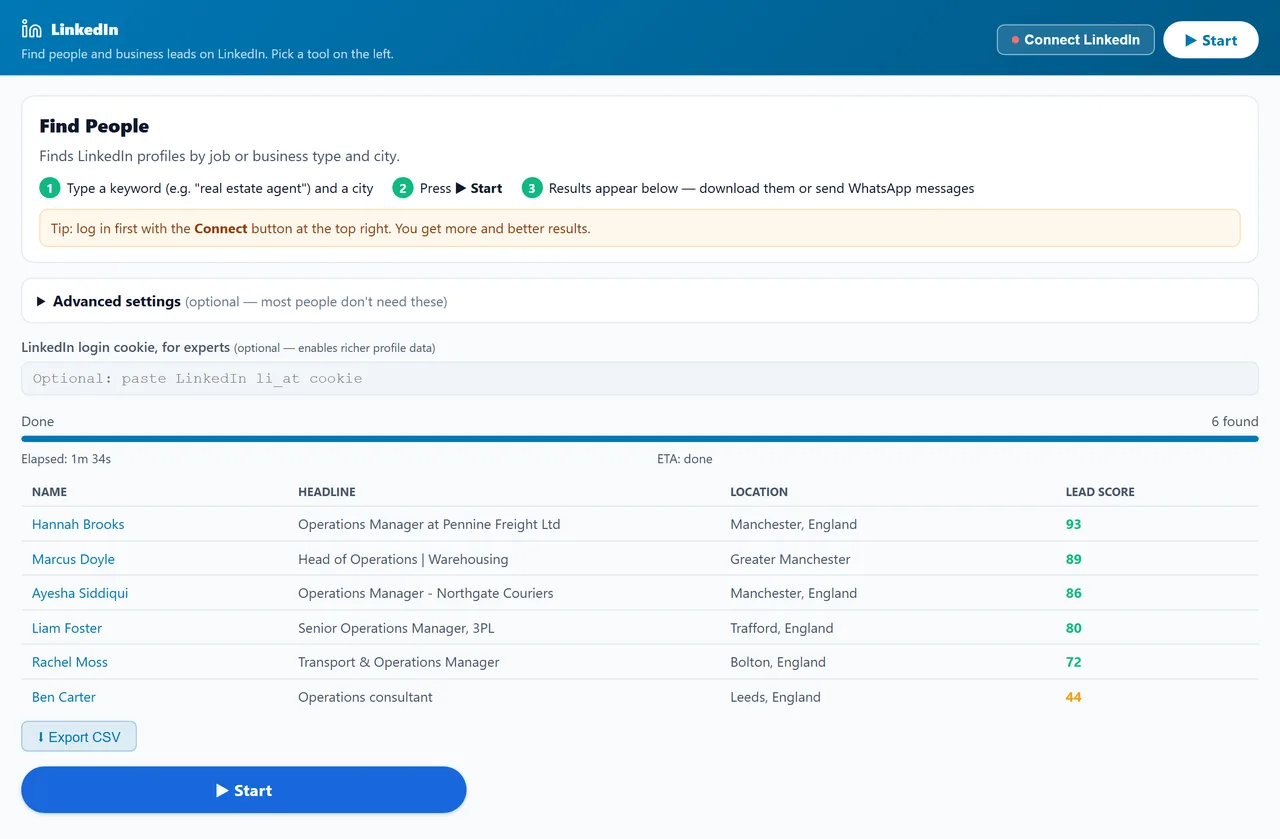
Once you have the company, finding the person is a search for a job title in a place. The Profile Search tab in LeadTrapper’s LinkedIn scraper takes a keyword, a location, an optional job title and a Max Results number (1 to 1,000), finds profile links through Bing, Yahoo and DuckDuckGo, then reads each profile’s name, headline and location.
Two limits matter. First, it searches by role and place, so you get people matching “Finance Director, Leeds”, not “everyone at Smith & Co”. Add the company name to the keyword to narrow it, and read the headline to confirm. Second, it returns no emails or phone numbers. Our guides on finding people by job title on LinkedIn and finding employees of a company on LinkedIn cover the search step by step, and the LinkedIn X-ray search guide shows the manual, free version.
A Worked Example
A payroll software seller wants accounting firms in Leeds.
- In the Google Maps scraper, search “accounting firm Leeds” and export to Excel. Say it returns 143 rows with name, phone, website, address, rating and review count.
- Sort by review count. Firms with 20 to 150 reviews are usually established practices, not one-person operations. Keep 60 rows.
- Open each remaining firm’s website and note the managing partner’s name, where the site shows one.
- In Profile Search, use keyword “accounting”, location “Leeds”, job title “Managing Partner”, Max Results 100. Match the profile links to your 60 firms in a new column.
- Message the 25 firms where you found both a name and a profile link. Keep it short and specific, and within the marketing rules of your country. In the UK, the ICO’s direct marketing guidance applies.
The numbers illustrate the method, not what a search will return. Your counts will differ by city and by what Google Maps shows.
What LeadTrapper Cannot Do Here
LeadTrapper does not read LinkedIn company pages. It cannot return a company’s industry, size, follower count, employee list or posts, and it has no export of Sales Navigator accounts. Its LinkedIn tool finds personal profiles, and the search engines limit what it sees. Connecting a LinkedIn session is optional and puts that account at risk, as the LinkedIn profile scraper guide explains. If you need company size or industry, take it from the company’s own site, a national register, or LinkedIn by hand.
Where LeadTrapper Finds Leads
LeadTrapper collects leads from each of these sources in one Windows app, then checks the numbers and sends the WhatsApp messages from the same place.
- Google Maps Scraper: Business leads from any city.
- Facebook Scraper: Advertisers, pages and group members.
- Instagram Scraper: Leads from profiles and hashtags.
- TikTok Scraper: Creators, hashtags and commenters.
- LinkedIn Scraper: Profiles by role and city.
- Email Finder: Emails from business websites.
Frequently Asked Questions
Not as a list of other companies. LinkedIn lets a Page admin export that Page's own analytics (visitors, content, followers, leads) as an XLS file. There is no built-in export for the company pages you search for, so a prospect list has to come from another source.
Add-ins such as Coupler.io and Supermetrics connect Excel to the LinkedIn Pages you manage and pull in analytics on a schedule. They don't read pages you don't administer. They suit reporting on your own company page, not building a list of target companies.
No. LinkedIn's Sales Navigator help page says it currently doesn't offer the option to export account and lead information. Advanced Plus customers can sync with a CRM such as Salesforce instead. Third-party extensions that add an export button are not LinkedIn features.
LinkedIn's User Agreement bans using scripts, robots or other automated means to scrape or copy the services, including profiles and other data. Company pages are part of the services. The risk of a restricted account or legal action is yours. This isn't legal advice.
No. Its LinkedIn tools look for personal profile links (linkedin.com/in) by keyword, job title and location, and read name, headline and location. They don't read company pages, follower counts or employee lists. The company list comes from the Google Maps scraper.
Search Google Maps by business type and city and copy the results by hand, which is slow, or use a Maps scraper that exports .xlsx. Official registers, such as a national company register or a chamber of commerce directory, often publish downloadable lists for free.
Search Google or Bing for site:linkedin.com/in with the company name and a job title in quotes, or use a profile scraper that runs that search for you. Results show only what the search engines have indexed, not every employee, and they carry no email or phone number.
About LeadTrapper
LeadTrapper is a Windows app for finding business leads and contacting them on WhatsApp. It collects business contacts from Google Maps, Instagram, Facebook, TikTok, LinkedIn and business websites, checks which numbers are on WhatsApp with its Number Filter, and sends personalised campaigns with automatic delays from one or more WhatsApp accounts. It also has a chatbot, a shared inbox for every account, and Store Orders for online shops. It installs from the Microsoft Store, and the full app is free for 14 days, then $50 a year. Free web tools, browser extensions and a Wix app are listed on the Free Tools page.
Build the Company List and the People List in One App
Google Maps scraper, LinkedIn profile search and the WhatsApp sender all come with LeadTrapper. $50/year, all features included.