In this article 7 sections
Open the company's LinkedIn page and click People, or search People with the Current company filter. For a list in a file, LeadTrapper's LinkedIn scraper accepts a company name as the keyword and returns name, headline and location. LinkedIn's rules ban scraping, and results are partial.
- The free routes are the company page's People tab and the People search with a Current company filter. Use the Past company filter for former employees.
- LinkedIn lists only people who put the company on their profile. A list is partial and self-reported, and it does not export from a normal search.
- A search-engine X-ray query, site:linkedin.com/in with the company name in quotes and a title, shows public profiles without logging in.
- LeadTrapper's LinkedIn scraper accepts a company name in its Keyword field, but it matches the words anywhere in a profile found by search engines. Check each headline for the company.
- LinkedIn gives no emails. To contact the people you find, use the contact details the company publishes on its own website.
You want to know who works at a company: to find the head of a department, to build a prospect list, or to check who has left. LinkedIn shows employees, but only those who say they work there, and only some of them. This guide shows four ways and what each gives you. We make LeadTrapper, which appears in method 4, and we say so there.
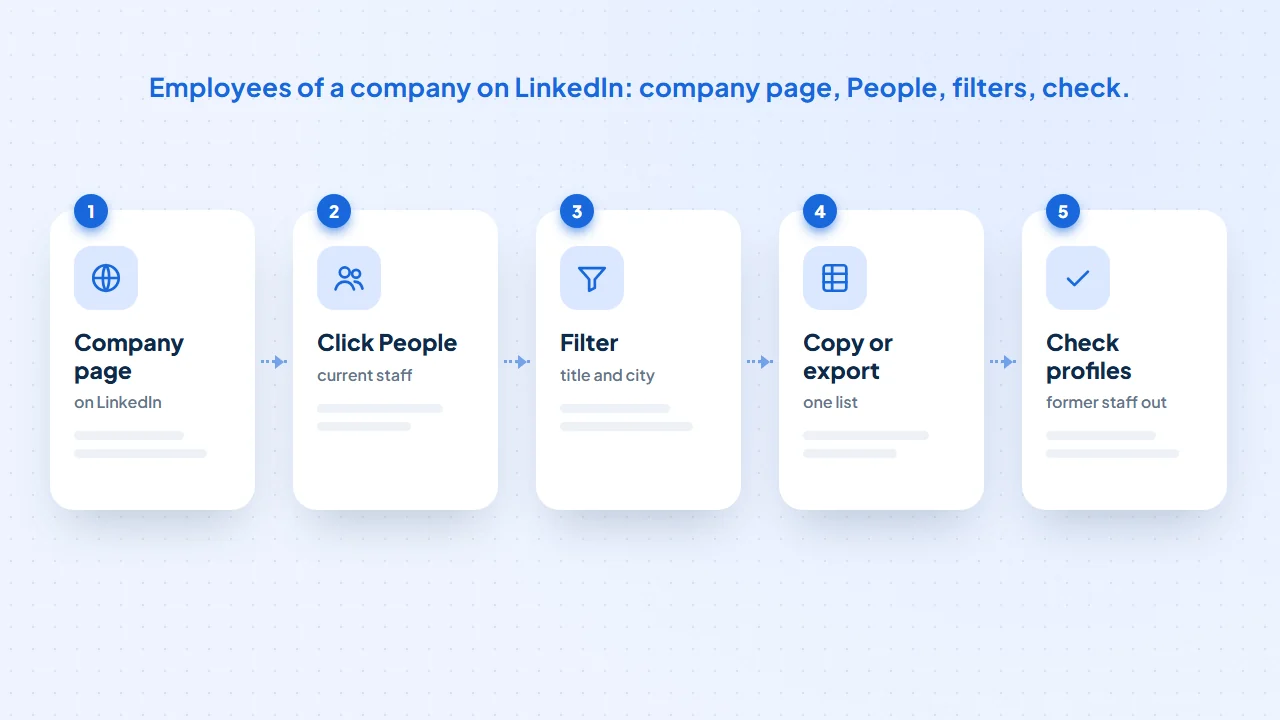
The People Tab
The quickest way to see a company’s staff is the People tab on its LinkedIn page. Open the company page, click People, and use the search box and filters to narrow by keyword, title or location.
This is the route most guides start with, including those by Cleverly and PhantomBuster, both read on 24 November 2026. Cleverly says the tab has no seniority filter, lists people in LinkedIn’s own order and cannot be saved or exported. Those are that vendor’s observations, and the tab may change, so check it yourself.
The Current Company Filter
The People search with a company filter gives more control than the tab. Search the company name, switch to People, open All filters and enter the company under Current company. Add a title, a location or a keyword.
For former employees, use Past company in the same filters, as PhantomBuster’s guide describes. For several titles at once, use LinkedIn’s Boolean search. LinkedIn’s Boolean search help page (read on 24 November 2026) says AND, OR and NOT must be in capitals, quotes mark an exact phrase and parentheses group terms. For example: ("Head of Finance" OR "Finance Director" OR CFO). Our guide to finding people by job title on LinkedIn shows how to write the variants.
Some filters are only on paid plans, according to third-party guides, and LinkedIn does not publish one fixed free limit, so check what your account shows.
X-Ray Search Without Logging In
A search engine can list public LinkedIn profiles that mention a company. In Google or Bing, search site:linkedin.com/in "Acme Logistics" "operations manager". Google’s guide to refining web searches confirms that quotes give exact phrases and site: limits results to one site.
The limits: a search engine shows only profiles it has indexed, a profile that mentions the company may be a past job, and similar company names bring in the wrong people. Our LinkedIn X-ray search guide covers the query patterns.
A CSV List With LeadTrapper
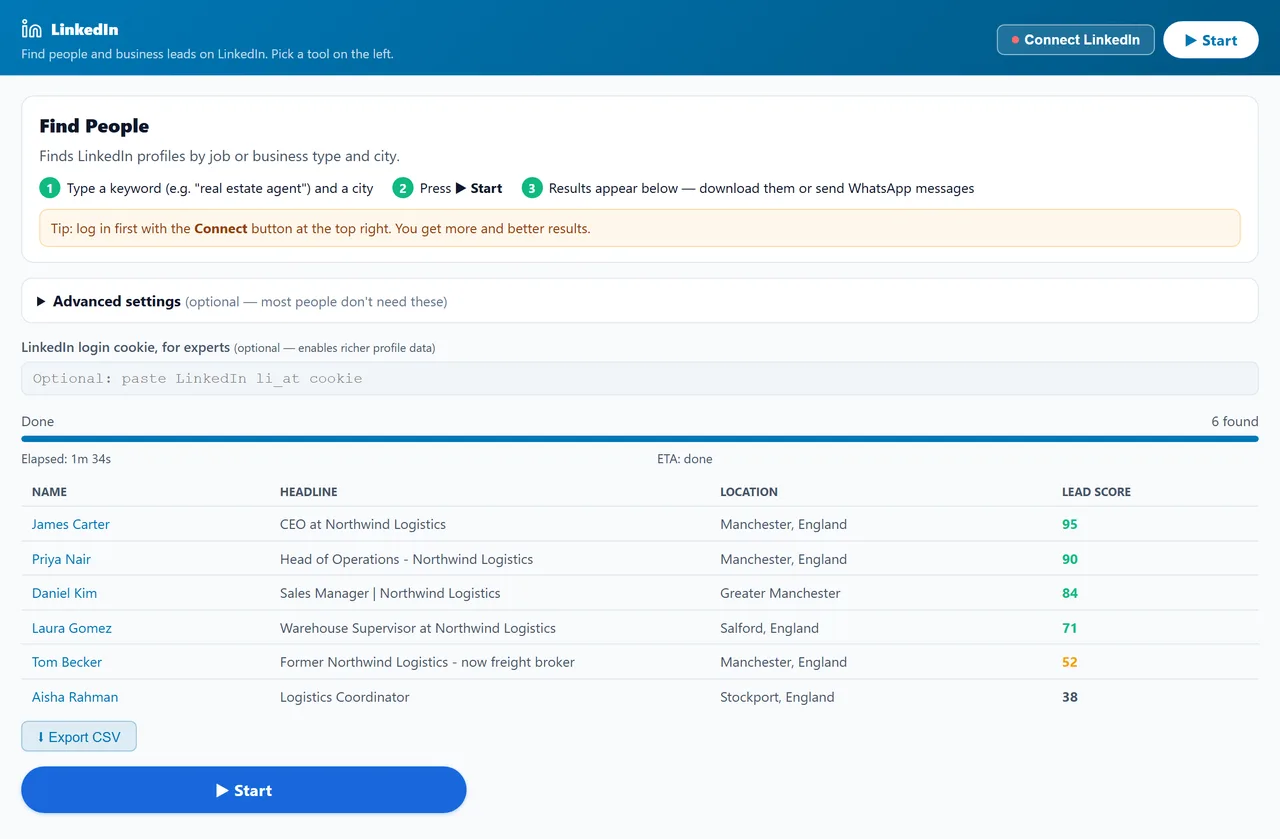
LeadTrapper’s LinkedIn scraper builds the same kind of search for you and writes the result to a CSV. In the app’s Find People tab, the Keyword field takes “job title, industry, or company”. Type the company name, add a Location and, if you want, a Title Filter, then set the maximum results (up to 1,000).
What happens: the app searches Bing, Yahoo and DuckDuckGo for site:linkedin.com/in plus your words, then reads each profile’s name, headline and location, and scores how well it matches. What to know before you rely on it:
- It matches words, not employment. The company name is searched as plain words in a loose query, not as a LinkedIn company filter. A profile that mentions the company in a past job, a school or another person’s name can appear. Keep rows whose headline shows the company.
- Rows can be partial. When LinkedIn hides a profile behind a sign-in page, the row is marked partial and shows a name taken from the link only.
- No emails or phone numbers. The LinkedIn tools do not collect them, and the app does not message people on LinkedIn. See what a row holds in our LinkedIn profile scraper guide.
- The rules. LinkedIn’s Prohibited software and extensions page (read on 24 November 2026) says LinkedIn does not permit third-party scraping software and may restrict accounts that use it. The search-engine mode does not use your LinkedIn account; connecting your account is optional and puts it at risk. Our guide to whether LinkedIn allows scraping explains more.
Try the LinkedIn scraper free for 14 days
Four Ways Compared
Use the People tab for a quick look, the filter for control, X-ray when you are logged out, and a CSV list when you need to work in a spreadsheet.
| Need | People tab | Current/Past company filter | X-ray in a search engine | LeadTrapper CSV |
|---|---|---|---|---|
| Quick look at a small company | Best | Fine | Fine | Overkill |
| Former employees | No | Yes, Past company | By words only | By words only |
| Several titles at once | Limited | Yes, Boolean | Yes, with OR | One keyword per run |
| Needs your LinkedIn login | Yes | Yes | No | No in search-engine mode |
| Export to a file | No | No | Copy by hand | Yes, CSV |
| Confirms the person works there | Self-reported | Self-reported | Words only | Words only, check the headline |
Worked Example
A freight software seller wants the operations managers at a mid-size logistics company, “Northline Freight”. The names and numbers are invented to show the steps.
- People tab: open Northline Freight’s page, click People, search “operations”. LinkedIn shows 22 people; the seller notes 7 managers.
- Filter: People search, Current company Northline Freight, keyword
"operations manager" OR "head of operations". 5 names, 3 new. - LeadTrapper CSV: Keyword “Northline Freight operations”, Location blank, maximum 100. Say 40 rows return; 12 headlines name Northline.
- Merge and check: the seller merges the three lists, removes duplicates and keeps 11 people, each seen with the company in the headline or profile.
- Reach them: LinkedIn gives no email, so the seller opens northlinefreight.example, reads the published emails and works out the address pattern. Our guide to finding a company’s email format shows how to do that and confirm it.
What You Cannot Get
You cannot get a complete or verified staff list from LinkedIn. Profiles are self-reported, people forget to update them, and some employees are not on LinkedIn at all.
- Missing staff. Factory, shop and field workers are often absent. Small firms may have few profiles.
- Wrong or old links. Someone who left last year may still list the company.
- No contact details. Not on profiles. Read the company’s website team and contact pages, or see how to find the decision makers in a company.
- No export from the free search. Paid Sales Navigator and third-party tools offer it; our Sales Navigator alternatives guide compares them.
- Rules on messages. Contacting the people you find falls under CAN-SPAM, PECR and GDPR; see whether email scraping is legal. This is not legal advice.
Where LeadTrapper Finds Leads
LeadTrapper collects leads from each of these sources in one Windows app, then checks the numbers and sends the WhatsApp messages from the same place.
- Google Maps Scraper: Business leads from any city.
- Facebook Scraper: Advertisers, pages and group members.
- Instagram Scraper: Leads from profiles and hashtags.
- TikTok Scraper: Creators, hashtags and commenters.
- LinkedIn Scraper: Profiles by role and city.
- Email Finder: Emails from business websites.
Frequently Asked Questions
Open the company's LinkedIn page and click People, or search People and set the Current company filter. You see only members who list that company on their profile, so the list is partial. Narrow it with title, location or keyword filters.
Search the company, switch to People, open All filters and use the Past company filter instead of Current company. It lists members who say they worked there earlier. People often keep an old employer on their profile for a while after leaving.
Partly. A search engine query such as site:linkedin.com/in with the company name in quotes returns public profile links. Results depend on what the engine has indexed, and LinkedIn may hide full profiles behind a sign-in page.
Not from the normal search or the People tab. Sales Navigator and third-party tools offer exports. LeadTrapper's LinkedIn scraper can write the profiles it finds, with name, headline and location, to a CSV. LinkedIn's rules ban scraping tools, so the risk is yours.
Yes, in a loose way. Its Keyword field takes a job title, industry or company, and the app searches for profiles that mention those words. It does not read LinkedIn's company page or confirm employment, so check each headline.
LinkedIn does not show them. Take the company website from its page, read the emails the business publishes, and work out the company's email pattern from a published example. Confirm a guess before you send, and follow email marketing law.
About LeadTrapper
LeadTrapper is a Windows app for finding business leads and contacting them on WhatsApp. It collects business contacts from Google Maps, Instagram, Facebook, TikTok, LinkedIn and business websites, checks which numbers are on WhatsApp with its Number Filter, and sends personalised campaigns with automatic delays from one or more WhatsApp accounts. It also has a chatbot, a shared inbox for every account, and Store Orders for online shops. It installs from the Microsoft Store, and the full app is free for 14 days, then $50 a year. Free web tools, browser extensions and a Wix app are listed on the Free Tools page.
Employee Lists in a CSV
LeadTrapper's LinkedIn scraper, Email Finder and Google Maps scraper come with the app. $50/year, all features included.