In this article 7 sections
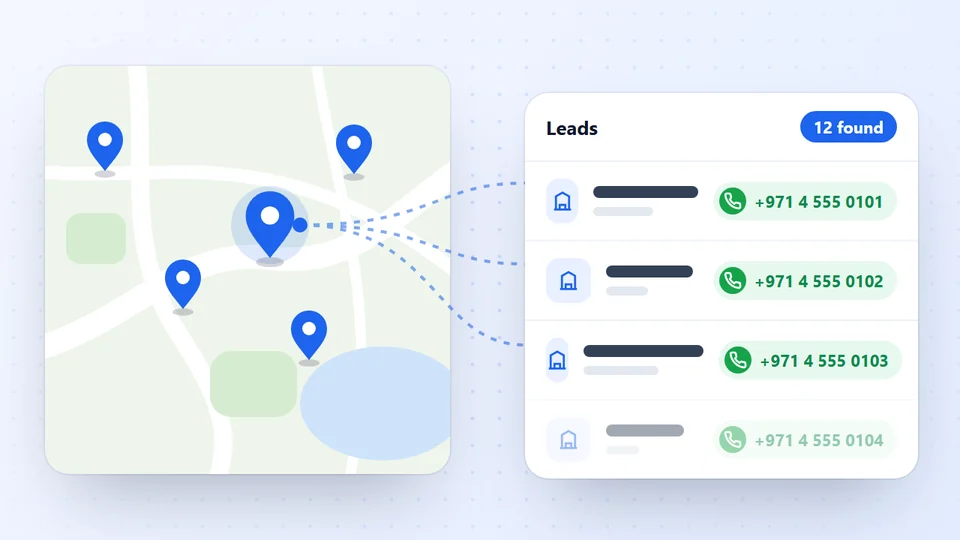
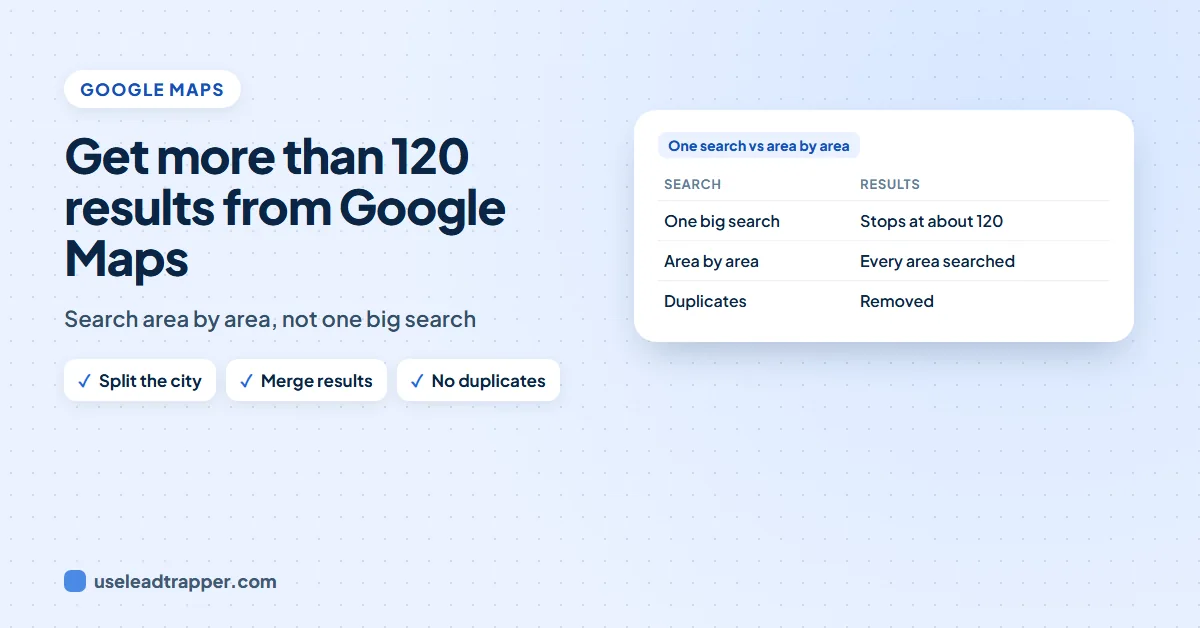
Google Maps shows about 120 places for one search, then the list ends. To scrape more than 120 results, split the city into smaller areas, search each one and merge the lists without duplicates. LeadTrapper's Google Maps scraper does this automatically, area by area.
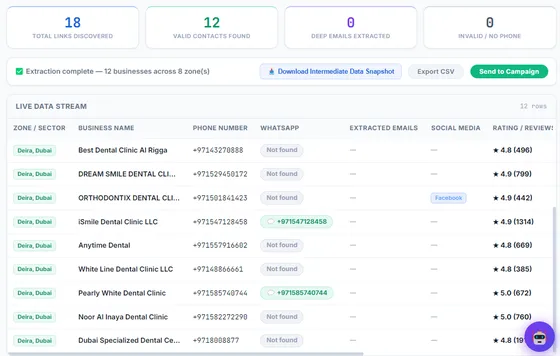

LeadTrapper searches Google Maps area by area, keeps one row per business and exports phones, emails and WhatsApp numbers. $50 a year after the free trial.
- Splits the city into areas automatically
- One row per business, no duplicates
- No record limit and no credits
- One Google Maps search lists about 120 places, then stops, however big the city is.
- The way past it is the same for every tool: split the city into smaller areas, search each one, then merge the lists and remove duplicates.
- By hand that means many searches and a lot of copying; different keywords for the same business type also bring different places.
- LeadTrapper splits ten large cities into 5 to 9 preset districts and any other place into north, south, east and west, searches each area until no new businesses appear, and keeps one row per business.
- For one neighbourhood only, paste a Google Maps link instead of a city name.
Search “dentist London” on Google Maps and scroll the list. After about 120 places it stops, even though London has far more dentists than that. If you are building a lead list, the businesses after that point are the ones your competitors never see. This guide shows why the list stops and how to scrape more than 120 results from Google Maps.
Why Google Maps Stops at About 120
Google Maps shows about 120 places for one search, then the results list ends. It is a limit of the list, not of the map: zoom out over a whole country and you still get about 120. Google’s own Places API is stricter still, at most 60 places per text search.
So the number of businesses you can collect depends on how many searches you run, not on how far you scroll. Every method below, by hand or with a tool, comes down to the same idea: split the area into smaller searches, then merge the lists without duplicates.
Get More Results by Hand
Without any tool you can do this in the Google Maps website:
- Search a smaller area. Instead of “dentist London”, search “dentist Westminster”, “dentist Hackney”, “dentist Islington” and so on.
- Or zoom in and use “Search this area”. Move the map to one district, zoom in, and click the button so the search covers only what you see.
- Copy each list. Every search gives up to about 120 places, so ten districts can give over a thousand.
- Merge and remove duplicates. Neighbouring searches overlap, so the same business appears more than once. Remove repeats by phone number or Maps link.
It works, but each business has to be opened to copy its phone number and website, so a city takes hours.
Use More Than One Keyword
Different words bring different places. “Dentist”, “dental clinic” and “orthodontist” overlap, but each also finds businesses the others miss, because Google matches the words to how each business describes itself. Run two or three keywords for the same kind of business, then merge the lists. This works by hand and in any scraper.
Search Area by Area With LeadTrapper
The LeadTrapper Google Maps scraper does the splitting for you. Type a business type and a city, and it searches the city area by area:
- Ten large cities have preset districts: London is split into 7 (from the City of London to Islington), Dubai into 8, Cairo into 9, and Riyadh, Jeddah, New York and Paris into 6 each. Any other place is searched as north, south, east and west.
- Each area is searched until no new businesses appear, so each one can return its own full list.
- One row per business. A business found in two areas is kept once.
- You see it work. The screen shows which area it is scanning and counts the businesses found, those with a phone number and the emails found.
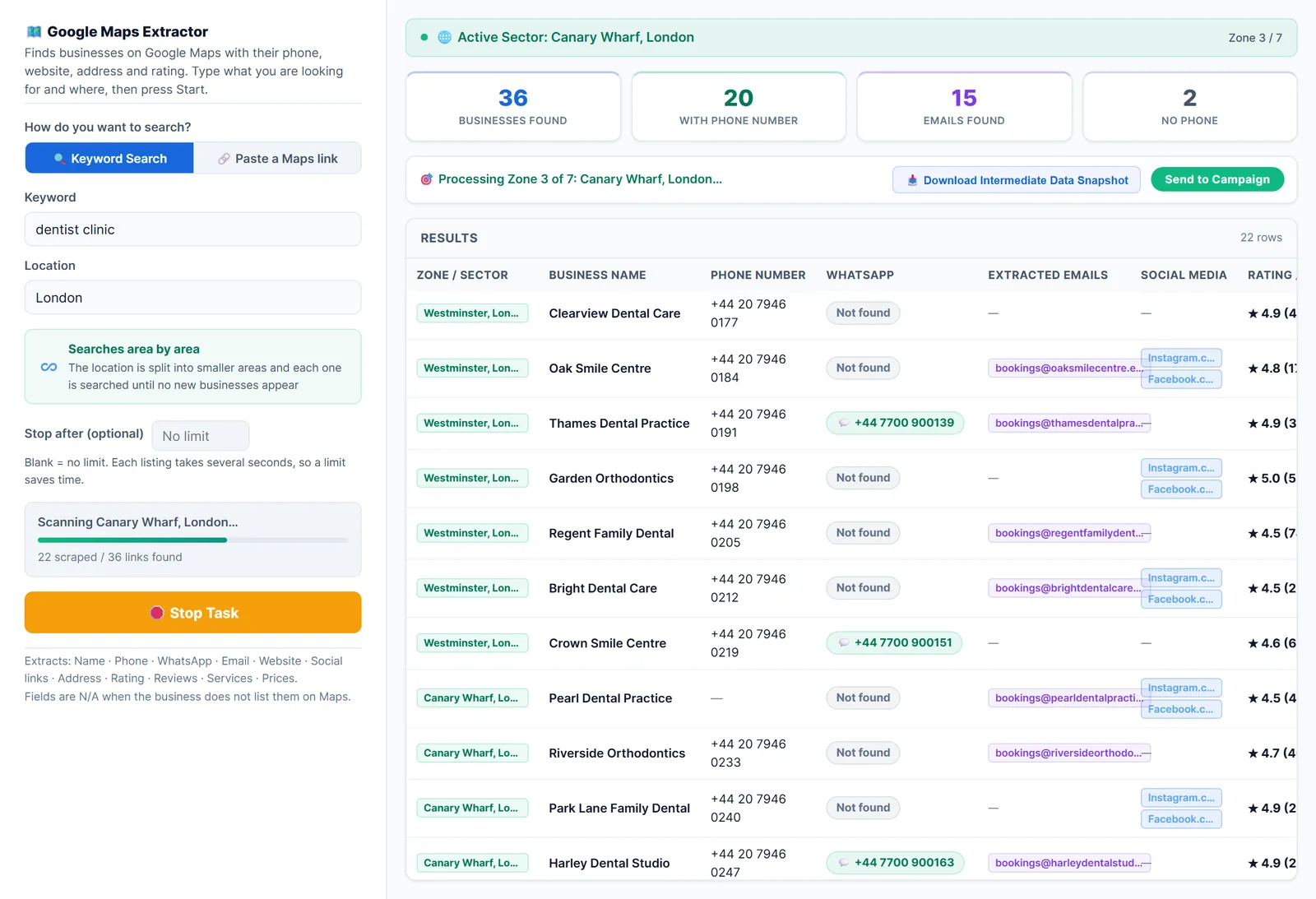
For every business it collects the name, phone, address, rating, review count, website and Maps link, plus WhatsApp numbers, emails, social links, services and prices when the business lists them on Google Maps or its homepage. There is no record limit and no credits. To end a run early, type a number in “Stop after”, or download a snapshot of what has been found so far while the search keeps going.
How long it takes depends on the city. In our real scans LeadTrapper collected about seven or eight businesses a minute, so a few hundred businesses take under an hour.
The video below shows the whole search, from keyword and city to the finished list, including a second example in Dubai.
What the video shows:
- 0:00 Google Maps Scraper: Unlimited Local Business Leads
- 0:16 What This Google Maps Scraper Extracts
- 0:38 Unlimited Google Maps Scraper, No Credits
- 0:49 Scrape Google Maps by Keyword and City
- 1:12 Get Past the Google Maps 120 Results Limit
- 1:30 Extract Google Maps Leads Live
- 1:51 Google Maps Leads with Phone, Email & WhatsApp
- 2:12 Scrape Google Maps Data for Any City
- 2:26 Scrape One Area with a Google Maps Link
- 2:36 Export Google Maps Data to Excel
- 2:57 Find Emails from Business Websites
- 3:09 Send WhatsApp Messages to Google Maps Leads
- 3:33 WhatsApp Lead Generation: Your First Message
- 4:00 LeadTrapper Free Trial
Video transcript
Need every dentist in London, with their phone number, email and WhatsApp? Copying them from Google Maps one by one takes days. In this video, you'll scrape unlimited local business leads from Google Maps with LeadTrapper, then message them on WhatsApp, from the same app. For every business, it collects the name, phone number, WhatsApp, email, website, social media, address, rating, reviews, services and prices, whenever the business lists them on Google Maps or its homepage. Your Excel file gets thirteen columns, including the area it was found in, and its Google Maps link. Many Google Maps scrapers charge for every thousand records, or limit you each month. LeadTrapper has no record limit. One yearly price, running on your own PC. Open LeadTrapper, click Google Maps, then Find Businesses. Option one, keyword search. Type what you are looking for, like dentist clinic, and where, like London. Tip: try two or three keywords for the same kind of business. Dentist, dental clinic and orthodontist each bring different businesses. Run them one after another, and your list gets much bigger. Here's the problem with Google Maps. One search shows only about a hundred and twenty places, and then the list stops. So LeadTrapper splits the city into smaller areas. London becomes seven areas, from the City of London to Islington, and each area is searched until no new businesses appear. Want a quick list? Type fifty in Stop after. Leave it blank, and there is no limit. Press Start Extracting Leads, and watch it work. You see which area it is scanning, how many businesses it found, how many have a phone number, and how many emails. Need the leads right now? Download a snapshot at any time, without stopping the search. Done. Every business from all seven areas, in one table. A business found in two areas shows up only once. Scroll right for social media, rating and reviews, address, services and prices. If a business doesn't list an email or WhatsApp on Google Maps or its homepage, that field stays empty. That's normal. It works the same in any city. Type real estate agency and Dubai, and LeadTrapper splits Dubai into eight areas, from Deira to Mirdif. For a city it doesn't have areas for, it searches north, south, east and west. Option two: paste a Google Maps link. Search Maps in your browser, zoom into one neighbourhood, copy the link, and paste it here. LeadTrapper scans just that area. When the search is done, click Export CSV, and open it in Excel. Every business is one row, with its phone, email, website, address and rating, ready for your sales team or your CRM. In Excel, sort by rating to contact the best-reviewed businesses first, and filter the email column to keep only businesses that have an email. Some businesses have a website, but no email on Maps. Open Contacts from Websites, paste their websites, and it finds the emails, phone and WhatsApp numbers, and social profiles on their pages. Now the part most scrapers can't do. Click Send to Campaign. Every lead with a phone number lands in Send Bulk Messages, in one click. Before sending, every number is checked on WhatsApp. Numbers without WhatsApp are skipped, and nothing is sent to them. Write a personal message with their name, choose safe delays, and press Start. Our WhatsApp Bulk Sender video shows every step. What should you send? Keep the first message short and personal: their name, one line on why you are writing, and one easy question. For example: Hi, I found Crown Dentistry on Google Maps. We help clinics get more bookings on WhatsApp. Can I send you a two-minute example? A short question is easier to answer than a long sales message. One honest tip: send businesses an offer that is relevant to them, and add anyone who asks you to stop to the do not send list. LeadTrapper also finds leads on Instagram, Facebook, TikTok, LinkedIn and YouTube, warms up your WhatsApp numbers, and answers with a chatbot. One Windows app, from lead to message. Search useleadtrapper.com. Fourteen days free, no credit card. And subscribe for the next video.
Scan One Neighbourhood With a Maps Link
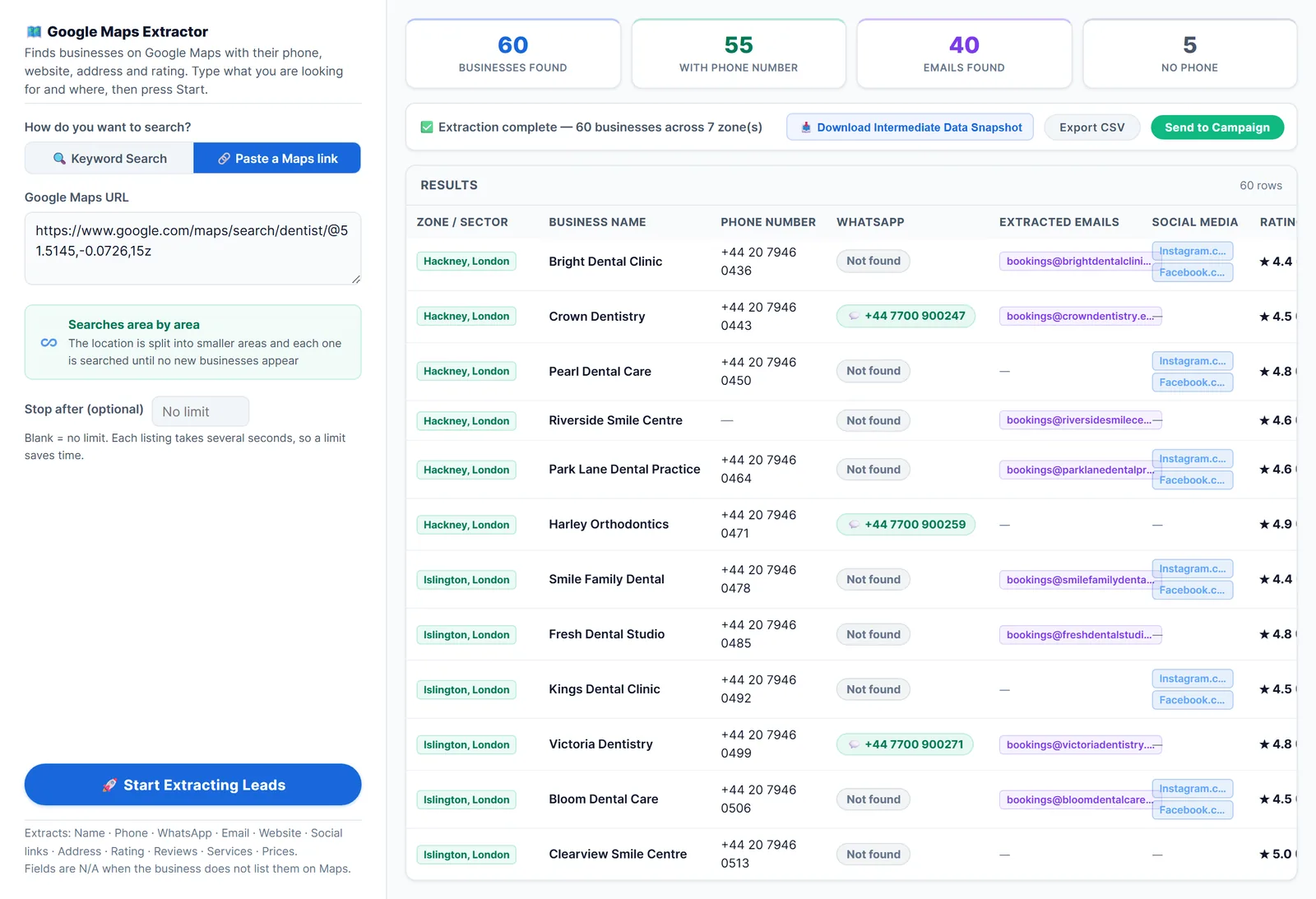
Sometimes you want the opposite: every business in one small area. Typing a neighbourhood in the city box doesn’t narrow a keyword search, so use a link instead:
- Search the neighbourhood on Google Maps in your browser, for example “dentist Canary Wharf”, and zoom to the area you want.
- Copy the address of the results page.
- In LeadTrapper choose Paste a Maps link, paste it and start.
The Three Ways Compared
| Compared | By hand | More keywords | LeadTrapper, area by area |
|---|---|---|---|
| Gets past 120 | Yes, one area at a time | Partly, adds places the first word missed | Yes, every area of the city |
| Phone, website, rating | Copied one business at a time | Same as the method you use | Collected for every business |
| Emails and WhatsApp numbers | Open each website yourself | Same as the method you use | When listed on Maps or the homepage |
| Duplicates | Remove them yourself | Remove them yourself | Kept once automatically |
| Time for a city | Hours | Adds one search per keyword | About seven or eight businesses a minute |
| Cost | Free | Free | $50 a year after a 14-day free trial |
Most people combine them: run LeadTrapper area by area with two or three keywords, then check the merged list before contacting anyone.
Tips for a Big Search
- Start with a limit. Try “Stop after” 50 to check the results are what you want, then run the full search.
- Run two or three keywords and combine the exports. The WhatsApp Number Filter removes duplicate numbers and keeps only the ones on WhatsApp.
- Expect empty email columns. Most businesses don’t list an email on Google Maps. The Email Finder (Contacts from Websites in the app) reads their contact and team pages.
- Google sometimes says no. After heavy searching Google Maps can slow down or refuse a search. LeadTrapper tries each area three times and tells you plainly; waiting a few minutes usually helps.
- Use the data responsibly. Read whether scraping Google Maps is legal before you start, and only contact businesses with an offer that fits them.
Once the list is ready, the WhatsApp Number Filter keeps the numbers that are on WhatsApp and the WhatsApp bulk sender messages them, in the same app. For the whole process from search to message, see how to scrape Google Maps for B2B leads, or compare tools in the best Google Maps scrapers.
Where LeadTrapper Finds Leads
LeadTrapper collects leads from each of these sources in one Windows app, then checks the numbers and sends the WhatsApp messages from the same place.
- Google Maps Scraper: Business leads from any city.
- Facebook Scraper: Advertisers, pages and group members.
- Instagram Scraper: Leads from profiles and hashtags.
- TikTok Scraper: Creators, hashtags and commenters.
- LinkedIn Scraper: Profiles by role and city.
- Email Finder: Emails from business websites.
Frequently Asked Questions
The list on Google Maps shows about 120 places for one search and then ends. It is a limit of the results list, not of how many businesses exist, so a big city always has more than one search shows.
Search smaller areas one at a time, for example each neighbourhood or nearby town, and zoom in so 'Search this area' covers less ground. Each search shows up to about 120 places, so ten areas can show far more in total. Then merge the lists and remove duplicates.
No. The app has no record limit and no credits. You can set an optional 'Stop after' number to end a run early. Google Maps itself sometimes slows or refuses heavy searching, so a very large run can take a long time or stop early.
Not in LeadTrapper. A business found in two areas is kept once. If you merge lists from several searches by hand, remove duplicates by phone number or Maps link.
Yes. Search the neighbourhood on Google Maps in your browser, copy the address of the results page, choose 'Paste a Maps link' in LeadTrapper and paste it. Typing a neighbourhood in the city box does not narrow a keyword search.
About LeadTrapper
LeadTrapper is a Windows app for finding business leads and contacting them on WhatsApp. It collects business contacts from Google Maps, Instagram, Facebook, TikTok, LinkedIn and business websites, checks which numbers are on WhatsApp with its Number Filter, and sends personalised campaigns with automatic delays from one or more WhatsApp accounts. It also has a chatbot, a shared inbox for every account, and Store Orders for online shops. It installs from the Microsoft Store, and the full app is free for 14 days, then $50 a year. Free web tools, browser extensions and a Wix app are listed on the Free Tools page.
Scrape Every Business in the City, Not the First 120
LeadTrapper's Google Maps scraper searches area by area, keeps one row per business and sends the list to WhatsApp. $50/year after a 14-day free trial.