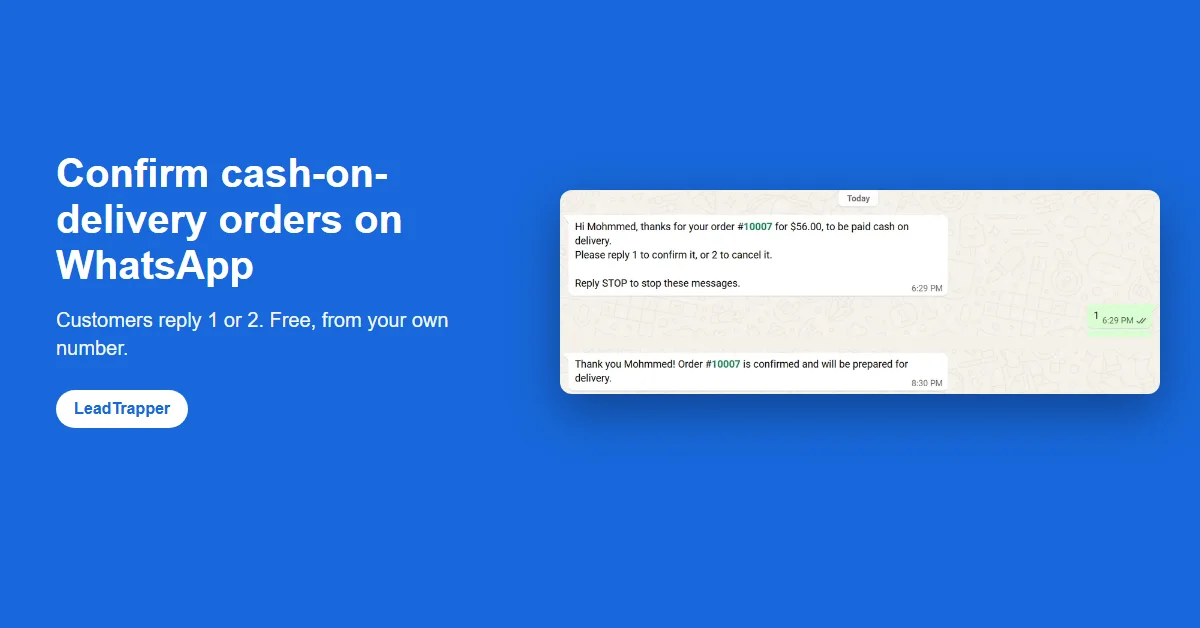
- A cash-on-delivery order costs you shipping even when the buyer never meant to pay. Asking on WhatsApp before you ship lets the real buyers say yes and the rest say no.
- With LeadTrapper Store Orders, every COD order gets one message from your own WhatsApp number: reply 1 to confirm, 2 to cancel. The reply is read automatically and thanked, and the answer appears next to the order in your store app.
- Replies in Arabic, English, French and Spanish are understood, as are Arabic numerals: 1, ١, yes, ok, نعم and oui all confirm; 2, ٢, no, cancel and لا all cancel.
- Orders whose phone number is not on WhatsApp are flagged, which is a common sign of a fake order. No answer after two days is reported as no reply.
- It does not use the WhatsApp Business API, so there is no per-message fee and no Meta approval. It does need the free LeadTrapper app for Windows running on a computer.
You can confirm cash-on-delivery orders on WhatsApp for free: after each COD order, the customer gets one message from your own WhatsApp number asking them to reply 1 to confirm or 2 to cancel, and you ship only the orders that say yes. LeadTrapper Store Orders sends that question, reads the answer, thanks the customer and puts the result next to the order in your store app. It does not use the WhatsApp Business API, so nothing is charged per message.
Why COD Orders Need a Confirmation
Cash on delivery is how a large share of online shoppers prefer to pay in the Gulf, Egypt, India, Pakistan, much of Latin America and many other markets. It removes the buyer’s risk and moves it to you. When a buyer orders on a whim, types a wrong number or simply is not home, you still pay for packing, the courier and the return trip.
A short question before you ship changes that. A buyer who meant it replies 1 in a few seconds. One who changed their mind replies 2, and you have lost nothing. One who never answers, or whose number does not exist, is a warning you get before the parcel leaves, not after. A shop in Riyadh, Cairo or Mumbai sending twenty COD parcels a day feels the difference in a week.
What the Customer Sees
This is a real test order on a Wix store, sent by LeadTrapper from the shop’s own WhatsApp number. The customer replied 1:
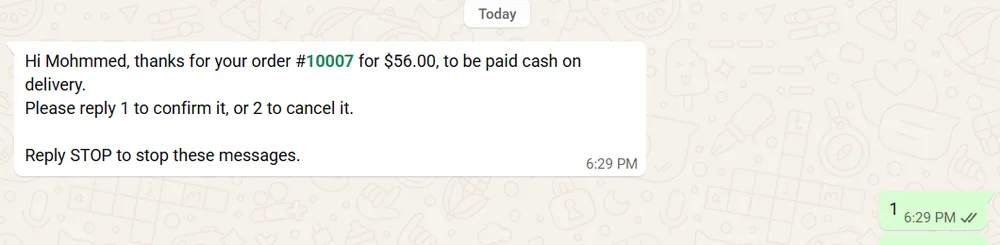
And this is the thank-you LeadTrapper sent back on its own:

A reply of 2 gets a short note that the order has been cancelled as asked. The customer does not have to type anything exact. LeadTrapper understands 1, ١, yes, ok, confirm, نعم, موافق, sí and oui as a yes, and 2, ٢, no, cancel, لا, إلغاء and non as a no. Every message ends with a line saying how to stop these messages, in English or in Arabic to match the message, and a customer who replies STOP is never messaged by the store again.
Writing the question in your own words
The wording is yours to change, and placeholders fill in the details: {{name}}, {{order}} and {{total}}. If a value is missing, for example an order without a total, that part is left out cleanly instead of sending “for {{total}}”. You can also add variations, such as {Hi|Hello}, so each customer gets slightly different wording. The guide to WhatsApp order confirmation message templates has ready-to-copy versions in English and Arabic.
What You See
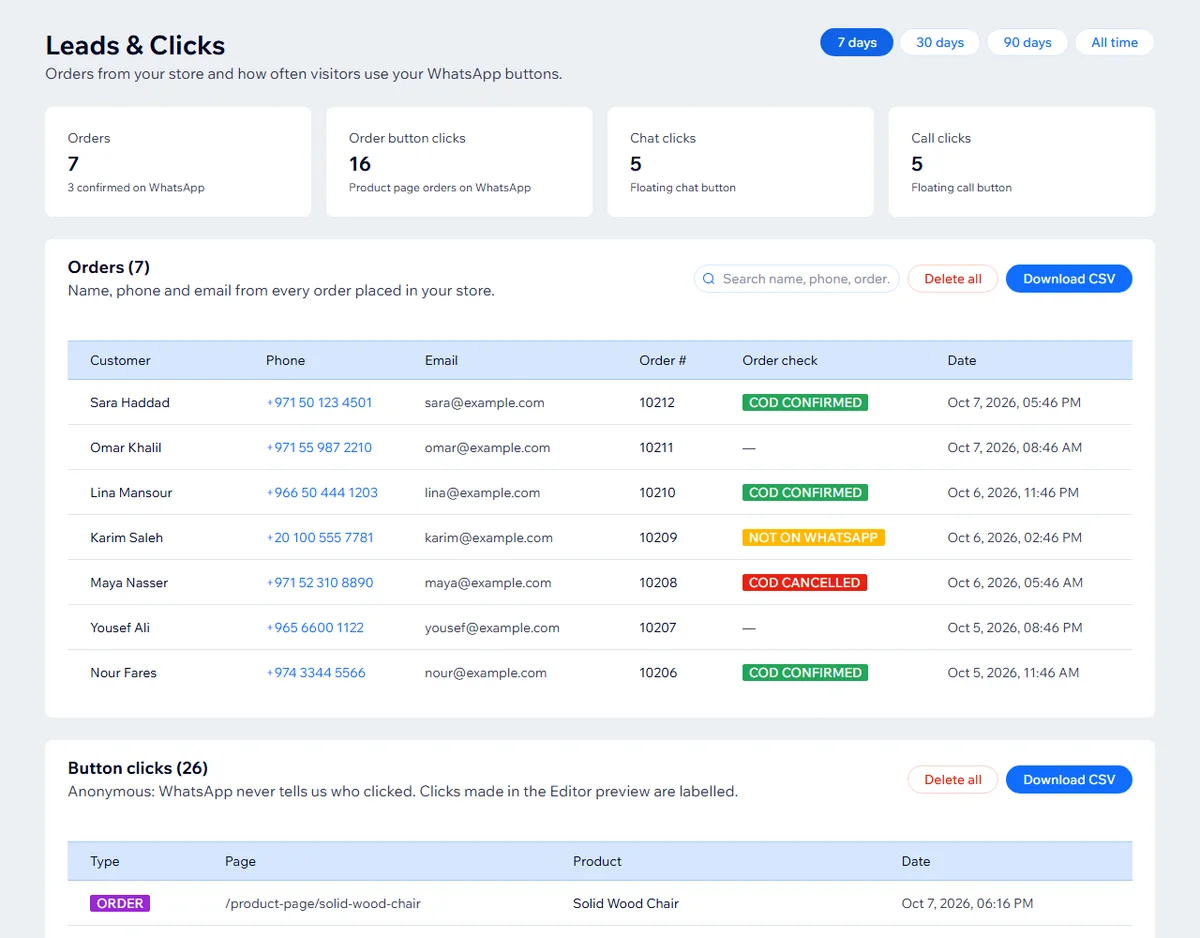
The answer goes back to your store. In the Wix app, the Leads & Clicks page shows each order with a coloured label: COD confirmed, COD cancelled, COD no reply, or Not on WhatsApp. You can search it, filter by 7, 30 or 90 days and download it as a CSV for your courier.
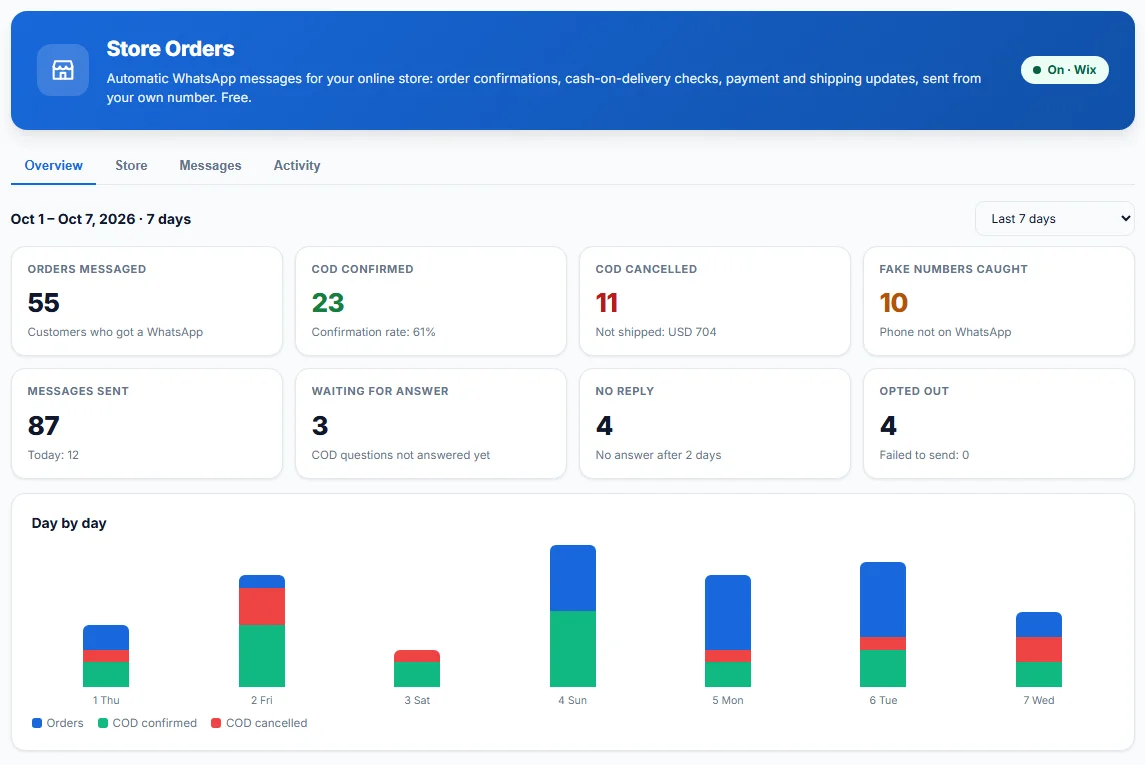
LeadTrapper keeps its own record too. The Store Orders overview counts orders messaged, COD confirmed and cancelled, fake numbers caught, orders still waiting, no replies and opt-outs, with a day-by-day chart and a date picker. The cancelled card also shows the value of the orders you did not ship. The screenshot below shows example figures:
Catching Fake Numbers
Before any message goes out, LeadTrapper checks whether the order’s phone number is registered on WhatsApp. When a customer leaves out the country code, it tries the store’s country and uses the corrected number only when exactly one version is on WhatsApp, so it never guesses between two real people. When no version is on WhatsApp, nothing is sent and the order is marked Not on WhatsApp in your store app.
That label does not prove an order is fake. Some genuine buyers in London, Toronto or Berlin simply do not use WhatsApp. It is a strong prompt to call before you ship, and in markets where nearly everyone uses WhatsApp it catches most of the made-up numbers. The same checking idea powers LeadTrapper’s WhatsApp number filter for contact lists.
Set It Up in Four Steps
The confirmation needs two free pieces: the store app, which tells LeadTrapper about new orders, and the LeadTrapper app for Windows, which sends the messages from your WhatsApp.
1. Add the free app to your Wix store
Install the LeadTrapper WhatsApp Suite from the Wix App Market. It also adds an order button and a chat or call button to your shop; the guide to the WhatsApp order button for Wix covers those.
2. Install LeadTrapper on a Windows computer
Download LeadTrapper and connect your WhatsApp by scanning the QR code, the same way you connect WhatsApp Web. Store Orders is free; it needs no licence and no trial.
3. Connect the two
In the Wix app’s Settings, under Connect LeadTrapper, generate a connection code and paste it into LeadTrapper’s Store Orders screen. Then tick “Cash-on-delivery confirmation” in the Wix app.
4. Choose your messages
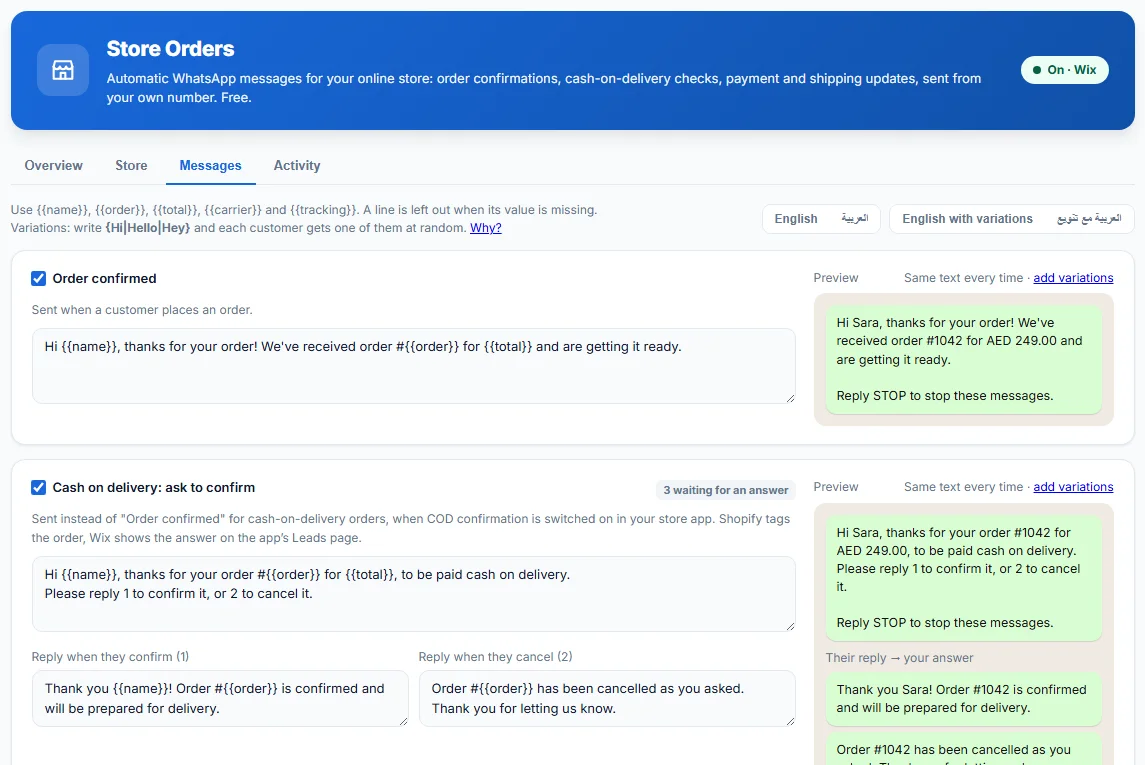
Under Messages in Store Orders, keep the ready-made English or Arabic texts or write your own. The preview on the right shows exactly what a customer will receive.
Without the Business API
Most COD confirmation services run on the WhatsApp Business API. That means a provider subscription, Meta’s per-message charges, approved templates and a business verification before the first message. The WhatsApp Business API cost breakdown shows how those fees add up.
LeadTrapper takes a different route. It sends from the WhatsApp account you already use, through WhatsApp on your computer, so there are no per-message fees and no templates to get approved. The trade-off is that your own number carries the sending, which is why Store Orders sends at most 40 messages an hour and 300 a day per number by default, lets you share the load between several numbers, and puts COD questions first in the queue on busy days. WhatsApp publishes no official safe volume, so these are limits you can lower, not a guarantee. The guide to order notifications without the WhatsApp API compares the two routes in more detail.
Limits Worth Knowing
LeadTrapper runs on Windows, and the computer has to be on, with LeadTrapper open, for messages to go out. Orders that arrive while it is closed wait in a secure mailbox for up to seven days and are sent when it opens, though a confirmation more than two days old is skipped because it would only confuse the customer. Messages go from your own number, so they look like any other chat with your shop, which customers tend to trust, and they follow the same rules: message only your own customers about their own orders.
If you also run a WhatsApp marketing list, keep it separate from order messages. The WhatsApp bulk sender in LeadTrapper is a different feature with its own safeguards, and the LeadTrapper licence covers it; Store Orders stays free either way.
Frequently Asked Questions
Send each COD customer a message after the order asking them to reply 1 to confirm or 2 to cancel, then ship only the confirmed ones. LeadTrapper Store Orders does this automatically from your own WhatsApp number: it sends the question, reads the reply, thanks the customer and shows the answer next to the order in your store app.
With LeadTrapper it is. The Wix app and the Store Orders feature in the LeadTrapper Windows app are both free, and messages go out from your own WhatsApp account, not the paid WhatsApp Business API, so there is no per-message charge.
The order shows as waiting for an answer. After two days without a reply, LeadTrapper reports it as no reply, so you can call the customer or decide whether to ship.
Yes. Arabic words and Arabic numerals are understood: ١ or نعم confirms, ٢ or لا cancels. You can also write the question itself in Arabic; ready-made Arabic messages are included.
Before sending, LeadTrapper checks whether the phone number on the order is on WhatsApp. If it is not, nothing is sent and the order is marked as not on WhatsApp, which is a common sign of a fake or mistyped order.
Confirm Your COD Orders on WhatsApp, Free
Add the free LeadTrapper WhatsApp Suite to your Wix store, then turn on cash-on-delivery confirmation in the free LeadTrapper app for Windows.
Related Articles
WhatsApp Order Button for Wix: Free Order & Chat App
Add a free WhatsApp order button to Wix product pages and a floating chat or call button to your sit…
Read article
Best WhatsApp Apps for Wix Stores, Compared (2026)
WhatsApp apps for Wix compared: free plans, prices, order buttons, order notifications and COD confi…
Read article