In this article 8 sections
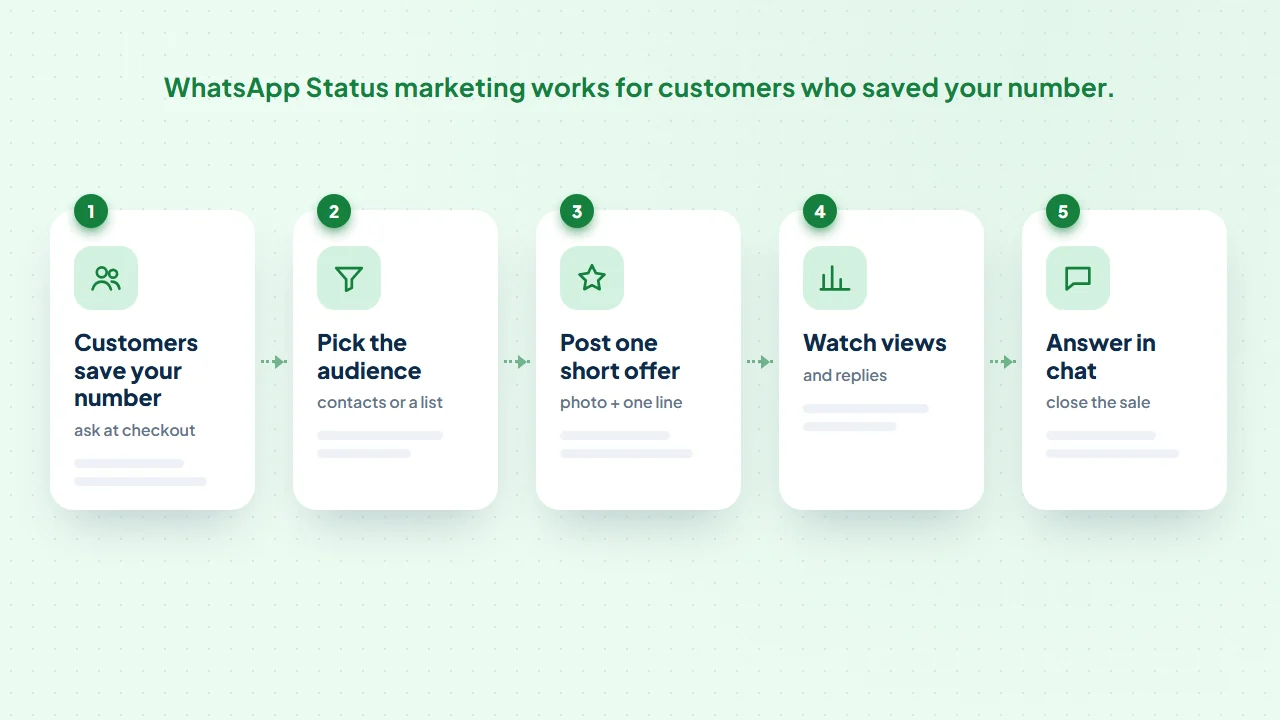
WhatsApp Status marketing means posting photos, videos, voice notes or text that vanish after 24 hours and reach only people who saved your number. Post offers, new stock and behind-the-scenes updates a few times a week, and use privacy settings to choose the audience.
- WhatsApp says Status updates disappear from view after 24 hours, so every post is a short-lived notice, not a permanent page.
- You can't share Status with people who don't have your number: Status marketing only reaches customers who saved you.
- The default audience is all your contacts. 'My contacts except' and 'Only share with' let you target one group before you post.
- Viewers can react and reply, which opens a chat: the best Status posts end with one clear thing to reply with.
- Status is for people who already know you. To grow the audience, put a wa.me link or QR code on your own materials so people save your number.
WhatsApp Status is the one place on WhatsApp where a business can speak to many customers at once without sending a single message. It costs nothing and customers see it next to their friends’ posts. But it has rules that decide whether it helps you at all: it lasts a day, it reaches only people who saved your number, and viewers must go and look. This guide starts with what WhatsApp itself says, then covers audience settings, the Business app, post ideas and a weekly plan.
What WhatsApp Says About Status
Status is a feature for sharing photos, videos, voice notes and text that disappear after 24 hours. WhatsApp’s Status page says shared updates “disappear from view after 24 hours” and that you choose who sees each one. People can like or reply to a status, which starts a conversation.
What the official pages say, checked on 23 Nov 2026:
- 24 hours. A status is only available for 24 hours (WhatsApp Help Center: can’t see someone’s statuses).
- Your contacts only. WhatsApp’s privacy settings page says you “can’t set status privacy to Everyone or share your status with people who don’t have your number.”
- Default audience. All your contacts, unless you change it (how to manage status privacy).
- Features added on 7 Feb 2023. Voice status, status reactions, a private audience selector, profile rings and link previews (WhatsApp blog).
- Ads exist. WhatsApp’s Status and Channels terms say businesses can pay to show people ads on Status and Channels. That is a separate paid product; this guide covers free Status posts.
File size, video length and text length limits change between app versions. Guides disagree on them (we found both 30 and 60 seconds for voice notes in different articles), and WhatsApp’s pages don’t list them, so check what your app accepts before planning a post around a limit.
Who Sees Your Status, and How to Choose
Only people who saved your number and are in your Status audience can see your Status. The options in WhatsApp’s help page are:
| Option | Who sees the next status | Use it for |
|---|---|---|
| My contacts | Every contact | General news, opening hours, new stock |
| My contacts except… | Everyone but the contacts you exclude | Hide a post from suppliers, staff or old leads |
| Only share with… | Only the contacts you tick | VIP offers, one customer group, a launch for regulars |
| Mention a person or group | The people you mention, even outside your audience | Telling a group about an event, naming a customer with consent |
Three details from WhatsApp’s help page matter for a business:
- Changing settings doesn’t touch old posts. A status you already shared keeps its audience.
- A status posted to a group is visible to all group members, whatever your status privacy settings say.
- Mentioned people can reshare. Your name, profile information and phone number don’t show in the reshared status, but they can edit and reshare the content to their own audience.
Customers also need your number saved correctly. WhatsApp’s help page lists wrong number formats, multiple accounts and missing address-book access as reasons a status doesn’t show.
Status in the Business App
The WhatsApp Business app uses the same Status as the normal app: the same 24 hours, the same audience settings and the same “saved number” rule. We found no separate Business-only Status rules in WhatsApp’s help pages, and the Status and Channels terms set no extra commercial rules for Status beyond the general acceptable-use list (illegal activity, harm, fraud). To post, open the Updates tab (called Status in older versions), tap the plus button, and choose photo, video, voice note or text. Menu names change between versions.
What the Business app adds is around Status, not inside it: your business profile (name, hours, address), a catalog, labels and quick replies. A viewer who replies to your Status lands in a chat you can label and answer from the same app. Post from the number customers have saved. If they saved a different number of yours, they won’t see this one’s Status.
What to Post
Good Status posts are short, finish in seconds and give a reason to reply. These ideas come from guides written by tool vendors and marketing blogs (for example Chatarmin and Dochipo). They are those authors’ advice, not WhatsApp’s rules:
- A time-limited offer. “Today only: 10% off cakes until 6 pm. Reply CAKE.” A 24-hour post suits a 24-hour offer.
- New stock. One clear photo, the price and a reply word.
- Behind the scenes. The team, the workshop, the kitchen. Not polished, just real.
- A quick tip or FAQ. One idea per slide.
- Customer proof. A review screenshot or photo, only with the customer’s consent.
- Opening hours and holiday closures. Dull, and the most useful thing you can post.
- A reply prompt. “Reply 1 for the menu, 2 for delivery.” Replies turn a view into a chat.
The same guides suggest short text, one idea per slide and a strong first line, because viewers move through Status quickly. Their suggested posting rates range from 2 to 3 a week to 2 to 5 a day, which shows nobody has a proven number: test with your own customers.
A Weekly Status Plan: Worked Example
A small plan beats posting when you remember. This example is for a bakery with 240 saved contacts (made-up numbers, not a benchmark):
| Day | Post | Audience |
|---|---|---|
| Monday | New week: opening hours and the cake of the week, with a reply word | My contacts |
| Wednesday | Behind the scenes: the oven at 5 am, no text | My contacts |
| Thursday | Weekend pre-order reminder, “Reply ORDER” | My contacts except staff and suppliers |
| Friday | Last orders for Saturday, 12 left | Only share with customers who ordered before |
| Sunday | Thank-you photo, closing times for next week | My contacts |
Five posts a week, each under a few minutes to make. After two weeks, open each status’s viewer list and write down views and replies in a sheet. If Thursday’s “Reply ORDER” gets 9 replies from 60 views and Wednesday’s photo gets 2, you know what to post more of. Views show only while read receipts are on, so keep them on for the business number.
The same plan works for a salon (free slots tomorrow), a clinic (flu jab days) or a shop (new arrivals). Match it to what your customers ask you most. The guides in the WhatsApp for clinics, salons, gyms and schools topic show what each kind of business sends in chat.
Status Lookup: Problem, Cause, Fix
When customers say they never see your Status, the cause is almost always one on WhatsApp’s own troubleshooting list.
| What you see | Likely cause | Fix |
|---|---|---|
| Customer says “I never see your Status” | They haven’t saved your number | Ask them to save it; add a “save our number” line to receipts and chats |
| Status doesn’t show for some contacts | Number saved in the wrong format, or a second number of yours | Ask them to save the full international format; post from the number they saved |
| Views list is empty | Read receipts off for you or the viewer | Turn on read receipts in Privacy |
| A contact you deleted still appears in views | WhatsApp keeps them on the list until the status expires | Wait for the 24 hours to pass |
| An unknown number viewed your Status | A contact may have changed their number (WhatsApp’s explanation) | Check recent customers who changed phones |
| Post has vanished | It is 24 hours old | Repost it, or move the offer to a chat message or catalog |
| Wrong people saw the post | Audience was left on My contacts | Set the audience before posting |
| One customer can’t see it after blocking you | Blocking hides status updates | Nothing to fix; respect the block |
If a customer still can’t see it, a weak connection, an old app version and missing address-book permission are the next checks on WhatsApp’s page.
Reach People Who Don't Know You Yet
Status can’t introduce you to strangers, because only people with your number can see it. To grow the audience, put your number where people already look and make saving it easy:
- Add a “Message us on WhatsApp” link or QR code to your website, bio, receipts and shop window. The free WhatsApp link generator builds a wa.me link with a pre-filled message, and our guide to creating a WhatsApp QR code covers the printed version.
- Ask people who message you to save the number so they see your offers.
- For a list of customers who opted in to hear from you, send a message instead of a Status. It lands in their chat and doesn’t depend on them opening the Status tab. LeadTrapper’s WhatsApp bulk sender sends to such a list from a Windows PC through your own number. It is an unofficial tool, and WhatsApp’s terms don’t allow unwanted bulk messages.
LeadTrapper does not post to Status. The app code has no Status posting feature, so Status stays a job you do by hand on the phone.
Message your customer list free for 14 days
Status reaches only people who saved your number. To reach a list directly, see our guides to the WhatsApp broadcast list limit and WhatsApp channels, groups and communities.
Keep Status Within the Rules
Status sits next to people’s private life, so spam gets noticed fast. A few habits keep it safe:
- Don’t post more than people want. One or two useful posts a day is plenty for most small businesses.
- Get consent for customer photos and chats. Blur names and numbers.
- Don’t promise what you can’t deliver. A “12 left” post should be true.
- Follow WhatsApp’s content rules. The Status and Channels terms ban illegal and harmful activity and fraud, and say WhatsApp may remove updates and suspend accounts that break them.
- Check your local marketing rules. Consent and promotion rules for businesses vary by country.
The numbers to watch are replies, not views. If views hold but nobody replies, your audience is probably tired of offers: swap in a tip or a behind-the-scenes post.
Frequently Asked Questions
WhatsApp's Status page says status updates disappear from view after 24 hours. If you want a post to stay longer, repost it the next day or keep the offer in your catalog or a chat message.
No. WhatsApp's help page says you can't share your status with people who don't have your number. The exception is mentions: someone you mention in a status can see it even if they aren't in your audience.
Yes. Open Status privacy and pick My contacts, My contacts except, or Only share with. WhatsApp's February 2023 update also added a private audience selector for each post, and your latest choice becomes the default for the next status.
Yes, as long as read receipts are on. WhatsApp's help page says that if you or a contact turned read receipts off, you can't see that person's view. A viewer you deleted from your contacts stays on the list until the status expires.
It works for people who already know you: regular customers, past buyers and enquiries. It doesn't find new customers, because only people who saved your number can see it, and viewers have to open the Status tab themselves.
Status is a broadcast to your saved contacts, not a way to message strangers. WhatsApp's terms for Status and Channels say it may remove updates or limit accounts that break its rules, so keep posts useful and don't spam.
About LeadTrapper
LeadTrapper is a Windows app for finding business leads and contacting them on WhatsApp. It collects business contacts from Google Maps, Instagram, Facebook, TikTok, LinkedIn and business websites, checks which numbers are on WhatsApp with its Number Filter, and sends personalised campaigns with automatic delays from one or more WhatsApp accounts. It also has a chatbot, a shared inbox for every account, and Store Orders for online shops. It installs from the Microsoft Store, and the full app is free for 14 days, then $50 a year. Free web tools, browser extensions and a Wix app are listed on the Free Tools page.
Reach Customers Who Opted In, in Bulk
Status reaches your saved contacts. LeadTrapper's WhatsApp tools message your own list from your PC, through your own number, with safe pacing. $50/year after a 14-day free trial.