In this article 7 sections
To scrape a Facebook page's posts, connect Facebook in LeadTrapper, open Page Posts, paste the public page link, optionally set a date range, and run. You get post text, reactions, comments, shares, date and link, ready to export to Excel.
- LeadTrapper's Page Posts tool reads the timeline of one public Facebook page per run and returns post text, reactions, comments, shares, date and a link to each post.
- You can set a From date and a To date, and a Max Results number from 10 to 5,000 (200 by default). The run scrolls the page up to 25 times, so very long histories may not be fully reached.
- Post text is cut at 500 characters, and the tool reads no images, videos, comment text or commenters' names.
- Posts collected in an earlier run are skipped next time, so a repeat run on the same page only adds new posts.
- Meta's Automated Data Collection Terms ban automated collection without written permission, so the risk to your Facebook account is yours. For your own Page, Meta's own Insights export is the safe route.
Scraping a Facebook page’s posts means copying its timeline into rows: what each post said, how many reactions, comments and shares it got, when it went up and its link. LeadTrapper’s Facebook scraper has a Page Posts tool that does this for one public page at a time and exports the rows to Excel or CSV. This guide covers how to run it, what you get, what you don’t, and what Meta’s rules say.
What Meta Allows
Meta bans automated collection of data from Facebook unless Meta gives written permission. Its Automated Data Collection Terms (effective 7 Oct 2024, checked 25 Nov 2026) say you will not engage in automated data collection, meaning scrapers, bots, crawlers or spiders, without Meta’s express written permission, and that agreeing to the terms is not permission. They also bar collecting personal data beyond what people have made public.
Running a scraper on Facebook is therefore a risk to the Facebook account you use, and the choice is yours. Don’t use an account your business depends on. This isn’t legal advice.
If the page is yours, you don’t need a scraper. Meta’s own Page Insights tools give post-level numbers for Pages you manage; see Meta’s help page on content insights in Meta Business Suite. The Page Posts tool is for pages you don’t manage, such as a competitor’s.

What the Page Posts Tool Collects
The tool returns seven fields for each post it reads, and nothing else. They are the columns in the table and in the Excel export.
| Field | What it holds |
|---|---|
| Post ID | Facebook’s ID for the post |
| Text | The post’s words, cut at 500 characters |
| Likes | The total reaction count |
| Comments | The number of comments |
| Shares | The number of shares |
| Date | Date and time of posting (UTC), when Facebook supplies it |
| Link | A link to the post |
It does not read images, video, link previews, the text of comments or the names of people who reacted or commented. For people, see scraping Facebook group members. For a page’s contact details, see the Facebook business page scraper and the Facebook page email extractor.
Step by Step
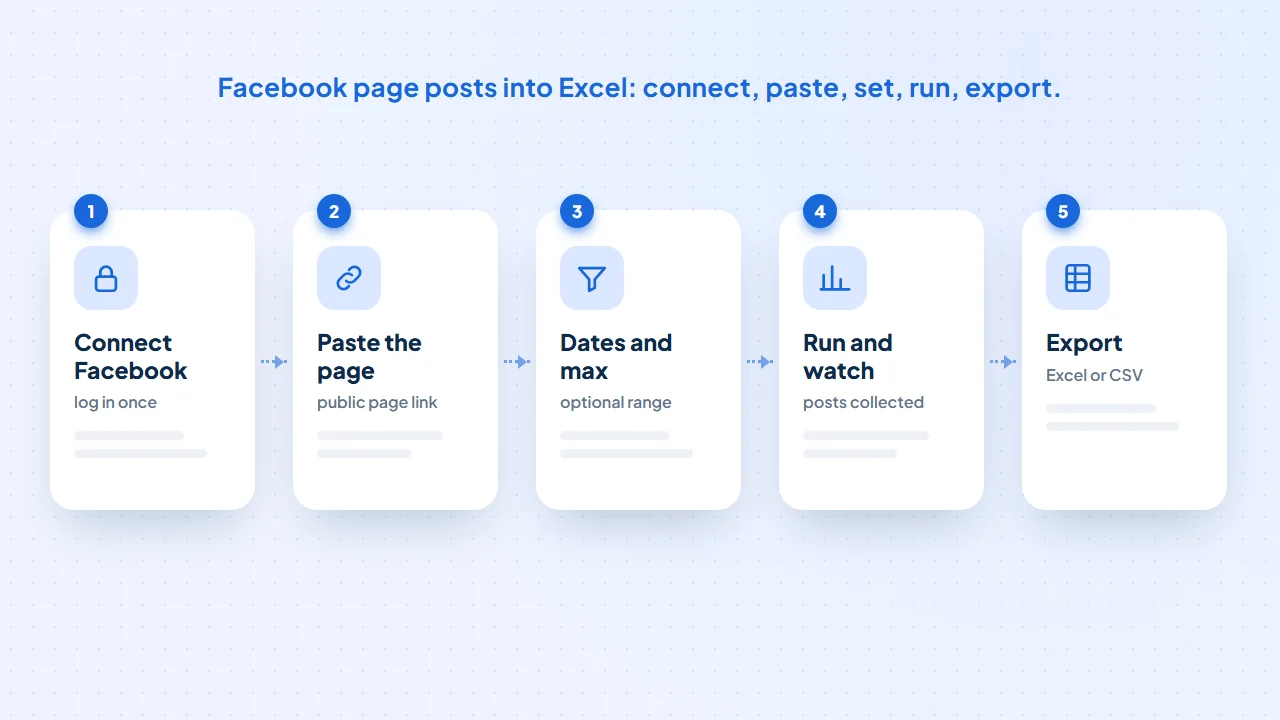
You run the tool from the Facebook screen of the app. A browser window opens and scrolls the page while the posts are collected.
- Open Facebook in LeadTrapper and click Connect in the header to log in to Facebook.
- In the left menu, choose Page Posts.
- Paste the page link, such as
https://www.facebook.com/yourpagename, into Facebook Page URL. - Optionally set From date and To date. The To date defaults to today.
- Set Max Results (10 to 5,000, 200 by default).
- Press Start and watch the progress line (“Collecting posts… scroll 3/25”).
- When it says “Done”, press Excel (or CSV) to save the file.
The tool opens a visible browser window while it works, so leave it alone until it finishes. If Facebook shows a security check, the scraper stops for 24 hours to protect your account. See the best Facebook group scraper comparison for how other tools handle the same limit.
Get a page's posts into Excel, free for 14 days
No card needed. Free for 14 days, then $50 a year. Windows 10 and 11.
Choose Your Method
Which method fits depends on whose page it is and how many pages you need. Most people searching for this choose between Meta’s own export, a hosted scraper and a desktop tool.
| Your case | Method | What you get | Catch |
|---|---|---|---|
| Your own Page | Meta’s Page Insights export | Post-level numbers | Only for Pages you manage |
| A few posts from one page | Copy by hand | Whatever you copy | Slow past 20 posts |
| One competitor page, 200 posts | LeadTrapper Page Posts | Text, reactions, comments, shares, date, link in Excel | Needs a connected Facebook account |
| Many pages, scheduled | Hosted tools such as Apify actors | JSON, CSV or Excel; some work without login | Paid per run; one listing caps results at 200 per run |
| Developers | Facebook Graph API with an app you control | Structured data for Pages you have access to | Needs app approval and code |
| Comments or reactor names | Not in LeadTrapper | Use Meta’s tools for your own Page |
The hosted and open-source options are listed from public pages such as Apify’s Facebook posts guide, and they fall under Meta’s terms too.
Read the Results
Sort by Comments, then Shares, because comments and shares show effort from readers, while a like is cheap. A competitor’s top 10 posts by comments tell you which offers, questions and formats their audience reacts to. Look at the date column too: a page that posted 3 times in a month is not the same prospect as one that posts daily.
The tool also remembers every post it has collected. When you run the same page again, posts you already have are skipped, so the second run adds only new posts. If you need the full set again for a fresh spreadsheet, keep your first export.
A Worked Example
A bakery supplier wants to see what a rival’s page promotes, and which small bakeries comment on it.
- Connect Facebook, open Page Posts and paste the rival’s page link.
- Set From date 1 Sep and To date 25 Nov, Max Results 200, and press Start.
- Say it returns 74 posts. Export to Excel and sort by Comments.
- The top 5 posts are, say, a wholesale price list, a free-delivery offer, two product launches and a giveaway. That tells you which offers pull replies.
- Open the two highest-comment posts through their links, and note the bakeries commenting. For their contact details, search each page with the Facebook business page scraper.
The counts are an illustration. Your results depend on the page, the dates and what Facebook loads. Our guide to finding clients for a social media marketing agency uses the same idea, checking how often a business posts before pitching it.
What It Cannot Do
The Page Posts tool does not return everything a page has ever published. It scrolls the timeline up to 25 times per run, so it may stop before reaching a page’s oldest posts, and a run that hits Facebook’s limits stops early. It reads one page per run, cuts post text at 500 characters, and returns no comments, commenters, images or video. It does not work on private pages, profiles or groups, and it does not pull emails or phone numbers from posts.
For phone numbers and emails a page publishes in its About section, use the business page tools; for ads a business is running, the Facebook Ad Library scraper.
Where LeadTrapper Finds Leads
LeadTrapper collects leads from each of these sources in one Windows app, then checks the numbers and sends the WhatsApp messages from the same place.
- Google Maps Scraper: Business leads from any city.
- Facebook Scraper: Advertisers, pages and group members.
- Instagram Scraper: Leads from profiles and hashtags.
- TikTok Scraper: Creators, hashtags and commenters.
- LinkedIn Scraper: Profiles by role and city.
- Email Finder: Emails from business websites.
Frequently Asked Questions
Yes, technically. Tools read a page's public timeline and return the text, reactions, comments and shares of each post. Meta's Automated Data Collection Terms ban this without Meta's written permission, so the risk to your account is yours. For your own Page, use Meta's Insights export instead.
For your own Page, use the export in Meta's Insights tools, which gives post-level numbers. For a competitor's or prospect's page, a scraper such as LeadTrapper's Page Posts tool collects the posts and exports an .xlsx file with post ID, text, likes, comments, shares, date and link.
No. The Page Posts tool is built for public Facebook pages, and it reports that no posts were found when the page isn't public or you aren't logged in. Group posts are a separate matter: LeadTrapper's group tool lists members, not posts.
It collects the number of comments on each post, not the comment text or who wrote them. The same goes for reactions: it reads the total count, not the people behind it, and it does not separate likes from other reaction types.
As far as the page's timeline loads. The tool scrolls up to 25 times and stops at your Max Results or your From date, whichever comes first. How far 25 scrolls reach depends on how often the page posts and what Facebook loads, so test with a small limit first.
Yes, for good results. The tool shows 'No posts found. Make sure you are logged in to Facebook and the page is public' when it gets nothing. Connect a Facebook account in the app first, and use one you can afford to have limited, since Meta restricts accounts that break its rules.
To see which topics and offers get the most comments and shares on a competitor's page, to check how often a prospect posts before you pitch them, or to collect a page's announcements for research. Posts are public, but check Meta's terms and your local data rules before collecting at scale.
About LeadTrapper
LeadTrapper is a Windows app for finding business leads and contacting them on WhatsApp. It collects business contacts from Google Maps, Instagram, Facebook, TikTok, LinkedIn and business websites, checks which numbers are on WhatsApp with its Number Filter, and sends personalised campaigns with automatic delays from one or more WhatsApp accounts. It also has a chatbot, a shared inbox for every account, and Store Orders for online shops. It installs from the Microsoft Store, and the full app is free for 14 days, then $50 a year. Free web tools, browser extensions and a Wix app are listed on the Free Tools page.
Read a Competitor's Page, Then Find Its Customers
Facebook page posts, business pages, group members and the Ad Library come with LeadTrapper, plus Google Maps and the WhatsApp sender. $50/year, all features included.