In this article 5 sections
A Google Maps reviews scraper collects either each review's text, stars, date and owner reply, or each business's overall rating and review count. Review-text tools such as Apify actors charge per 1,000 reviews; Google's Places API returns only a few reviews per place; lead tools such as LeadTrapper export the rating and review count per business.
- Decide which data you need: full review text for analysis, or rating and review count per business for lead lists.
- Review-text scrapers on Apify listed prices of roughly $0.20 (on higher plans) to $0.60 per 1,000 reviews in November 2026.
- Google's Places API returns only a few reviews per place, so it can't export a business's full review history.
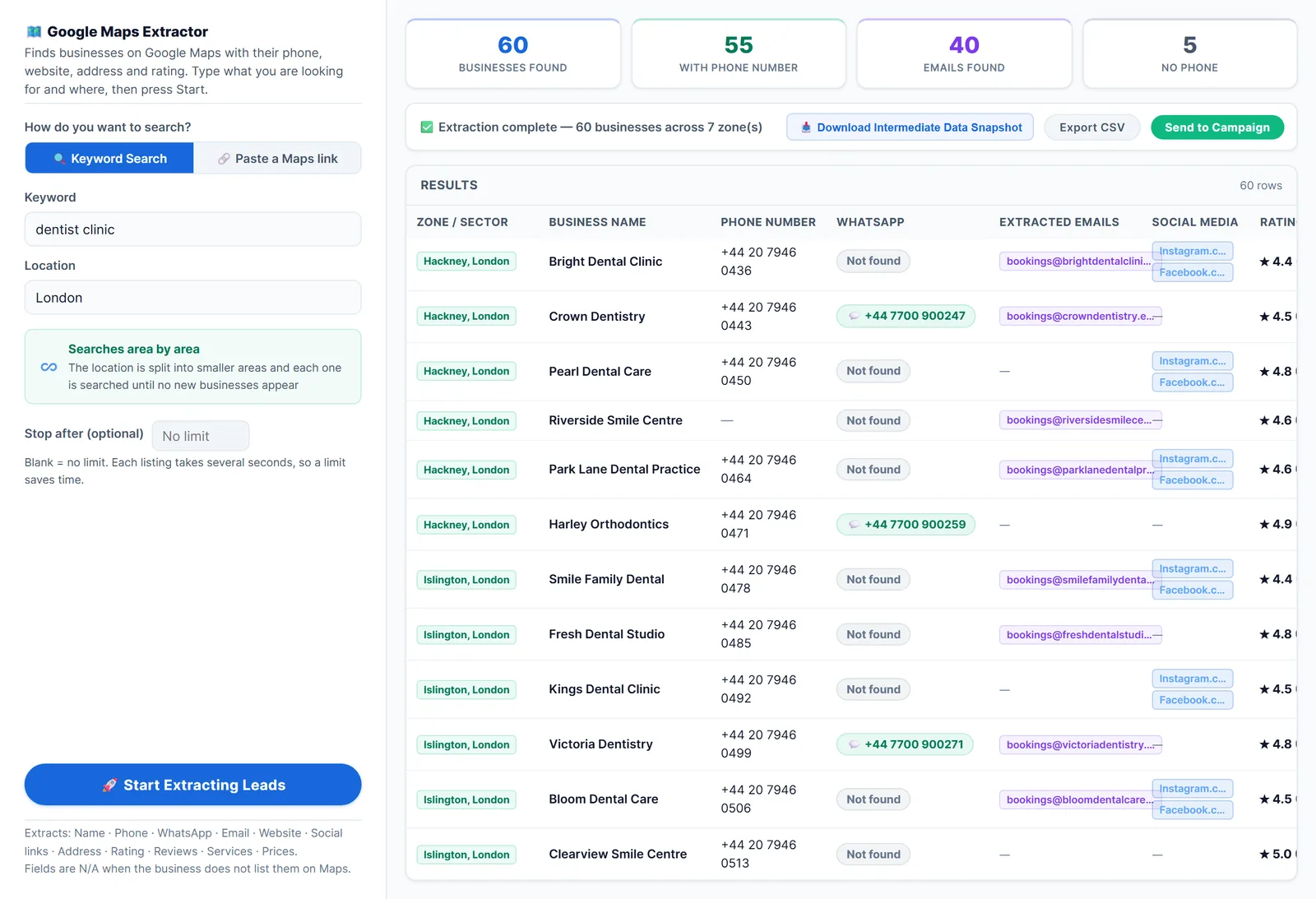
- LeadTrapper's Google Maps scraper exports each business's rating and review count, not the review text.
- Reviews contain reviewers' names and words: use them for analysis and lead qualification, not to contact reviewers.
“Google Maps reviews scraper” means two different jobs, and most disappointment comes from buying a tool for the wrong one. A brand monitoring its locations wants every review’s text. An agency looking for clients wants each business’s rating and how many reviews it has. This guide separates the two, compares the tools for each, and shows clever ways businesses use review data.
Two Kinds of Review Data
| Compared | Full review text | Rating and review count |
|---|---|---|
| What you get | Each review: text, stars, date, reviewer name, owner reply | Per business: average stars and number of reviews |
| Used for | Sentiment analysis, complaints, competitor research | Ranking and qualifying leads |
| Typical tools | Review scrapers on Apify and similar services | Google Maps lead scrapers |
| Priced | Per 1,000 reviews | Per business, or flat |
Tools for Full Review Text
Apify actors. Apify’s store lists many Google Maps review scrapers. In November 2026 their listed prices ranged from roughly $0.20 (on higher plans) to $0.60 per 1,000 reviews, depending on the actor and plan, and each states its own cap on reviews per place. Most return the owner’s reply, the reviewer’s profile and review count, a Local Guide flag and photos as well. One practical limit from the most-used actor’s page: filtering by date needs the reviews sorted by newest first. They return text, stars, date and usually owner replies, as CSV or JSON.
Google’s Places API. Google’s documentation says it returns at most 5 reviews per place, so it can’t export a business’s full history.
Your own reviews: the Business Profile API. Owners and agencies managing verified locations can read their own reviews through Google’s Business Profile API, after Google approves access. It’s the clean route for reputation dashboards, but it only covers profiles you manage. It suits showing recent reviews in an app, not research.
Do it yourself. Browser automation can open a place’s reviews tab and scroll, but long review lists load slowly, and the page changes often; see scrape Google Maps with Python, GitHub or n8n for the trade-offs.
Rating and Review Count for Lead Lists
For finding clients, you don’t need every review; you need every business with its numbers. LeadTrapper’s Google Maps scraper exports, for each business in a city, the star rating and review count together with name, phone, address, website and Maps link. It doesn’t export individual review text. Because its unlimited scan mode searches district by district, you get the numbers for the whole city, not just the first 120 places.
Export pitfalls
- Relative dates. Google shows “3 months ago”; good tools convert it to a date, so check yours does.
- Star-only reviews. Many reviews have stars but no text. Keep them, or your averages won’t match Google’s rating.
- Signed-out limits. Browser-based tools that aren’t signed in may see fewer reviews than you do.
Clever Ways to Use Reviews
These are the uses agencies, suppliers and analysts describe most:
- Find reputation clients. Filter for businesses with many reviews and a rating under 4. They’re busy, and their rating is costing them customers: a clear offer for reputation or review-management services.
- Find businesses that need more reviews. A new restaurant with 6 reviews next to competitors with 400 needs review-request help, a QR code at the till or a WhatsApp follow-up after each visit.
- Find automation clients. Reviews that complain about slow replies or missed calls point to businesses that need an instant-reply or booking assistant; see how to find clients for an AI automation agency.
- Spot the leaders. Sort a city’s dentists by review count to see who dominates, then study how their profiles differ.
- Qualify before calling. Many reviews and a website usually means an established business; few reviews and none recent can mean it closed.
- Read competitors’ complaints. With review text, search for “wait”, “price” or “rude” across competitors to find what customers hate, then make it your selling point.
- Combine with the website column. Many reviews plus no website is one of the strongest web design leads; see how to find businesses without a website.
Rules and Risks
- Google’s terms restrict automated access; read is scraping Google Maps legal.
- Review text includes reviewers’ names and opinions. Use it for analysis, and don’t contact reviewers or republish their words as your own.
- Contact businesses about their own listings politely, with a specific offer and an easy way to say no.
Frequently Asked Questions
Review-text scrapers can export many reviews per place, with text, stars, date and owner reply, though providers state their own caps. Google's Places API returns only a handful of reviews per place.
Some Apify actors and Chrome extensions have free tiers or trials; Apify's free monthly platform credit covers thousands of reviews at the listed per-1,000 prices. For ongoing or large jobs, expect to pay per 1,000 reviews.
LeadTrapper exports each business's star rating and review count from Google Maps, along with phone, website and address. It doesn't export the text of individual reviews.
Google's terms restrict automated access, and reviews contain reviewers' names and opinions, which data-protection laws may protect. Use them for analysis or to qualify businesses, and don't contact reviewers. Read our guide on whether scraping Google Maps is legal for details.
About LeadTrapper
LeadTrapper is a Windows app for finding business leads and contacting them on WhatsApp. It collects business contacts from Google Maps, Instagram, Facebook, TikTok, LinkedIn and business websites, checks which numbers are on WhatsApp with its Number Filter, and sends personalised campaigns with automatic delays from one or more WhatsApp accounts. It also has a chatbot, a shared inbox for every account, and Store Orders for online shops. It installs from the Microsoft Store, and the full app is free for 14 days, then $50 a year. Free web tools, browser extensions and a Wix app are listed on the Free Tools page.
Rating and Review Count for Every Business in a City
LeadTrapper's Google Maps scraper exports each business's rating and review count with its phone and website, ready to sort. $50/year, 14-day free trial.