In this article 6 sections
Paste one public post or Reel link into LeadTrapper's People Who Liked a Post tool and it lists who commented, with username, followers, verified badge and the first 120 characters of the comment. Read the comments on screen, export the accounts to CSV or Excel, then run the best ones through Profile Details for bio, website, email and phone.
- In LeadTrapper, paste a public post or Reel link in the Instagram tool People Who Liked a Post. It returns people who commented and people who liked, one row per account, each labelled.
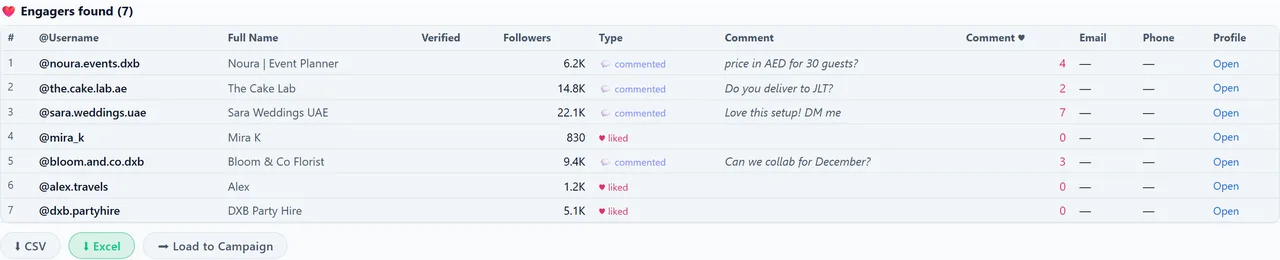
- On screen each row has username, full name, verified badge, followers, the first 120 characters of the comment and the likes on that comment. The CSV and Excel export holds the account columns, not the comment text. Email and phone are empty; use Profile Details.
- The tool signs in to your own Instagram account in a browser window. Instagram's terms bar automated collection without its permission, so the risk is yours.
- You may get fewer comments than the post shows. The tool reads what Instagram loads while it scrolls, and Max Results can be set from 10 to 5,000 (100 by default).
- Instagram's official comments API only covers accounts you manage, so for other people's posts a scraper or manual copy is the only route.
Comments are the one place on Instagram where people say out loud that they care. Someone who writes “where can I buy this?” under a competitor’s Reel is closer to a purchase than a follower who never replied. An Instagram comment scraper gets those people into a spreadsheet so you can sort and check them instead of scrolling.
LeadTrapper’s Instagram scraper does this from one link. This guide shows what comes back, what does not, and how to use it without fooling yourself about the numbers.
What the Tool Returns
LeadTrapper lists the accounts that commented on, or liked, one public post or Reel. The tool is called People Who Liked a Post, and each row is marked “liked” or “commented”.
| Column | What you get | Note |
|---|---|---|
| @Username and Full Name | The account that engaged | One row per account, even if it commented twice |
| Verified | A tick for verified accounts | |
| Followers | The account’s follower count | Quick size check |
| Type | “liked” or “commented” | Shown on screen; tells commenters from likers |
| Comment | The first 120 characters of the comment | Longer comments are cut off |
| Comment ♥ | Likes on that comment | A comment others liked is a louder signal |
| Email and Phone | Empty in this tool | Fill them with Profile Details |
| Profile | A link that opens the account |
It does not list comment dates or the account’s bio in this table. For bio and contacts, run the usernames through the profile tool described in our guide to the Instagram profile scraper.
Scrape a Post Step by Step
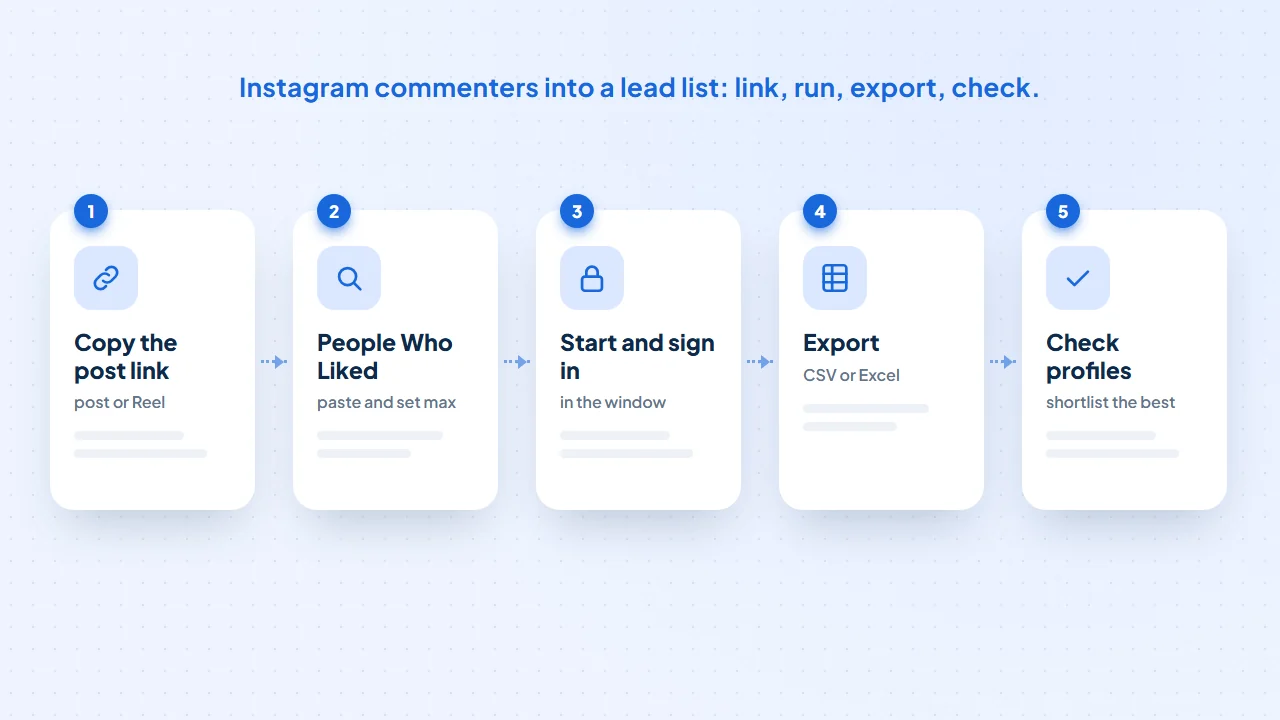
You need the link of one public post or Reel and an Instagram account to sign in with. Five steps:
- Open the post in Instagram and copy its link. It looks like
instagram.com/p/...orinstagram.com/reel/.... - In LeadTrapper open Instagram, then People Who Liked a Post, and paste the link.
- Set Max Results. The field accepts 10 to 5,000 and starts at 100.
- Press Start. A browser window opens. If Instagram asks, sign in there. The job shows its progress and can be stopped.
- When the table appears, read the comments on screen. Export the accounts as CSV or Excel. The export holds username, name, verified, followers, following, posts, bio, email, phone and profile link, but not the comment text.
Run one job at a time. If another Instagram task is running, the next one waits, and if Instagram shows signs of trouble the app pauses Instagram jobs for a cooldown to protect your account.
Scrape your first post free for 14 days
No card needed. Free for 14 days, then $50 a year. Windows 10 and 11.
Which Method Fits
The right method depends on whose post it is and how much you need. The table lists what is on offer, with prices where the vendor publishes them.
| Method | Whose posts | Cost | Good for | Catch |
|---|---|---|---|---|
| Instagram app, copy by hand | Any public post | Free | Under 30 comments | Slow, error-prone |
| Meta’s comments API (official) | Only accounts you manage | Free, needs an app | Your own posts, moderation | Not for other people’s posts |
| LeadTrapper People Who Liked a Post | Public posts you can open | In the $50/year app | One post at a time, with followers | Signed-in browser, fewer rows than a huge post shows |
| Browser extensions for comment export | Public posts | Varies | One-click CSV | Check permissions and reviews first |
| Cloud scrapers such as Apify | Public profiles | Apify lists $2.30 per 1,000 results for its Instagram comment actor (checked 25 Nov 2026) | Many posts at once | You pay per result and manage the run |
Meta’s own comment moderation documentation says the API works with media owned by your app users, who are Instagram professional accounts. It is the right tool for your own posts and the wrong one for a competitor’s.
Apify’s Export Instagram Comments and Posts page lists comment text, commenter username and profile picture as its comment fields, and takes a limit for posts and comments per post. Users of such tools report two common limits: replies are often missing, and counts rarely match what the post shows, because hidden and deleted comments are not returned. Treat those as other users’ reports, not guarantees. If you also want to compare the cost of a cloud scraper, see our Apify alternative guide.
A Worked Example
A small skincare brand in Dubai wants customers for a vitamin C serum. A competitor’s Reel about it has 480 comments. The owner copies the link and runs the tool with Max Results at 200. These are sample numbers, not a measured result.
- The table returns 143 rows: 96 commented, 47 liked.
- On screen she reads the “commented” rows and notes the ones with the most Comment ♥. Comments like “does this work on dark spots?” and “price in AED?” stand out.
- She exports the accounts, drops those with under 100 followers and those whose username looks like a shop, and keeps the 38 whose comments showed interest.
- She pastes those 38 usernames into Profile Details. Eleven publish a website, and four show an email or phone.
Result: 38 people who showed buying interest, 4 contacts to reach directly, and a list of 34 accounts she can follow, comment under or reply to from her own brand page. A list of commenters is a source of conversations. It is not a ready phone list.
Turn Commenters Into a Shortlist
Commenters are warm, but not all of them are leads. A short filter keeps your time on the ones that count:
- Read the comment. A question about price or availability beats “nice” or an emoji.
- Check the badge and size. Verified accounts and accounts with millions of followers are usually brands or celebrities, not buyers.
- Spot bots. Many identical comments, “follow me” and gambling or crypto names are noise. Delete those rows.
- Run Profile Details. It gets bio, followers, website, and phone and email when public, as our Instagram email extractor guide explains in detail.
- Reach the right way. For contacts you find, collect them with the Instagram lead scraper, and for people who publish a WhatsApp number see how to put a WhatsApp link in an Instagram bio or website.
To go the other way and find an audience before a post exists, our guide to scraping Instagram followers covers a competitor’s followers. If you also work on TikTok, the same idea is in how to scrape TikTok comments.
Rules and Risk
Instagram’s terms do not allow automated collection of its data without permission, and the tool runs signed in to your own account, so the risk is yours. Meta’s Automated Data Collection terms state that you may not access or collect data from Meta’s products by automated means without prior permission. Instagram can limit or close an account it believes breaks that. LeadTrapper cannot promise that will not happen.
Keep to a few habits:
- Use an account you can afford to lose a week of, not your main brand account.
- Run small jobs of 100 to 200 rows, not thousands.
- Never message hundreds of commenters with the same text. Instagram sees that as spam.
- Collect only what you need and delete the rest.
The law is separate from Instagram’s rules. A username and a comment are personal data in many countries. In the UK, the ICO’s electronic mail marketing guidance says you must not send marketing emails or texts to individuals without specific consent, while you can email corporate bodies. Sole traders count as individuals. Our guide on whether email scraping is legal goes through the main rules by country. This is general information, not legal advice.
What the tool cannot do: it cannot read private accounts, cannot return every comment on a huge post, cannot show comment dates, and cannot supply emails or phones for commenters unless their profile publishes them.
Where LeadTrapper Finds Leads
LeadTrapper collects leads from each of these sources in one Windows app, then checks the numbers and sends the WhatsApp messages from the same place.
- Google Maps Scraper: Business leads from any city.
- Facebook Scraper: Advertisers, pages and group members.
- Instagram Scraper: Leads from profiles and hashtags.
- TikTok Scraper: Creators, hashtags and commenters.
- LinkedIn Scraper: Profiles by role and city.
- Email Finder: Emails from business websites.
Frequently Asked Questions
Only from public posts and Reels that you can open while signed in. A private account's posts are out of reach unless your account follows it, and even then the tool only sees what Instagram shows you. Deleted, hidden and moderated comments are not returned.
Paste the post link into LeadTrapper's People Who Liked a Post tool, set Max Results, press Start, and when the table appears use the CSV or Excel export. You get one row per account with username, name, followers and profile link. The comment text is shown in the app table, not in the export, so copy the comments you want to keep.
Not in this tool. The email and phone columns stay empty for commenters. Copy the usernames into Profile Details, which reads a profile's bio, website, and the phone and email when the account publishes them. Many accounts publish none.
There is no single answer. Instagram's terms say you may not collect data by automated means without permission, so your account can be limited. Commenter names and comment text are also personal data in many countries. This is not legal advice; check your local marketing and privacy rules before you contact anyone.
Meta's Instagram API lets an app read and moderate comments only on media owned by the professional accounts that connect to it. It does not cover comments on someone else's posts. For your own posts, that route is the clean one.
The tool reads the comments Instagram loads on the page while it scrolls, so a post with thousands of comments can return fewer rows. It also skips accounts it saved in earlier runs. Clear the seen-leads list in the Instagram tools if you want them again.
About LeadTrapper
LeadTrapper is a Windows app for finding business leads and contacting them on WhatsApp. It collects business contacts from Google Maps, Instagram, Facebook, TikTok, LinkedIn and business websites, checks which numbers are on WhatsApp with its Number Filter, and sends personalised campaigns with automatic delays from one or more WhatsApp accounts. It also has a chatbot, a shared inbox for every account, and Store Orders for online shops. It installs from the Microsoft Store, and the full app is free for 14 days, then $50 a year. Free web tools, browser extensions and a Wix app are listed on the Free Tools page.
Turn Your Next Post's Comments Into a Lead List
The Instagram scraper, Email Finder and WhatsApp tools all come with LeadTrapper. $50/year, all features included.