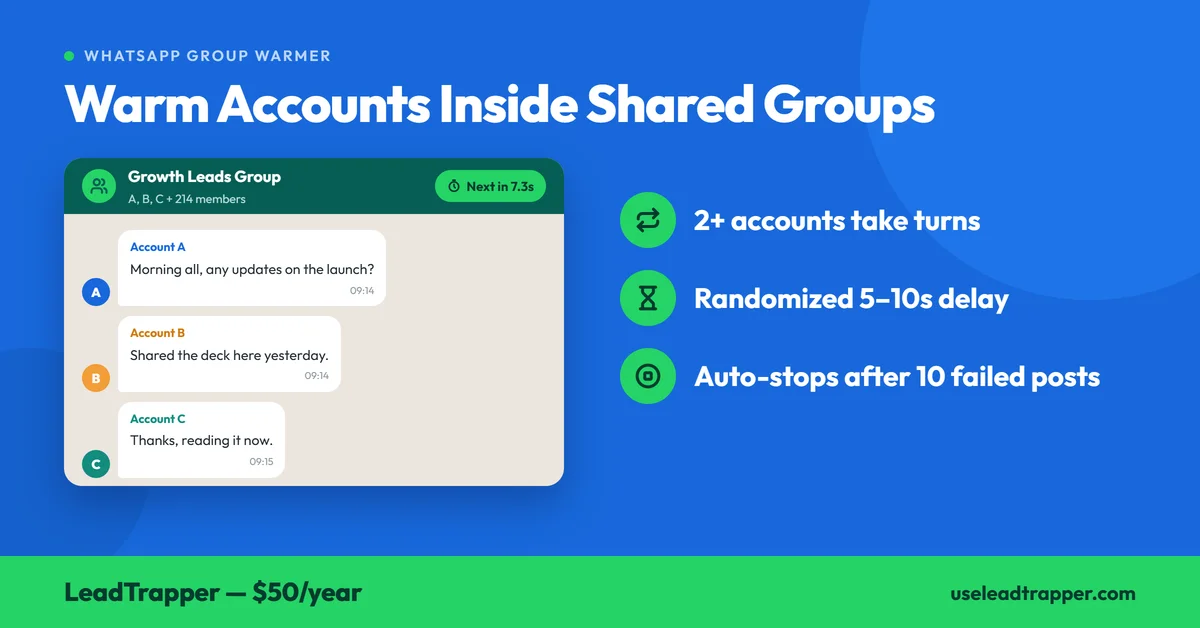
- The Group Warmer is a separate tool from the Account Warmer: instead of private chats between your accounts, two or more of your accounts take turns posting inside WhatsApp groups they all belong to.
- It needs at least two connected accounts, and it only lists regular groups where every selected account is a member — communities and channels are excluded.
- In each group the first account posts and the others follow, working through your message list one line per post, with every line run through spin-tax so the same text doesn't repeat word for word.
- The delay between posts is randomized inside a range you set (5 to 10 seconds by default), and the run stops itself after 10 failed posts in a row instead of failing quietly.
- It posts real messages into real groups, so the sensible use is groups you own or that hold only your own team — scripted chatter in a group of strangers is exactly what gets reported.
LeadTrapper has two warmers, and they do different jobs. The Account Warmer has your accounts message each other in private chats. The Group Warmer has two or more of them take turns posting inside WhatsApp groups they all belong to: the first account posts, the rest follow. Here’s exactly what it does, checked against the code that runs it rather than the feature’s description.
What It Does, and How It Differs From the Account Warmer
A number’s history isn’t only private chats. Group conversation is part of ordinary WhatsApp use too, and the Group Warmer builds that kind of activity between accounts you control, before a campaign starts.
Nobody outside WhatsApp knows precisely how it weighs any of this, and the tool doesn’t claim to. What the tool does is mechanical and checkable, and the two warmers compare like this:
| Account Warmer | Group Warmer | |
|---|---|---|
| Where messages go | Private chats between your own accounts | Groups all selected accounts belong to |
| Accounts needed | At least 2 | At least 2 |
| Pairing options | One to One or One to Many | None: accounts take turns in each group |
| Message text | Your list, through spin-tax | Your list, through spin-tax |
| Delay between messages | Randomized, min/max you set | Randomized, min/max you set (default 5 to 10 seconds) |
| Stops itself after | 10 failed sends in a row | 10 failed posts in a row |
Setting It Up: Four Steps
The Group Warmer is a four-step wizard, and each step has one rule worth knowing.
Select Accounts
Tick two or more connected accounts. The wizard refuses to continue with fewer than two and tells you why: the accounts must all be members of the same group to exchange messages.
Select Groups
This list only shows regular groups where every account you ticked is a member, along with each group’s member count. Communities and channels are excluded. If the list comes back empty, the accounts don’t share a group yet, and the fix is to add them to one before you try again.
Conversation
Write one message per line, or load a plain .txt file instead of retyping a script. The box can’t be left empty. The tool works through your lines in rotation, one per post, moving on to the next line each time and wrapping back to the top when it reaches the end.
Delay Settings
Set the minimum and maximum seconds between posts. The defaults are 5 and 10, the minimum has to be lower than the maximum, and you can stretch the range up to an hour. Finish the wizard and a run window opens.
Press Click to Initiate first, which points the built-in WhatsApp window at each account you selected. Then press Start. A live table logs every post with who sent it, which group, the time and the exact message, and a status line underneath counts down to the next one.
The Posting Order
The order is fixed by the accounts and groups you pick. For each group in turn, every selected account posts once, first account first. With three accounts (A, B, C) and two groups (1 and 2), one full cycle looks like this:
A posts in group 1, B posts in group 1, C posts in group 1, then A in group 2, B in group 2, C in group 2, and back to the start.
The log labels every post after the first in a group as a reply. That’s a label for the order, not a WhatsApp quoted reply. Each post is simply the next line from your list, sent as a normal message, so write your lines to read naturally in sequence: a greeting, a question, an answer, a comment on the answer.
Every line also goes through the spin-tax parser before it’s sent. Write Hi {everyone|all|team}, hope the week is going well and each post resolves to one of the three, chosen fresh each time. A run of an hour or more shouldn’t repeat the same sentence word for word between the same accounts in the same group.
The Delay, and What Stops It
Between posts the tool waits a random interval drawn from your range, not a fixed gap. At the 5 to 10 second default that averages about 8 posts a minute, which is fast for something meant to look like ordinary use. A warmer isn’t in a hurry, so most runs are better with a wider, slower range.
There are two ways a run ends. You can press Stop, and because the waiting is done in short slices, it responds within a couple of seconds. Or it can stop itself: after 10 posts in a row fail, it halts and logs the reason, telling you to check that the accounts are still connected and still in those groups. That second case is the one that matters overnight, because an account that gets removed from a group would otherwise fail every few seconds for hours while you assumed it was working.
A post that goes out but can’t be confirmed isn’t counted as a failure. It’s logged separately and resets the failure streak, and the closing line reports the totals: how many were sent, how many unconfirmed, how many failed. The other automatic stops in LeadTrapper, for campaigns and the Number Filter, are covered in why a run stops by itself.
Which Groups to Use
This is the part the software can’t decide for you. The Group Warmer posts real messages into real groups, and whoever is in those groups sees them.
Our recommendation is groups you own or admin, or ones that contain only your own team. A small internal group with your accounts in it is the clean case. Scripted small talk dropped into a group of strangers is the pattern that gets reported, and how real recipients react to your messages is what WhatsApp’s enforcement responds to, as the article on what actually gets accounts flagged covers. WhatsApp’s own developer documentation sets out the platform’s rules for business messaging, and they apply here as much as anywhere.
What It Doesn't Do
Warming doesn’t guarantee an account won’t be restricted, and it doesn’t replace sending only to people who want your messages. It addresses one narrow pattern, a number with no history suddenly sending in bulk, and it does nothing about the others: pacing, reply balance, or the shape of a session’s activity. Those are handled by separate features, and how each one fits alongside the warmers is laid out in the Account Safety Telemetry overview.
If your accounts share a group, the Group Warmer is a low-effort way to give a new number some ordinary activity before its first campaign, and both warmers come with LeadTrapper for $50 a year, all features included.
Frequently Asked Questions
It's a LeadTrapper tool that has two or more of your own connected accounts take turns posting messages inside WhatsApp groups they all belong to. The first account posts, the others follow, and your message list rotates one line per post, on a randomized delay you set.
At least two. The setup wizard won't continue with fewer, and every selected account has to be a member of the same regular group, because the tool works by having the accounts post in turn inside it.
The Account Warmer runs private conversations between your own accounts, in One to One or One to Many pairings. The Group Warmer posts into shared group chats instead. Both need at least two accounts, both use spin-tax and a randomized delay, and both stop after 10 failed sends in a row.
No. Only regular groups where all the selected accounts are members appear in the list. Communities and channels are left out by design, so if a group you expected is missing, check that every selected account is actually in it.
You can press Stop at any time, and it takes effect within a couple of seconds. It also stops by itself after 10 posts fail in a row, and logs a message telling you to check that the accounts are still connected and still in those groups.
Warm Up Your Accounts Before They Send a Campaign
LeadTrapper's Account Warmer and Group Warmer both run on any connected accounts. $50/year — all features included.
Related Articles
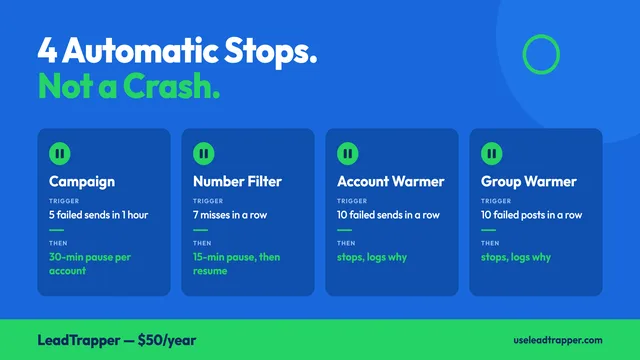
Why Your WhatsApp Campaign Stopped Itself (and What to Do)
LeadTrapper halts a run on its own in four cases: repeated failed sends, a run of dead numbers, or a…
Read article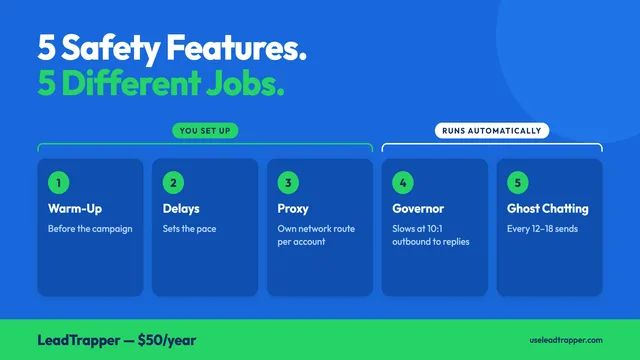
Warm-Up vs Ghost Chatting vs Delays: What Each Does
Warm-up, delays, the reply-ratio governor, Ghost Chatting and proxies: five LeadTrapper safety featu…
Read articleBrowse All Articles
Lead generation, WhatsApp marketing, Google Maps, Instagram, and Facebook scraping guides.
See all