In this article 5 sections
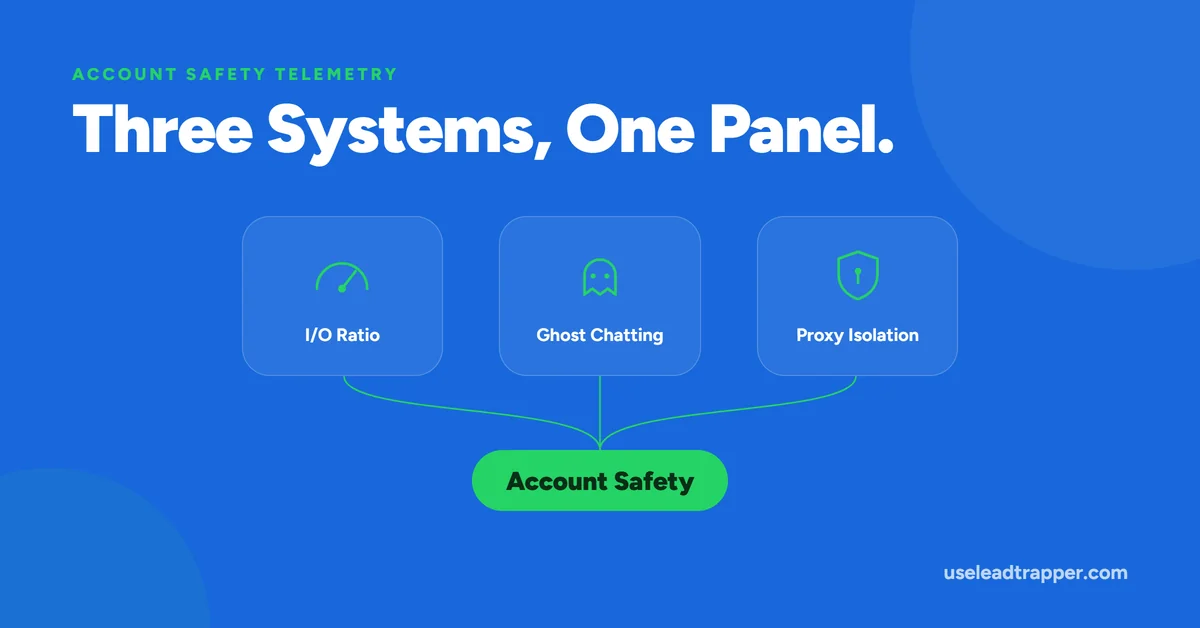
WhatsApp account safety telemetry in LeadTrapper is three separate mechanisms in one panel: a governor that slows sending when messages outpace replies, Ghost Chatting that browses another chat between sends, and an optional proxy per account. They reduce named risk patterns but do not remove the risk of a ban.
- Account Safety Telemetry is three independent mechanisms sharing one panel: a ratio-based sending governor, a simulated-browsing 'Ghost Chatting' feature, and a per-account network proxy.
- The Governor slows sending when outbound messages badly outpace replies — it's a delay throttle, not a message blocker, and it self-corrects automatically as replies come in.
- Ghost Chatting periodically opens an unrelated chat and scrolls it, so the browser's activity pattern doesn't look like a pure sequential send bot — it's a preventive measure LeadTrapper performs, not a status it detects.
- The proxy is a real, functional per-account network route (HTTP or SOCKS5), isolated per WhatsApp session, that persists across restarts unlike the other two counters.
- None of these three eliminate ban risk. They reduce specific, named risk patterns — they don't replace sending to people who actually want to hear from you.
Open WhatsApp > WA Accounts in LeadTrapper and there’s a small panel labeled “Account Safety Telemetry” — a few numbers, a status badge, a proxy toggle. It looks like one feature. It’s actually three separate, independent mechanisms that happen to share a display, and understanding what each one really does (verified against the source code, not the panel’s own labels) matters if you’re relying on any of them.
Three Mechanisms, One Panel
The panel shows Outbound and Inbound message counts, an Out/In ratio with a color-coded badge, a “Governor” status, a “Ghost last event” timestamp, and a Network Proxy control. These map to three genuinely different systems: a sending-speed throttle driven by the outbound-to-inbound ratio, a simulated-activity feature that runs independently of any ratio, and a network proxy that has nothing to do with either. They’re documented here separately because they work differently, get triggered by different conditions, and fail differently if something goes wrong.
That distinction matters practically, not just technically. A customer troubleshooting a slow bulk sender campaign needs to know whether the cause is the Governor doubling delays, or something else entirely — checking the ratio badge answers that in seconds instead of guessing. Someone wondering why a “Ghost last event” still says “no events yet” after hours of sending needs to know that’s a session-scoped counter, not a sign the feature silently failed. Treating all three as one undifferentiated “safety system” makes both of those questions harder to answer than they need to be.
The Governor: A Ratio-Based Throttle
The Governor watches the ratio between messages an account has sent and messages it has received. Cross a ratio of 10 outbound messages for every 1 inbound reply, and the Governor doubles the delay between sends for that account — nothing more. It doesn’t stop the campaign, skip contacts, or block anything. It’s a timing throttle, and it’s the only thing it is.
The badge shows exactly two states: “✓ NORMAL” when the delay multiplier sits at its default, and “⚠ 2× ACTIVE” when the ratio has crossed the threshold and delays have doubled. There’s no third, more severe state — despite what a “safety” panel might imply, this is a binary throttle, not a graduated warning system.
It’s also self-correcting. The ratio is re-checked before every campaign starts and after every single message sent, so as soon as new replies come in and pull the ratio back under 10:1, the multiplier resets to normal automatically — no manual intervention needed. The logic behind the 10:1 threshold, worth being precise about, is a design assumption built into LeadTrapper’s own code: the reasoning is that a wildly outbound-heavy account looks statistically different from a normal conversational one, similar to how email providers treat engagement rate as part of sender reputation. It’s a reasonable, real engineering decision — it isn’t a number pulled from WhatsApp’s own published enforcement criteria, because WhatsApp doesn’t publish one.
One practical note: the Outbound and Inbound counts behind this ratio live in memory for the current session only. They reset whenever the app or server restarts, or when an account is removed and re-added — they’re not a permanent history of the account’s activity, just a live counter for the current run.
Ghost Chatting: Simulated Browsing Between Sends
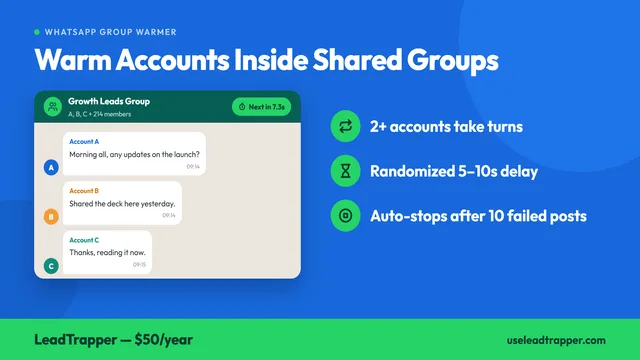
Every 12 to 18 messages sent (the exact count randomized each time), LeadTrapper briefly opens a different, unrelated one-on-one chat inside the same authenticated WhatsApp Web session, scrolls it slightly, and pauses for a few seconds before resuming the campaign. This is Ghost Chatting, and despite the name, it has nothing to do with WhatsApp “ghosting” or dropping a message — it’s an action LeadTrapper itself performs, not a status LeadTrapper detects.
The reasoning is about activity pattern, not content: a browser session that does nothing but send message after message in strict sequence has a distinctive, mechanical fingerprint. Real human use of WhatsApp Web involves looking at other conversations, scrolling, pausing — the kind of behavioral noise a pure sending loop doesn’t generate on its own. Ghost Chatting adds that noise back in deliberately, similar in spirit to how browser fingerprinting is countered by making an automated session’s behavior pattern look less mechanically uniform.
The “Ghost last event” timestamp on the panel only updates after a Ghost Chatting action actually completes successfully — and like the ratio counters, it’s tracked in memory and resets on restart. Seeing “no events yet” on a freshly reconnected account doesn’t mean the feature isn’t working; it means it hasn’t had a chance to fire yet in the current session.
The Network Proxy: Real, Per-Account Routing
The third piece is unrelated to either of the first two: a genuine, functional network proxy, configurable per connected WhatsApp account. The options are Direct (no proxy), an HTTP proxy server, or a SOCKS5 tunnel. Unlike the ratio counters and the Ghost Chatting timestamp, the proxy configuration is saved to disk and survives an app restart — it’s treated as a durable setting, not session telemetry.
Each connected WhatsApp account runs in its own isolated browser session inside LeadTrapper, and the proxy is applied to that specific session before it ever loads WhatsApp Web — so if a proxy is configured, the very first request that account makes already goes through it. One limit worth knowing plainly: the “Test Connection” button checks that the proxy’s address and port are reachable over a raw network connection. It does not verify that the proxy actually completes a working HTTP or SOCKS5 handshake, or that WhatsApp Web loads correctly through it — a successful test confirms the door is open, not that everything behind it works as expected.
What This Reduces, and What It Doesn't
Each of these three mechanisms addresses a specific, named pattern: an imbalanced send-to-reply ratio, a mechanically uniform browsing fingerprint, and a shared or geographically mismatched IP address across multiple accounts. None of them, individually or together, override the fact that WhatsApp’s own enforcement is driven by block and report rates from real recipients. A well-throttled, well-camouflaged, well-proxied account sending to people who don’t want to hear from it can still get reported and restricted — these mechanisms reduce specific risk patterns, they don’t replace sending to a list that actually wants the message. For the mechanics of the Governor specifically, see why your campaign slows down mid-send; for Ghost Chatting, see what it actually does during a campaign; for the proxy, see routing each account through its own network route.
Frequently Asked Questions
It's a panel combining three separate mechanisms: an outbound-to-inbound ratio governor that slows sending when it's badly imbalanced, a Ghost Chatting feature that simulates browsing activity between sends, and a per-account network proxy. They're independent systems that happen to share one display.
No. Each mechanism reduces a specific, named risk pattern — a lopsided send-to-reply ratio, a bot-like activity fingerprint, a shared or flagged IP address. None of them override WhatsApp's own block-and-report-based enforcement, which still applies regardless of what LeadTrapper does on its side.
No — they're counted in memory for the current app session and reset when the app or server restarts, or when an account is removed and re-added. They're not a permanent, all-time record.
In WhatsApp > WA Accounts, under the connected account's card, labeled 'Account Safety Telemetry.'
About LeadTrapper
LeadTrapper is a Windows app for finding business leads and contacting them on WhatsApp. It collects business contacts from Google Maps, Instagram, Facebook, TikTok, LinkedIn and business websites, checks which numbers are on WhatsApp with its Number Filter, and sends personalised campaigns with automatic delays from one or more WhatsApp accounts. It also has a chatbot, a shared inbox for every account, and Store Orders for online shops. It installs from the Microsoft Store, and the full app is free for 14 days, then $50 a year. Free web tools, browser extensions and a Wix app are listed on the Free Tools page.
See What's Actually Running Behind Your Campaign
LeadTrapper's Account Safety Telemetry runs automatically on every connected account. $50/year — all features included.