In this article 7 sections
To extract data from Google Maps to Excel, copy a few listings by hand, export saved lists with Google Takeout, use a free browser extension for names and ratings, call the Places API, or use a scraper that opens each business for phones and websites. Then open the CSV in Excel with phone numbers set as text.
- Google Maps has no 'export to Excel' button for search results; Google Takeout exports only places you saved, with names and links, not phones.
- Free extensions read the results list: names, ratings, review counts and addresses, usually without phones or websites.
- The Places API gives structured data but caps a text search at 60 results and charges per request beyond the free monthly usage.
- A scraper that opens each business gets phones, websites and more, and can cover a whole city by searching district by district.
- Open the CSV with Excel's From Text/CSV import and set phone columns to Text, or Excel drops the + and leading zeros.
You want a list of businesses from Google Maps in a spreadsheet: names, phones, addresses, websites, ratings. Google doesn’t offer an export button for search results, so people use one of five routes. This guide compares them honestly, with what each returns, what it costs, and the Excel tricks that stop your phone numbers turning into nonsense.
What You Can Get, and What You Can't
| Way | Cost | Phones | Websites | Whole city |
|---|---|---|---|---|
| Copy by hand | Free | Yes | Yes | No, too slow |
| Google Takeout | Free | No | No | Only places you saved |
| Free browser extension | Free | Usually no | Usually no | One results page at a time |
| Places API | Free usage, then per request | Yes (higher tiers) | Yes (higher tiers) | 60 results per search |
| Google Maps scraper | Paid | Yes | Yes | Yes, area by area |
Way 1: Copy by Hand
Open each listing, copy the name, phone, website and address into a sheet. It’s free and accurate, and for 20 businesses it’s the right choice. For a city it isn’t: at a minute per business, 500 businesses is a working day.
Way 2: Google Takeout for Saved Places
A free trick few guides mention: save the businesses you care about into a list in Google Maps, then export your saved places through Google Takeout. You get a file with each place’s name and its Google Maps link. Saved lists arrive as CSV files you can open in Excel; some other Takeout exports come as GeoJSON or JSON, which Excel opens with Data, Get Data, From File, From JSON. It doesn’t include phones or websites, and it only covers places you saved one by one, so it suits a shortlist rather than lead generation.
Way 3: A Free Browser Extension
Extensions read the Google Maps results list that’s already on your screen. Our own free Maps Lead Extractor for Edge exports name, category, rating, review count and address to CSV. Like most free extensions, it doesn’t open each business, so phones and websites aren’t included. General scraping extensions such as Instant Data Scraper work the same way; the Instant Data Scraper alternative guide compares them.
Way 3b: A Google Sheets add-on
Add-ons such as Maps2Sheets run inside Google Sheets and write Maps businesses straight into a sheet. On 20 November 2026 its Workspace Marketplace listing advertised up to 100 free leads a day, and more searches if you connect your own Google Maps API key. It asks for permission to manage your spreadsheets and see your personal info, so read the permissions before installing.
Way 4: The Places API
Google’s own Places API returns structured data, including phones and websites on its higher tiers. According to Google’s documentation, a text search returns up to 20 results per page and at most 60 across all pages, and pricing is per request: in November 2026 Google’s pricing page listed Text Search Pro with 5,000 free requests a month, then $32 per 1,000. You need a Google Cloud account, an API key and some code or a no-code tool. The guide to scraping Google Maps with Python shows what that involves.
Way 5: A Google Maps Scraper
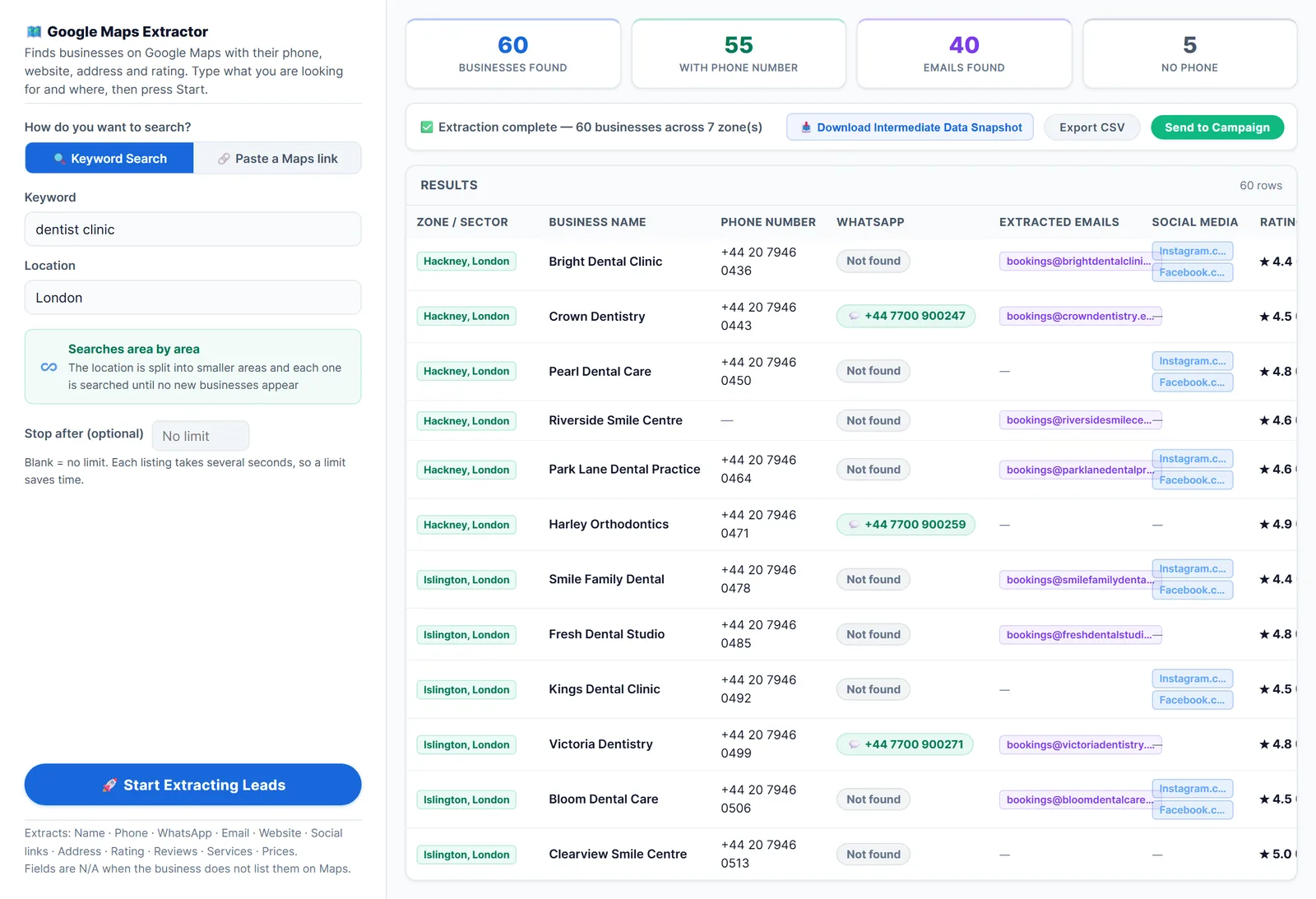
A scraper opens each business the way you would, then writes everything to a file. LeadTrapper’s Google Maps scraper exports name, phone, address, rating, review count, website and Maps link, plus WhatsApp numbers, emails and social links when the business lists them on Maps or its homepage. Its unlimited scan mode splits a city into districts to get past the roughly 120 places one search shows. In our test, 160 dentists in Amman took about 21 minutes, with phones for 99% of them.
Beat the 120 limit with better searches. Split by trade word (“pizza restaurant”, “sushi restaurant”) as well as by area, and search postcodes in big cities. The more than 120 results guide covers both.
Open the File in Excel Without Breaking It
Scrapers export CSV files, which Excel opens directly. Double-clicking is where most lists get damaged. Use the import instead:
- Data, From Text/CSV, pick the file, and set File origin to UTF-8, so names in Arabic, Turkish or accented letters display correctly.
- Transform Data, select the phone column, and set its type to Text. Otherwise Excel drops the + and leading zeros, and long numbers turn into 9.71E+11.
- Load, then turn the range into a table so you can sort and filter.
Then make the list useful:
- Remove duplicates on the Maps link column when you combine several searches; it identifies each place exactly, while a chain can share one phone number.
- Filter the Website column for blanks to get businesses without a website, a strong list for web designers; see how to find businesses without a website.
- Sort by review count to call the busiest businesses first.
- Fix number formats before messaging. The WhatsApp Number Filter adds country codes and checks which numbers are on WhatsApp.
Before collecting at scale, read is scraping Google Maps legal: Google’s terms restrict automated access, and data-protection rules apply to how you contact people.
Frequently Asked Questions
Partly. You can copy listings by hand, export places you saved with Google Takeout, or use a free browser extension that reads names, ratings and addresses from the results list. Free ways rarely give phone numbers and websites for a whole city.
Google Takeout exports your own saved places and lists, not search results. You get each place's name and Google Maps link, so you would still need to open each one for its phone and website.
Excel treats them as numbers, so it removes the + and leading zeros and may show long numbers in scientific notation. Import the file with Data, From Text/CSV and set the phone column to Text before loading.
One Google Maps search shows about 120 places, and the Places API text search returns at most 60. To list a whole city, a scraper has to search area by area; see our guide to getting more than 120 results.
About LeadTrapper
LeadTrapper is a Windows app for finding business leads and contacting them on WhatsApp. It collects business contacts from Google Maps, Instagram, Facebook, TikTok, LinkedIn and business websites, checks which numbers are on WhatsApp with its Number Filter, and sends personalised campaigns with automatic delays from one or more WhatsApp accounts. It also has a chatbot, a shared inbox for every account, and Store Orders for online shops. It installs from the Microsoft Store, and the full app is free for 14 days, then $50 a year. Free web tools, browser extensions and a Wix app are listed on the Free Tools page.
Get a Whole City from Google Maps into Excel
LeadTrapper's Google Maps scraper exports every business with phone, website, rating and reviews to CSV, district by district. $50/year, 14-day free trial.