In this article 6 sections
Yes, you can scrape Google Maps without coding. Use a browser extension for one quick list, a cloud tool with a form for big one-off lists, or a desktop app such as LeadTrapper for regular lists. Type a business type and a place, run a small test, then export to CSV.
- You can scrape Google Maps without writing code in three ways: a browser extension, a cloud tool with a form, or a desktop app.
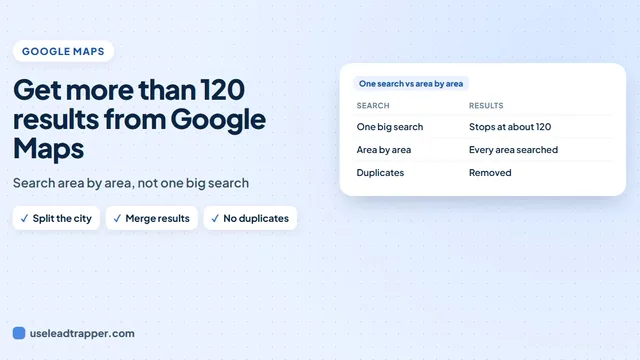
- One Google Maps search shows about 120 places. Extensions stop there; a tool that searches the city area by area gets more.
- Emails are almost never on Google Maps. A scraper reads them from each business's own website, so many rows have none: 15% had one in our Amman test.
- A business record is not a verified lead. Run a small pilot and count cost per usable contact before you pay for a big list.
- Google's terms restrict scraping Maps content, and privacy and marketing law apply to how you use the list. This is not legal advice.
You do not need Python, an API key or a developer to get a list of local businesses from Google Maps. This guide shows the three no-code ways, a worked example with real numbers, what data you can expect and where each way stops.
Can you scrape Google Maps without coding?
Yes. Every no-code way works the same: you type a business type and a place, press start and download a spreadsheet. The difference is where it runs and how you pay. Check the rules first: the Google Maps Platform terms say a customer may not “scrape Google Maps Content for use outside the Services” (read 23 November 2026). SerpApi, which sells a Maps API, lists more no-code Google Maps scraper options in a vendor overview. Developers who prefer code can run the open-source gosom Google Maps scraper, which is MIT-licensed; scrape Google Maps with Python, GitHub or n8n covers that route.
The three no-code ways compared
The three ways are a browser extension, a cloud tool and a desktop app. Pick by how often you scan and how big the list is.
| Way | How it works | Best for | Login needed? | Account risk | Price model |
|---|---|---|---|---|---|
| Browser extension (for example Instant Data Scraper) | Copies the results list open in your browser | One quick list, a look at a market | Usually none | Low | Free, or a monthly record allowance |
| Cloud tool (for example Outscraper, Apify) | You fill a form; it runs on their servers and returns a file | Big one-off lists, scheduled runs | Vendor account | None for your accounts | Per record, with a small free tier |
| Desktop app (LeadTrapper) | Runs on your Windows PC and opens Google Maps itself, area by area | Regular local lists you also check and message on WhatsApp | No Google login | Uses none of your accounts | $50 a year, no per-record fee |
Prices for other tools are on their own pages and change, so see best Google Maps scraper: 6 tools compared for the figures (checked Nov 2026).
A worked example: dentists in Amman
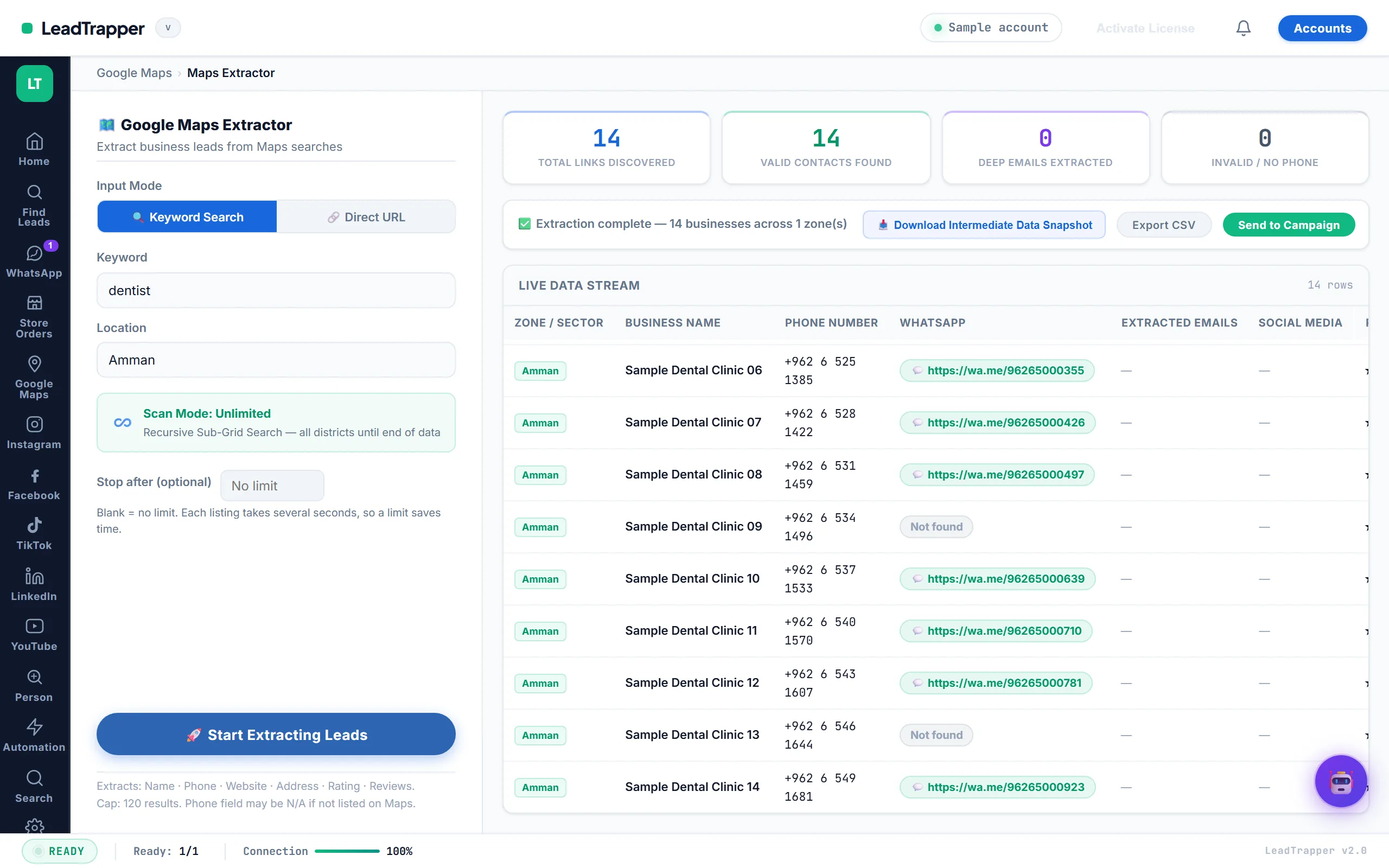
With LeadTrapper, scraping one business type in one city takes five steps and no code. The numbers below are from our own run on 24 September 2026.
- Open the LeadTrapper Google Maps scraper, choose keyword search, type “dentist” and “Amman”. To scan only one neighbourhood, choose “Paste a Maps link” and paste a Google Maps results link instead.
- Optionally type a number in “Stop after” to end the run early. Blank means no limit.
- Press Start Extracting Leads. Amman is not one of the ten preset cities, so LeadTrapper searches the north, south, east and west of it, until no new businesses appear in each. A business found twice is kept once.
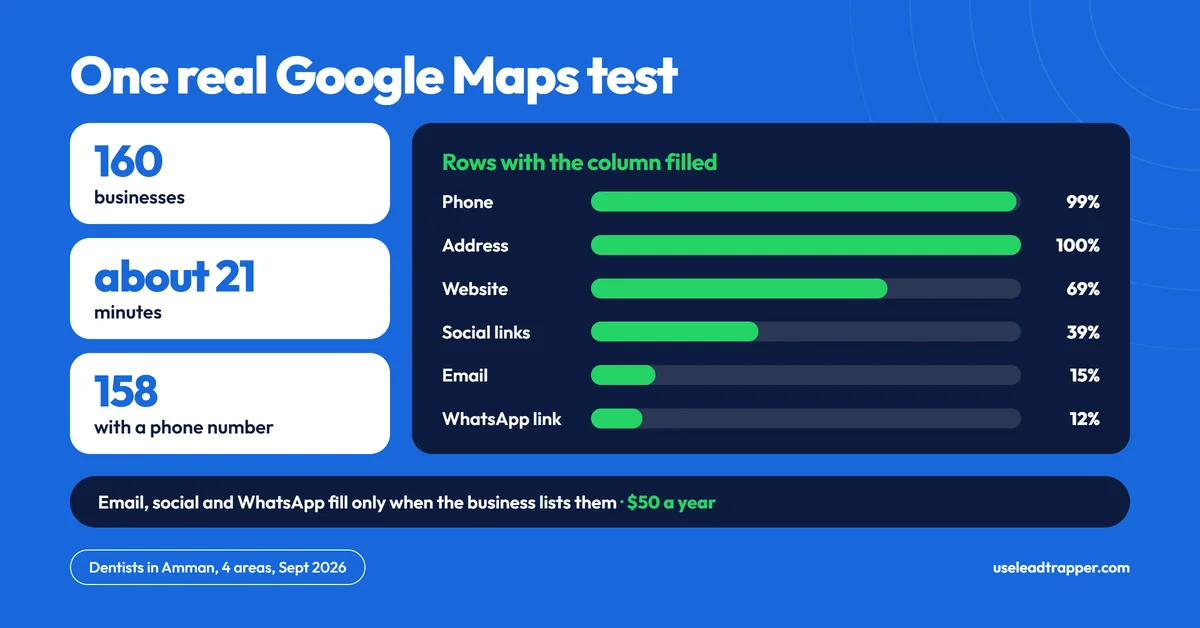
- Result: 160 businesses in about 21 minutes, 158 with a phone number, 69% with a website, 15% with an email.
- Click Export CSV, open it in Excel, sort by rating and remove the rows you do not want.
The same run with a cloud tool would be faster for a very large list but charged per record; an extension would have stopped near 120 places.
What data can you get?
A Google Maps scraper returns what the listing and the business’s website publish. The table shows what to expect and where each item comes from.
| Data | Where it comes from | How full it was in our Amman test |
|---|---|---|
| Name, address, rating, reviews, Maps link | The Google Maps listing | 100% address |
| Phone number | The Google Maps listing | 99% (158 of 160) |
| Website | The Google Maps listing | 69% |
| Email, social links, WhatsApp link | The business’s own website (homepage, then one contact, about or team page) | 15% email, 39% social, 12% WhatsApp link |
A business record is not a verified lead: a listing can be closed, outdated or a duplicate. Read what real scan results look like and check the file before you contact anyone.
What are the limits of no-code Google Maps scraping?
The main limits are Google’s cap of about 120 places per search, missing emails, the rules and your own cost per usable contact.
- The 120-place cap. Google Maps lists about 120 places per search. Extensions that copy the list stop there. A tool that splits the city into areas gets past it; see how to scrape more than 120 results.
- Emails are on websites, not on Maps. Expect most rows to have no email. The Email Finder reads more pages of each website.
- Google can refuse a run. On 24 September 2026 two of our five test runs were refused by Google. If a scan stops, see Google Maps scraper not working.
- The rules. Google’s terms restrict scraping, and privacy and marketing law apply to contacting people. In the UK, the ICO explains that email marketing rules differ for companies and individuals, while UK GDPR still applies to personal data (ICO business-to-business marketing guidance). Is scraping Google Maps legal? sets out the rules. This is not legal advice.
Before you pay: test this
- Run a pilot. One business type, one city you know, on the free tier or trial.
- Compute cost per usable contact. Price divided by rows that have a working phone or email, not by all rows.
- Check duplicates and closed places.
- Check each contact’s source. Listing or website?
- Then message only people you may contact. With LeadTrapper the next steps are the WhatsApp Number Filter to keep numbers that are on WhatsApp and the WhatsApp bulk sender for people who expect to hear from you.
Where LeadTrapper Finds Leads
LeadTrapper collects leads from each of these sources in one Windows app, then checks the numbers and sends the WhatsApp messages from the same place.
- Google Maps Scraper: Business leads from any city.
- Facebook Scraper: Advertisers, pages and group members.
- Instagram Scraper: Leads from profiles and hashtags.
- TikTok Scraper: Creators, hashtags and commenters.
- LinkedIn Scraper: Profiles by role and city.
- Email Finder: Emails from business websites.
Frequently Asked Questions
Yes. Browser extensions, cloud scrapers with a search form and desktop apps like LeadTrapper all let you type a business type and a place, run the search and download a CSV with no code. What you give up compared with writing code is mostly custom control.
Yes, with limits. Instant Data Scraper is a free Chrome extension that copies the visible list. Some cloud tools give a monthly free allowance, such as 500 records a month at Outscraper (checked Nov 2026). LeadTrapper has a 14-day free trial of the full Windows app. Free options usually miss details or stop at a cap.
Google Maps lists about 120 places for one search, so a tool that only copies the list stops there. To get more, search smaller areas and merge the results. LeadTrapper does this district by district for ten large cities and north, south, east and west elsewhere.
Not from Google Maps itself, which rarely shows emails. Scrapers get them by visiting each business's website. In our September 2026 test of dentists in Amman, 69% of businesses had a website and 15% a published email.
Google's terms restrict scraping Maps content, and data-protection and marketing laws apply to how you contact people. Collecting public business details is common, but you stay responsible for your use. This is not legal advice; read our guide on the rules first.
Run the same small search on its free tier or trial. Count unique businesses, how many have a phone and an email, and divide the price by the usable contacts. If the numbers are poor on 50 businesses, they will be poor on 5,000.
About LeadTrapper
LeadTrapper is a Windows app for finding business leads and contacting them on WhatsApp. It collects business contacts from Google Maps, Instagram, Facebook, TikTok, LinkedIn and business websites, checks which numbers are on WhatsApp with its Number Filter, and sends personalised campaigns with automatic delays from one or more WhatsApp accounts. It also has a chatbot, a shared inbox for every account, and Store Orders for online shops. It installs from the Microsoft Store, and the full app is free for 14 days, then $50 a year. Free web tools, browser extensions and a Wix app are listed on the Free Tools page.
Scrape Google Maps With No Code, Then Message the Leads
LeadTrapper's Google Maps scraper is a Windows app: type a business type and a city, export to CSV or send to WhatsApp. $50/year after a 14-day free trial.