In this article 5 sections
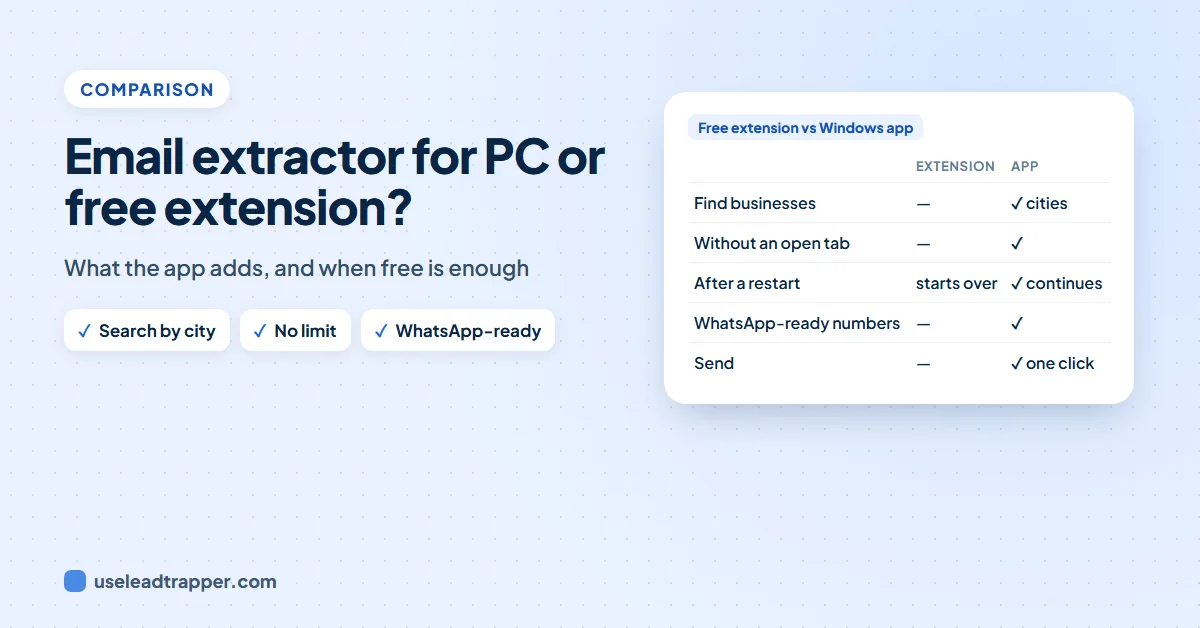
Email extractor software for PC runs on its own, so it can find businesses by type and city, read thousands of websites without a browser tab open, carry on after a restart and check which phone numbers are on WhatsApp. A free browser extension is enough when you already have the websites and only need their contact details.
- A browser extension reads websites you already have, inside a tab that must stay open. Desktop software works on its own, in the background.
- LeadTrapper's Windows app starts from a business type and one or more cities, finds the businesses on Google Maps and then reads each website.
- Since version 2.1.126 the app has no limit on the number of websites, reads up to 15 extra pages per site, and continues where it stopped after a restart.
- It can mark which phone numbers are on WhatsApp, using your connected account at the Number Filter's safe pace, and load only those numbers into a campaign.
- Our free Contact Finder extension stays free and unlimited for websites you already have. It does not search, check WhatsApp or send.
- The app costs $50 a year after a 14-day free trial; the extension costs nothing.
Email extractor software for PC and a free browser extension can read the same websites, but they are built for different jobs. We make both, the free Contact Finder extension and the LeadTrapper Windows app, so this comparison is about which one fits your work, not about selling you the paid one when you do not need it.
Two Different Jobs
You already have the websites. A trade directory gave you 200 supplier sites, or you are researching ten competitors. You want their emails, phones and WhatsApp numbers in a spreadsheet. A browser extension does this well, and ours does it free, with no limit.
You start from a type of business and a place. “Every dental clinic in Dubai, Sharjah and Abu Dhabi”, and then you want to reach them on WhatsApp. Now you need to find the businesses first, read hundreds of websites, find out which numbers are actually on WhatsApp, and send. That is a job for desktop software, because it has to run for a long time and do more than read a page.
Side by Side
| Compared | Contact Finder (free extension) | LeadTrapper Windows app |
|---|---|---|
| Emails, phones, WhatsApp numbers, addresses, social profiles | Yes | Yes |
| Contact, team, about and branch pages | Up to 6 per site | Up to 15 per site, your choice |
| Websites per run | No limit, from a list or your open tabs | No limit, from a list or a search |
| Find the businesses from a type and a city | No | Yes, on Google Maps, several cities in one run |
| Websites that block automatic reading | Open them in tabs and scan the tabs | Opened in a hidden browser automatically |
| Keeps running | Only while its tab stays open | In the background while you use other screens |
| After a restart | Contacts kept; the scan starts over | Continues where it stopped |
| Check which numbers are on WhatsApp | No | Yes, WhatsApp-ready numbers marked |
| Send WhatsApp messages | No | Yes, bulk sender with safe delays |
| Decision makers with job titles | No | Yes, when the business names them |
| How sure each email and phone is, best contact per business | No | Yes, High, Medium or Low with the reasons |
| HubSpot, Pipedrive, Zapier and Make | No | Import files and your own webhook |
| Price | Free | $50/year, 14-day free trial |
Both read only what a business publishes, label each contact as a general inbox, a department, a branch or a person, and check whether each email’s domain can receive mail. Our guide to checking if an email is valid explains what that check can tell you.
For what happens when a website shows a “Verify you are human” check to either tool, see why some websites block contact finders.
What the Desktop App Adds
It finds the businesses
In the app’s email finder, called Website Contact Finder in the menu under Google Maps, Search & find is the first option. Type the kind of business, then the cities or areas, one per line. The app searches Google Maps city by city with the same engine as its Google Maps scraper, and reads the website of every business it finds. In our real Google Maps scans, 69% to 97% of businesses listed a website, so most of them can be read.
No limit, and deeper reading
Leave “Up to” empty and the app reads every website. The Deepest setting opens up to 15 of each site’s own pages, such as Contact, Team, Branches and Impressum, where the extension opens up to 6. Clinic chains and estate agencies with a page per branch or agent give up more contacts this way.
It keeps going, even after a restart
A run of a thousand websites takes hours. The app saves its progress as it goes. If you close LeadTrapper or the computer restarts, the screen offers Continue where it stopped: websites already read are skipped and cities already searched are not searched again. The extension keeps the contacts it found, but its scan lives in a browser tab, and a closed tab means starting the list again.
It tells you which numbers are on WhatsApp
This is the step no extension can do. Tick Mark WhatsApp-ready numbers and, when the run finishes, the app checks every phone number with your own connected WhatsApp account. It uses the same pace as its WhatsApp Number Filter: one number at a time, 1 to 3 seconds apart, and a 15-minute Safety Pause after seven numbers in a row that are not on WhatsApp, because a run of dead numbers looks like probing to WhatsApp. If a campaign is sending from the same account, the check waits. Nothing is sent to the numbers.
Each number is then marked WhatsApp-ready, with “Business” when it is a WhatsApp Business account, or Not on WhatsApp, and you can filter the list by it. Our guide to finding a business phone number explains why this matters: many listed numbers are landlines.
One click to send
Send to WhatsApp-ready numbers loads only the checked numbers, with each business’s name, into the app’s WhatsApp bulk sender. You write the message once with each name filled in, and it sends with safe delays from one or several of your numbers.
When the Free Extension Is Enough
Use the extension when the websites come from somewhere else and you only need their details: a directory export, a client’s list, the competitors you are browsing anyway. It costs nothing, needs no account, and your list stays in your browser. Our comparison of email extractor Chrome extensions shows how it compares with the others in the store.
Move to the app when you find yourself searching Google Maps by hand to build the website list, leaving a browser tab open overnight, or copying numbers into WhatsApp one by one.
A Typical Run, Start to Finish
A real estate consultant in Dubai wants to offer a listing service to agencies in three emirates:
- In Website Contact Finder, choose Search & find, type "real estate agency", and add Dubai, Sharjah and Abu Dhabi on separate lines.
- Leave "Up to" empty, choose "Home + contact, team & branch pages", and keep Mark WhatsApp-ready numbers ticked.
- Press Find contacts and keep working in other screens. If the laptop restarts, open the screen again and press Continue.
- When it finishes, the WhatsApp check runs at the Number Filter's pace. Filter the list to WhatsApp-ready.
- Press Send to WhatsApp-ready numbers, write one short message with each agency's name, and start the campaign.
Before sending to businesses you found this way, read WhatsApp B2B outreach in six steps: a personal, relevant first message and an easy way to say no are what keep a number safe.
Frequently Asked Questions
It depends on where your leads start. If you have a list of websites, a free extension such as Contact Finder by LeadTrapper reads them. If you start from a business type and a city, or want to message the businesses on WhatsApp, desktop software such as the LeadTrapper Windows app finds the businesses, reads their websites, checks the numbers on WhatsApp and sends.
For large jobs, yes. An extension works inside a browser tab that must stay open, and a closed tab stops the scan. Desktop software runs in the background, can search Google Maps for the businesses first, and LeadTrapper's app continues where it stopped after a restart.
No. Since version 2.1.126 you can leave the limit empty and it reads every website in your list or every business it finds. You can still set a number if you want a smaller run.
When the run finishes, it checks each phone number with your own connected WhatsApp account, one number at a time, 1 to 3 seconds apart, with a 15-minute Safety Pause after seven numbers in a row that are not on WhatsApp. Those are the same settings as its Number Filter. Nothing is sent to the numbers.
No. It stays free with no limit for the websites you already have. The Windows app is for finding the businesses, checking them on WhatsApp and messaging them.
About LeadTrapper
LeadTrapper is a Windows app for finding business leads and contacting them on WhatsApp. It collects business contacts from Google Maps, Instagram, Facebook, TikTok, LinkedIn and business websites, checks which numbers are on WhatsApp with its Number Filter, and sends personalised campaigns with automatic delays from one or more WhatsApp accounts. It also has a chatbot, a shared inbox for every account, and Store Orders for online shops. It installs from the Microsoft Store, and the full app is free for 14 days, then $50 a year. Free web tools, browser extensions and a Wix app are listed on the Free Tools page.
Find, Check and Message Businesses From Your PC
LeadTrapper for Windows finds businesses by type and city, reads their websites, marks WhatsApp-ready numbers and sends with safe delays. $50/year, 14-day free trial.