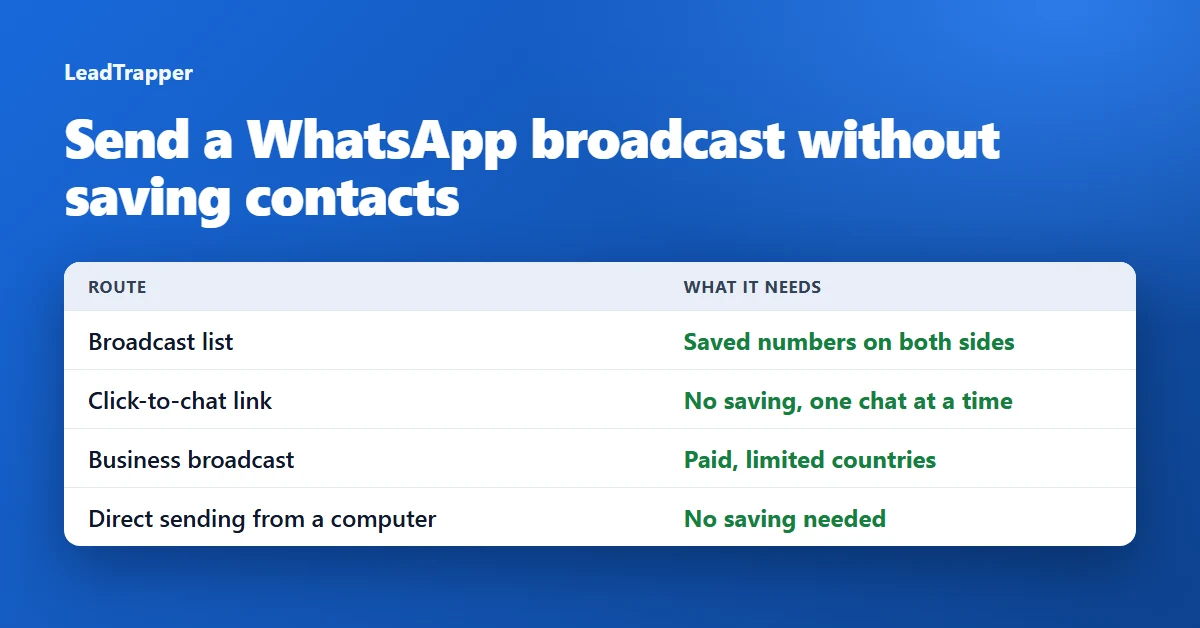
- A WhatsApp broadcast list needs saved numbers on both sides. You pick the recipients from your contacts, and WhatsApp delivers the message only to people who have saved your number.
- A click-to-chat link (wa.me) opens a chat with a number that is not in your address book. WhatsApp's own help page says so, and it works on your phone and on WhatsApp Web, but it is one chat at a time.
- The WhatsApp Business app has business broadcasts, which WhatsApp describes as paid per delivered message and available in limited countries. WhatsApp suggests marketing messages for customers who have not added you.
- A desktop sender such as LeadTrapper opens a chat with each number itself, so nothing has to be saved on either side. It comes with the same duty to message only people who expect to hear from you.
- Whichever route you pick, WhatsApp's terms name bulk messaging as an example of impermissible communication, so ask for consent first and check the rules in your country.
If you have a list of phone numbers, saving every one of them to your phone just to send a broadcast is slow, and it fills your address book with strangers. So the question is fair: can you send a WhatsApp broadcast without saving contacts? With a broadcast list, no. There are other routes that do work, each with a different cost and a different set of rules. This guide compares four of them. If your recipients have already saved you and you only want to avoid typing numbers in one by one, the guide to making a broadcast list from Excel does that with batches, and the free LeadTrapper broadcast list maker prepares the contact files.
Why a Broadcast List Needs Saved Contacts
The rule works in both directions. On your side, you build a list by searching for or selecting contacts, so a number has to be in your address book before you can add it. On the recipient’s side, WhatsApp’s broadcast list help page says only people who have added you to their phone’s contacts receive your broadcast message. The WhatsApp Business app has the same rule, and its help page says to check that the customer has added you to their address book. Nothing in the settings changes this, and if a list is already missing people, the guide to why a WhatsApp broadcast is not received lists the other causes.
Route 1: Click-to-Chat Links
WhatsApp’s click to chat feature lets you begin a chat with someone without their number being saved in your address book. You need to know the number, and the person needs an active WhatsApp account. The link looks like https://wa.me/ followed by the full number in international format, with no plus sign, zeros, brackets or dashes. It works on your phone and on WhatsApp Web.
This is the cleanest answer for a handful of numbers, and it is free. It is also one chat at a time, so it does not scale to a list. If your numbers are in a spreadsheet, the free WhatsApp number formatter cleans them into international format, and the guide to creating a WhatsApp link covers the link itself.
Route 2: Business Broadcasts
If you run a business, WhatsApp’s own answer to “my customers have not saved me” is on the Business app page. It says broadcast lists reach customers who have saved your number, and that if you are trying to reach customers who have not added you, you can consider converting your list into a marketing message. WhatsApp’s page on pricing for business broadcasts says they are sent for a fee, that you pay for each message delivered within five days, that the price depends on the country code of each recipient, and that business broadcasts are available in limited countries and might not be available to you yet.
This route suits a business with customers it has a relationship with. It is not free, and it is not open in every country.
Route 3: Status, Channels and Groups
WhatsApp’s page about broadcast limits says that if you want to send more messages to more people, you can use status updates and channels to message many people at once. Its broadcast help page says to create a group chat if you want recipients to take part in a conversation. None of these sends a private message to each number on your list. They publish to an audience instead, so they fit announcements and content better than one-to-one outreach.
Route 4: Send to the Numbers Directly
A desktop sender takes a different approach: it opens a chat with each phone number in your list and sends the message from your own WhatsApp session, much as a click-to-chat link opens a chat with a number that is not in your address book. Nothing has to be saved on your phone, and the recipient does not need to have saved you.
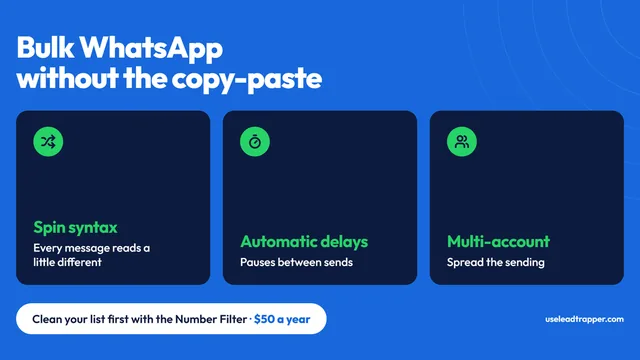
LeadTrapper for Windows works this way. Its Number Filter checks which numbers in a list are on WhatsApp before you send, and its Campaign Builder sends to them from your computer with calculated delays between messages. It is a WhatsApp bulk sender that costs $50 a year with a 14-day free trial, and it is not affiliated with or endorsed by WhatsApp.
Which Route Fits
| Route | You must save them | They must save you | Cost |
|---|---|---|---|
| Broadcast list | Yes, you pick from your contacts | Yes | Free, 256 per list |
| Click-to-chat link | No | No | Free, one chat at a time |
| Business broadcast | You select an audience in the Business app | WhatsApp suggests it for customers who have not added you | A fee for each delivered message, limited countries |
| Direct sending from a computer | No | No | $50 a year for LeadTrapper |
Do It Responsibly
Reaching a number that has not saved you is easier than it should be, which is why the rules matter. WhatsApp’s terms of service name “bulk messaging, auto-messaging, auto-dialing” as examples of illegal or impermissible communications, and the law on consent differs between countries. This is not legal advice. Message people who expect to hear from you, say who you are in the first line, keep the volume low and stop when someone asks. The cold outreach policy guide explains where the lines are, and the number filter guide shows how to avoid sending to numbers that are not on WhatsApp.
Frequently Asked Questions
Not with a broadcast list. You choose the recipients from the contacts on your phone, and WhatsApp's help page says only people who have added you to their contacts receive the message. To reach numbers that are not saved, use a click-to-chat link for single chats, a paid business broadcast on the WhatsApp Business app, or a sender that messages numbers directly.
Use a click-to-chat link. Open https://wa.me/ followed by the full number in international format, with no plus, zeros, brackets or dashes, for example https://wa.me/971501234567. WhatsApp's help page says this begins a chat with someone without having their number saved, as long as the number has an active WhatsApp account. It works on your phone and on WhatsApp Web.
Yes. WhatsApp says only people who have added you to their phone's contacts will receive your broadcast message, and that someone who is not receiving it should be asked to add you. The WhatsApp Business app page says the same for business broadcast lists.
Yes, but not with a broadcast list. WhatsApp offers business broadcasts on the WhatsApp Business app for a fee, and it says they are available in limited countries. A desktop sender such as LeadTrapper sends to the numbers in a list directly from your computer. Either way, message only people who expect to hear from you.
WhatsApp's terms of service name bulk messaging, auto-messaging and auto-dialing as examples of illegal or impermissible communications, and the rules on consent differ between countries. This is not legal advice. Get a clear opt-in before you message someone, keep messages relevant, and stop when they ask.
Message the Numbers in Your List Directly
LeadTrapper for Windows checks which numbers are on WhatsApp and sends to them from your own computer. $50/year, 14-day free trial.
Related Articles
WhatsApp Bulk Sender: 1,000+ Messages Without Ban
WhatsApp bulk sender software sends personalized messages to a contact list without the API or month…
Read article
WhatsApp Marketing: Templates, Timing, Personalization
How to write WhatsApp marketing messages that get replies — template structure, personalization toke…
Read article